Tag: Blog

  • The Ultimate Guide to Machine Learning Financial Auditing

    The Ultimate Guide to Machine Learning Financial Auditing

    Why Machine Learning Financial Auditing Is Reshaping How Firms Manage Risk

    Machine learning financial auditing is the use of ML algorithms to analyze financial data, detect anomalies, and assess risk — replacing or augmenting traditional manual and sampling-based audit methods.

    How it works in practice:

    1. Full-population analysis — ML models scan every transaction, not just a sample, eliminating sampling risk entirely.
    2. Anomaly detection — Algorithms flag unusual journal entries, unauthorized sources, or entries just below approval thresholds in real time.
    3. Predictive risk scoring — Models trained on historical data score current transactions by risk level, directing auditors to high-priority areas.
    4. Automated document review — Natural language processing (NLP) reads contracts, leases, and financial statements to surface key terms and outliers.
    5. Continuous monitoring — Instead of point-in-time audits, ML enables 24/7 transaction surveillance.

    The result: faster audits, fewer missed irregularities, and auditors spending more time on judgment-intensive work — and less on manual data checking.

    That said, ML in auditing is not a plug-and-play solution. Data quality, algorithmic bias, model transparency, and a shortage of professionals with data science skills are real barriers. According to a 2024 KPMG report, 72% of companies are already using AI in financial reporting — and adoption is projected to reach 99% within three years. Firms that delay risk falling behind on both accuracy and efficiency.

    I’m Orrin Klopper, CEO of Netsurit, and over nearly three decades of guiding organizations through digital transformation — including IT strategy for financial and professional services firms — I’ve seen how machine learning financial auditing separates firms that scale confidently from those stuck in reactive, manual processes. This guide gives you a clear, practical path to implementation, whether you’re evaluating your first ML tool or looking to mature an existing program.
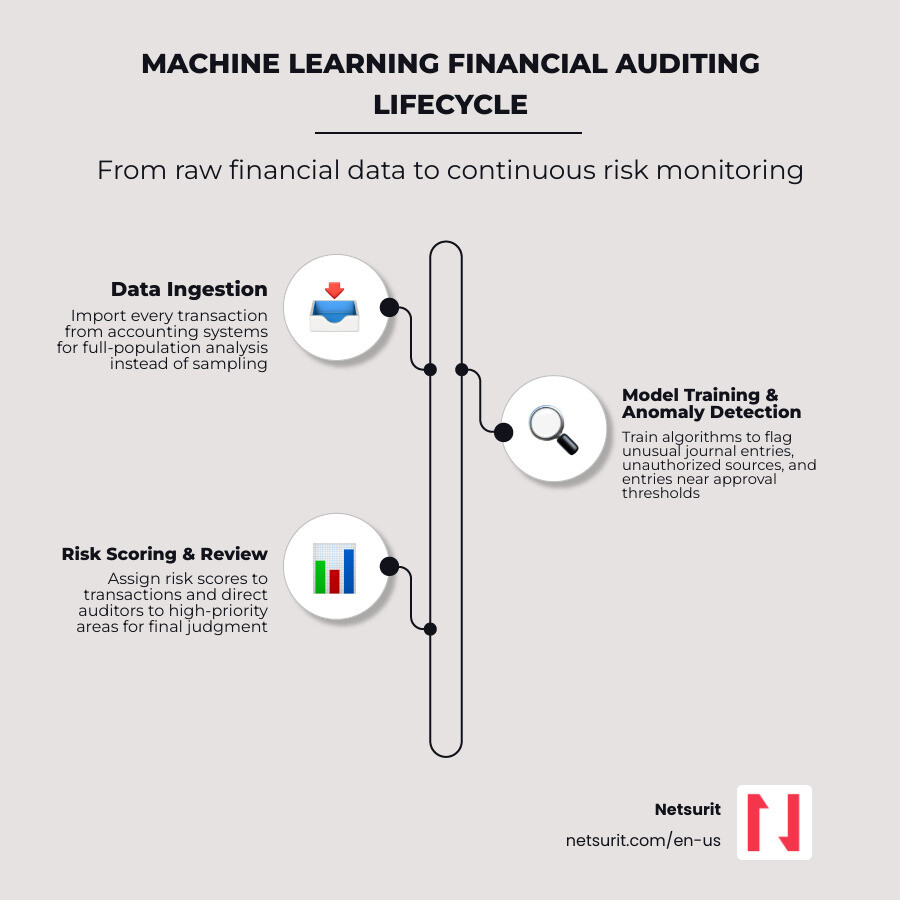
    Machine learning financial audit lifecycle: data ingestion, model training, anomaly detection, risk scoring, auditor review

    Related content about Machine learning financial auditing:

    Transitioning from Sampling to Full-Population Machine Learning Financial Auditing

    For decades, financial auditing relied on representative sampling. Auditors selected a small, statistically significant percentage of transactions, reviewed them manually, and extrapolated the results to the entire ledger. While this approach was necessary when physical ledgers and limited computing power restricted audit speed, it introduces inherent sampling risk—the very real possibility that material errors or fraudulent transactions slip through undetected because they were not part of the selected sample.

    With modern enterprise databases processing millions of transactions annually, sampling is no longer a viable defense against complex corporate fraud. Transitioning to full-population testing allows auditors to analyze 100% of transaction data, eliminating sampling risk entirely and exposing subtle, distributed irregularities that traditional methods miss. To understand how this shift changes the daily workflow of modern audit teams, read our detailed breakdown on From Samples to Smarts: Revolutionizing Audits with Machine Learning.

    Why Traditional Sampling Fails Modern Houston Accounting Firms

    Traditional manual checks are structurally unsuited for the transaction volumes processed by businesses today. For CPA firms in the Houston, Texas metro area—including fast-growing business hubs like Sugar Land, Katy, and Conroe—the sheer scale of client financial data has outpaced manual capacity.

    Consider a mid-sized accounting firm in Sugar Land auditing a regional oilfield services distributor. If the distributor processes 150,000 journal entries per year, a traditional manual audit might sample 150 to 200 transactions. If a rogue employee executes a billing scheme by splitting a single unauthorized $100,000 disbursement into twenty smaller payments of $5,000 spread across multiple vendor accounts, the probability of a manual sample catching even one of these transactions is remarkably low.

    Manual sampling also creates a speed-quality tradeoff. To meet tight regulatory deadlines, auditors are often forced to limit the depth of their testing, leaving clients exposed to undetected material misstatements.

    Implementing Full-Population Testing with Machine Learning Financial Auditing

    To eliminate these blind spots, firms are deploying supervised classification models to run full-population analyses. A prime example of this methodology is detailed in the study A Full Population Auditing Method Based on Machine Learning, which demonstrates how a machine-learning model can autonomously learn accounting rules from historical data and apply them to every transaction.

    In this research, a Classification and Regression Tree (CART) decision-tree model was developed using travel-expense records from a large enterprise. The implementation followed a structured, two-stage workflow:

    1. Model Training: The model was trained on 14,681 travel-expense samples from 2020. It mapped nine distinct business-feature inputs (such as department, employee role, and trip destination) to sixteen possible debit accounts, successfully learning the underlying accounting logic of the organization.
    2. Full-Population Testing: The trained model was then applied to audit the entire population of 10,738 travel-expense records from 2021. Instead of sampling, the algorithm evaluated every single transaction, comparing the model-predicted debit account against the actual manual bookkeeping entry.

    Whenever the model’s prediction diverged from the recorded account, the system flagged the entry as an anomaly. For instance, if an employee’s travel expenses were manually booked under “Administrative Expenses” but the model—based on the employee’s department and historical patterns—predicted they belonged under “Main Business Cost,” the transaction was immediately isolated for human review. This approach allows a Katy-based enterprise audit team to screen thousands of transactions in seconds, capturing rare account misclassifications and eliminating sampling risk.

    Comparing Machine Learning Algorithms to Traditional Auditing Methods

    To appreciate the impact of machine learning, we must compare its capabilities directly against traditional computer-assisted audit tools (CAATs). Traditional CAATs are deterministic; they rely on static, human-written rules (e.g., “flag any transaction over $10,000”). If a fraudulent transaction occurs at $9,950, a static rule misses it.

    In contrast, machine learning models rely on pattern recognition and predictive analytics. They evaluate transactions across hundreds of variables simultaneously, identifying complex, non-linear relationships that no human auditor could write a rule for. For a deeper look at this shift, see our analysis on AI and Auditing: The Future of Financial Assurance.
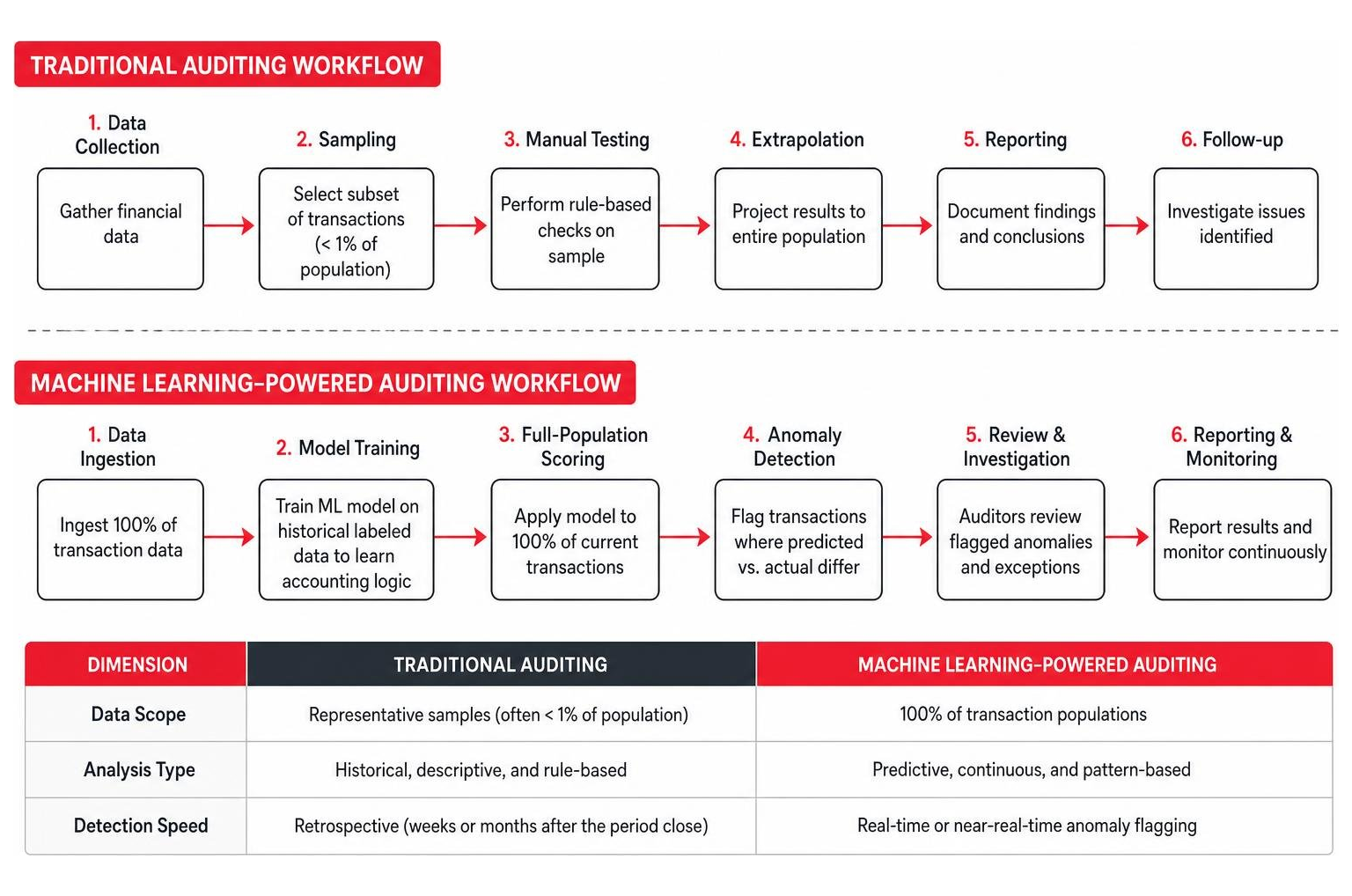
    Traditional auditing vs. machine learning-powered auditing workflow comparison

    Dimension Traditional Auditing Machine Learning-Powered Auditing
    Data Scope Representative samples (often < 1% of population) 100% of transaction populations
    Analysis Type Historical, descriptive, and rule-based Predictive, continuous, and pattern-based
    Detection Speed Retrospective (weeks or months after the period close) Real-time or near-real-time anomaly flagging
    Irregularity Capture Misses distributed, complex, or split-transaction fraud Detects non-linear anomalies and hidden correlations
    Human Effort High volume of manual data entry and repetitive verification Focus on high-risk exceptions and strategic analysis

    Supervised vs. Unsupervised Learning in Fraud Detection

    In machine learning financial auditing, algorithms generally fall into two categories: supervised and unsupervised learning.

    • Supervised Learning: These models are trained on labeled historical datasets where the outcomes (e.g., “fraudulent” vs. “legitimate”) are already known. Common supervised algorithms include Support Vector Machines (SVM), Random Forest, and K-Nearest Neighbors (KNN). In journal entry testing, supervised models learn the specific characteristics of past accounting errors—such as posting times, user IDs, and account combinations—to classify new entries by risk level.
    • Unsupervised Learning: These models analyze unlabeled data to find hidden patterns and natural clusters without prior instruction. Unsupervised techniques, such as deep autoencoders and clustering, are highly effective for advanced anomaly detection. For example, in a dataset of 307,457 journal entries, a deep autoencoder can learn the normal reconstruction pattern of standard transactions. Transactions that yield high reconstruction errors are flagged as anomalies. This is particularly valuable for identifying “unknown unknowns”—new fraud methods that have never occurred in the historical data.

    Real-World Performance Metrics of Random Forest and SVM Models

    When selecting an algorithm for enterprise financial audits, performance metrics like accuracy, recall, and F1-score are critical. Academic research comparing these models on Big Four accounting datasets reveals that ensemble methods consistently outperform simpler models:

    • Random Forest: Achieved the highest F1-score of 0.9012, with an overall accuracy of 92.56% and a recall rate of 90.04%. Its ability to handle high-dimensional, non-linear accounting data makes it highly robust against overfitting.
    • Support Vector Machine (SVM): Achieved an F1-score of 0.8756, with an accuracy of 88.16% and a recall of 89.25%.
    • K-Nearest Neighbors (KNN): Achieved an F1-score of 0.8545, with an accuracy of 86.07% and a recall of 86.32%.

    A major challenge in training these models is class imbalance; legitimate transactions outnumber fraudulent or erroneous ones by thousands to one. To address this, data scientists use Synthetic Minority Over-sampling Technique (SMOTE) during the preprocessing phase to generate synthetic examples of high-risk transactions, ensuring the model learns to identify rare anomalies effectively.

    Conroe Manufacturing Audit Example: An auditor in Conroe, Texas, is tasked with verifying inventory valuations for a manufacturing client with 80,000 SKU records. A traditional audit would sample 50 SKUs. By deploying a Random Forest model trained on historical regional material costs, shipping logs, and production run times, the auditor scans all 80,000 SKUs. The model flags 12 SKUs where the recorded valuation is highly inconsistent with current supply chain variables. The auditor investigates only those 12, resolving a potential $300,000 valuation error in hours instead of weeks.

    Overcoming the Practical Challenges of Machine Learning Financial Auditing

    While the benefits of ML-driven audits are clear, firms must navigate significant operational hurdles. Hasty implementation can lead to technology overload, where a firm spends more time managing complex software than delivering quality audits. To build a secure, defensible strategy, Texas businesses should review our guide on How to Audit-Proof Your Texas Business Using AI Software.

    Managing Data Quality, Algorithmic Bias, and the Black Box Problem

    The performance of any machine learning model depends entirely on the quality of its training data. If historical accounting ledgers contain manual errors, system workarounds, or inconsistent formatting, the model will codify these flaws, leading to inaccurate risk assessments.

    Furthermore, many advanced models—particularly deep neural networks—suffer from the “black box” problem. They generate highly accurate risk scores but cannot easily explain why a specific transaction was flagged. This lack of model explainability makes it difficult for auditors to document their findings or defend their conclusions to regulators.

    To manage these challenges, firms must implement rigorous data preprocessing, data cleaning, and validation controls before feeding ledger data into an ML pipeline.

    Houston Energy Sector Audit Example: A CPA firm in Houston uses an unsupervised clustering model to audit the joint-interest billings of an independent oil and gas producer. Because energy joint-operating agreements are highly complex and subjective, the raw billing data is incredibly noisy. If the firm runs the model without preprocessing, the algorithm flags thousands of legitimate, complex transactions as “anomalies” simply because they do not fit standard patterns. By implementing a strict preprocessing phase that filters transactions by contract type and joint-venture partner, the firm reduces false positives by 84%, allowing the audit team to focus only on genuine billing discrepancies.

    Auditing is a highly regulated profession governed by strict compliance standards, including the International Standards on Auditing (ISA) and regional privacy laws like the European Union’s General Data Protection Regulation (GDPR).

    A key challenge is that current ISA standards are technology-neutral and do not provide explicit guidance on how to audit or rely on dynamic, learning algorithms. Unlike static algorithms that are deterministic and produce the same output every time, machine learning algorithms are dynamic; they continuously update their parameters and behaviors based on new data inputs.

    As discussed in Chapter 4 Auditing Algorithms in the (Non-)Financial Audit: Status Quo and Way Forward, this dynamic nature makes it questionable whether learning algorithms can be audited as standard, standalone software. Under emerging regulations like the EU AI Act, firms must perform formal “algorithm audits” on high-risk AI systems. These audits assess the system’s fairness, robustness, explainability, and privacy controls, ensuring that the technology itself does not introduce systemic financial or ethical risks.

    Best Practices for Deploying Machine Learning in Your Audit Workflow

    Successfully integrating machine learning into an audit workflow requires a structured approach that balances technical execution with human oversight. Rather than deploying standalone, disconnected tools, firms must embed ML functionalities directly into their risk-based auditing procedures.

    An authoritative framework for this integration is outlined in Deep learning meets risk-based auditing: A holistic framework for leveraging foundation and task-specific models in audit procedures. This framework merges the Cross-Industry Standard Process for Data Mining (CRISP-DM) with the traditional phases of risk-based auditing defined by the ISAs. By aligning data preparation, model training, and evaluation directly with audit planning, risk assessment, and substantive testing, firms can ensure their ML applications remain compliant and technically sound.
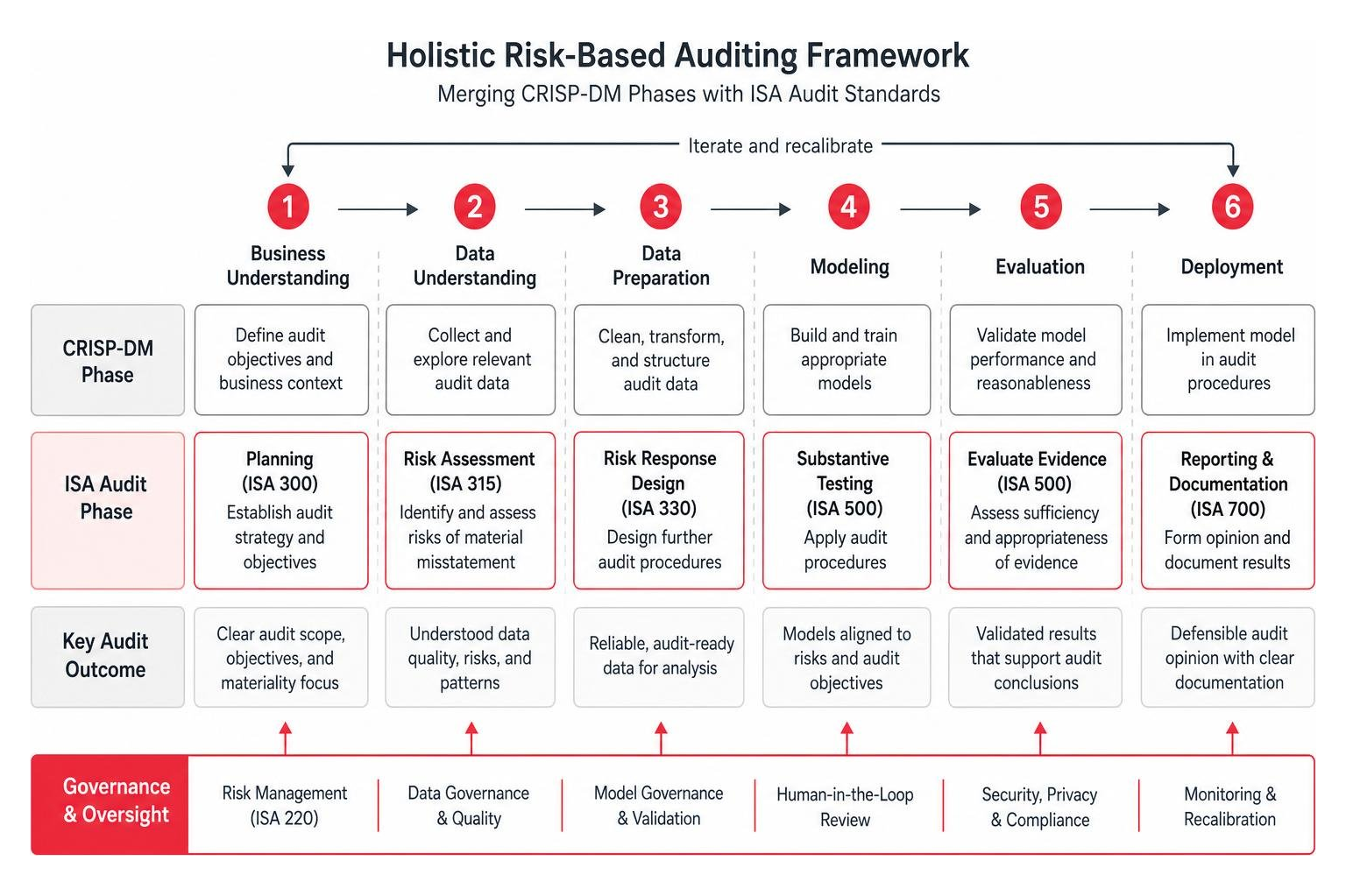
    Holistic risk-based auditing framework: merging CRISP-DM phases with ISA audit standards

    Building a Robust Governance Framework and Addressing the Skills Gap

    To oversee this technology, organizations must establish a robust IT governance framework. Because financial data is highly sensitive, security cannot be an afterthought. Firms must apply Zero Trust principles to their machine learning systems—enforcing strong authentication for model endpoints, restricting data access based on the principle of least privilege, and validating all model outputs before they are integrated into audit documentation.

    At the same time, accounting firms face a significant CPA and data science talent shortage. Most traditional auditors are experts in accounting standards but lack training in statistics, data preprocessing, and machine learning fundamentals. To address this gap, firms should:

    • Invest in Upskilling: Provide structured training programs that teach auditors how to interpret machine learning outputs and exercise professional skepticism when reviewing algorithmic results.
    • Build Cross-Functional Teams: Pair experienced financial auditors with data scientists and IT security professionals to design, deploy, and monitor audit models.
    • Establish Clear IT Controls: Implement general and application controls around the software development lifecycle of internal audit models, ensuring all code changes and training runs are documented and auditable.

    Real-World Case Studies from the Big Four and Mid-Market Firms

    The practical viability of machine learning financial auditing is demonstrated by its successful deployment across the professional services sector:

    • Deloitte’s Argus: This cognitive tool uses natural language processing (NLP) and machine learning to read, analyze, and extract key terms from thousands of complex contracts, leases, and sales agreements. By automating document review, Argus allows audit teams to quickly identify trends, outliers, and contract risks across entire populations of documents.
    • PwC’s Halo: This platform analyzes journal entries to identify problematic transaction patterns, such as entries posted at unusual times, unauthorized sources, or transactions that sit just below authorized limits. Halo evaluates 100% of a client’s journal entries, providing a visual representation of transaction flows and highlighting high-risk exceptions.
    • KPMG’s Watson Integration: KPMG leverages advanced cognitive computing to analyze structured and unstructured data across audit engagements, improving the accuracy of risk assessments and anomaly detection.
    • MindBridge AI: Mid-market CPA firms use platforms like MindBridge AI | The Leader in Autonomous Financial Oversight to run multi-dimensional risk scoring on client ledgers. MindBridge uses a combination of rules, statistical methods, and machine learning to analyze 100% of financial transactions, providing an explainable risk score for every entry.

    Frequently Asked Questions about Machine Learning in Auditing

    Can machine learning completely replace human financial auditors?

    No. Machine learning is designed to augment, not replace, human auditors. While algorithms excel at processing large volumes of data, identifying patterns, and flagging anomalies, they lack the capacity for cognitive reasoning, contextual understanding, and professional skepticism.

    Human auditors are essential for interpreting model outputs, understanding complex business risks, evaluating subjective management estimates, and conducting fraud interviews. The technology transforms the auditor’s role from a compliance-focused data checker into a strategic advisor.

    How do machine learning models handle unstructured financial data?

    Machine learning models handle unstructured data—such as PDF contracts, emails, meeting minutes, and invoice scans—using Natural Language Processing (NLP) and Large Language Models (LLMs). As explored in the research paper Automating Financial Statement Audits with Large Language Models, state-of-the-art LLMs can automatically review financial tables, identify missing rows or numerical inconsistencies, and compare disclosures against accounting standards.

    However, the study also highlights that current LLMs still struggle with complex joint reasoning across tables and text and can fail to generate accurate citations of specific accounting standards. Therefore, human oversight remains critical when using LLMs for financial statement verification.

    What are the initial steps for a mid-sized CPA firm to adopt machine learning?

    For a mid-sized CPA firm in locations like Houston or Albuquerque, the roadmap to machine learning adoption should follow a phased approach:

    1. Conduct a Technology Assessment: Evaluate your current IT infrastructure, data storage capabilities, and team skill sets. Identify where manual bottlenecks are most severe.
    2. Leverage Cloud-Based Platforms: Instead of building custom models from scratch, adopt established, cloud-based auditing software (such as MindBridge AI) that has built-in machine learning capabilities.
    3. Launch a Pilot Program: Select a single, low-risk client engagement with clean, structured data. Run the ML tool parallel to your traditional audit procedures to compare results and train your staff.
    4. Develop a Governance Policy: Establish clear guidelines on data security, client confidentiality, and how model outputs must be validated and documented by the engagement team.

    Conclusion

    Machine learning financial auditing is no longer a futuristic concept; it is an operational necessity for firms that want to remain competitive, accurate, and secure. By moving from manual sampling to full-population testing, accounting and finance teams can eliminate sampling risk, catch sophisticated fraud schemes, and deliver higher-value insights to their clients.

    However, deploying these advanced technologies requires a careful balance of data quality management, strict compliance governance, and robust cybersecurity controls.

    At Netsurit, we act as an elite technology partner for professional services and accounting firms across New York, New Jersey, Texas, and Seattle. We provide the managed IT, cybersecurity, and AI solutions needed to support your digital transformation, crush downtime, and protect your clients’ sensitive financial data.

    To learn how we can help your firm safely implement and manage the IT infrastructure required for modern, machine-learning-driven auditing, explore our specialized accounting firm IT services.

  • The Definitive Guide to Backup Disaster Recovery Solutions

    The Definitive Guide to Backup Disaster Recovery Solutions

    Why Every Business Needs a Backup Disaster Recovery Solution Before Disaster Strikes

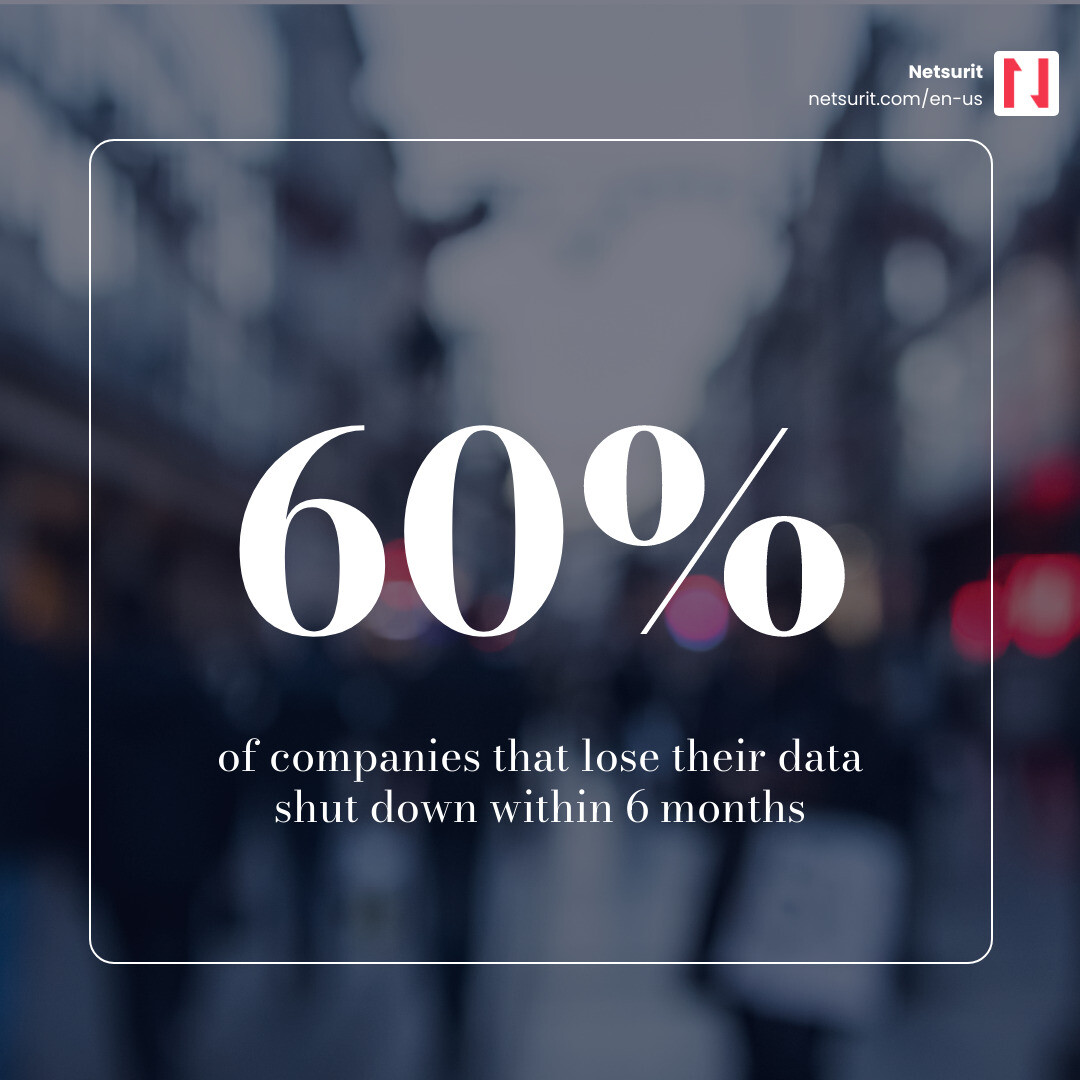
    A backup disaster recovery solution combines tools, processes, and plans to protect business data and restore systems fast. Data center outages cost $9,000 per minute on average. Sixty percent of companies suffering significant data loss close within six months. These are common outcomes for businesses treating backup as a set-and-forget task rather than a tested strategy.

    What it does Why it matters
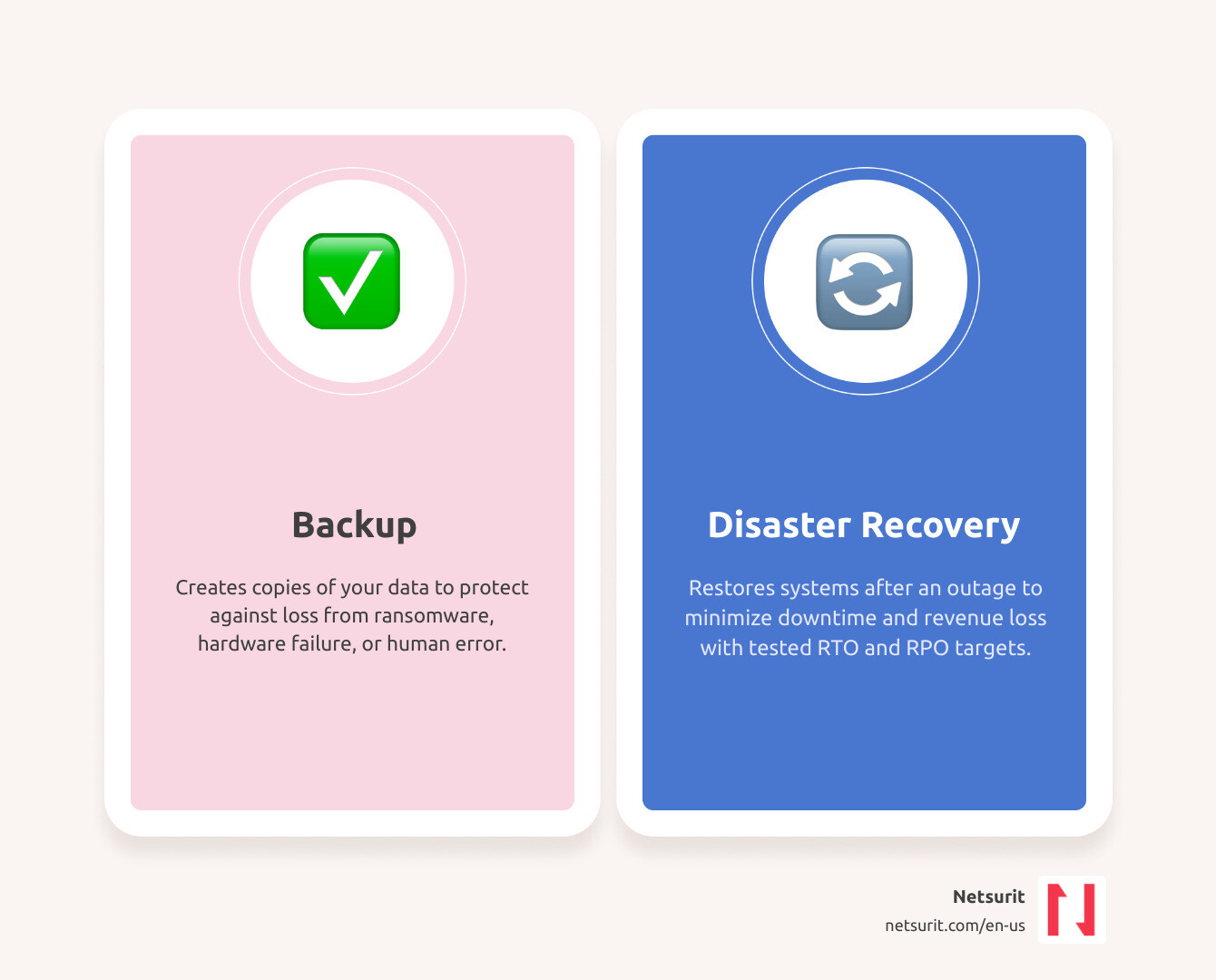
    Creates copies of your data Protects against loss from ransomware, hardware failure, or human error
    Restores systems after an outage Minimizes downtime and revenue loss
    Defines RTO (Recovery Time Objective) Sets how fast you get back online
    Defines RPO (Recovery Point Objective) Sets how much data you can afford to lose
    Covers backup and recovery Backup alone is not enough — you need a tested recovery plan too

    The threat landscape has shifted. Ransomware attacks now routinely target backup repositories first because they are your last line of defense. Yet most organizations still have gaps. While 90% of businesses perform regular backups, 58% of recovery attempts fail when it counts. This guide compares leading solutions available in May 2026 — Acronis, Veeam, Druva, Cohesity, and AWS Elastic DR — to help you find the right fit for your risk profile.

    I’m Orrin Klopper, CEO of Netsurit. Over three decades of scaling managed IT services across the US, South Africa, and Europe, I’ve seen that survival depends on whether your backup disaster recovery solution was tested, current, and complete. I’ll share what we’ve learned protecting 300+ client organizations so you can make a smarter decision.

    Infographic: Backup vs Disaster Recovery — key differences, RTO, RPO, and why backup alone is not enough infographic

    Defining the Modern Backup Disaster Recovery Solution

    In May 2026, a backup disaster recovery solution is a core operational requirement. For businesses in Houston, Seattle, or Tacoma, a “disaster” is often a botched software update, a deleted database, or a compromised password. True resilience requires protecting the entire environment, including virtual machines, databases, and infrastructure configuration. Platforms like Rackware Multi-Cloud Disaster Recovery and Backup allow organizations to bridge the gap between cloud environments, ensuring uptime even if a provider fails.

    Example: The Sugarland Tax Firm Scenario A mid-sized tax firm in Sugarland managing 1,200+ client returns faces catastrophic risk if ransomware strikes in April. Backing up files is only half the battle. Without a Backup and Disaster Recovery plan that includes “failover” (switching to a secondary system), the firm spends days rebuilding the server environment. In high-stakes tax seasons, every hour of downtime translates to lost billable time and permanent reputational damage.

    Trade-offs: Speed vs. Cost

    Works best when… Avoid when… Risks Mitigations
    You need near-zero downtime (High Speed) You have a limited IT budget and low-priority data High monthly subscription costs Tier your workloads; only pay for high speed on “Tier 1” apps
    You can tolerate 24 hours of downtime (Low Cost) You run mission-critical e-commerce or financial systems Significant revenue loss during recovery Use automated testing to ensure the “slow” recovery actually works

    Distinguishing Backup from Disaster Recovery

    Backup is the process of making copies of files. Disaster recovery is the plan for using those copies to re-establish access to applications.

    • Backup: The spare tire in your trunk.
    • Disaster Recovery: The roadside assistance service that changes the tire and gets you back on the highway.

    Without a plan to System Restore Simplified: Get Your Data Back and Running, backups are inert data. Disaster recovery involves “failover”—the redirection of users to a functional environment—and “failback”—moving operations back to the primary site once resolved.

    Critical Metrics: RTO and RPO

    1. Recovery Time Objective (RTO): The time allowed to recover operations. If your RTO is 4 hours, you must be online within that window.
    2. Recovery Point Objective (RPO): The maximum data loss you can tolerate, measured in time. Backing up every 24 hours means a crash at hour 23 results in a day’s lost work.

    For industry-specific impacts, see From Buck Converters to LASIK: What Fast Recovery Time Means for You.

    Comparing Top Backup Disaster Recovery Solutions for 2026

    The 2026 market is dominated by heavy hitters with distinct strengths. Choosing a backup disaster recovery solution depends on whether you manage a legacy on-premises data center, a hybrid environment, or a cloud-native stack.

    Feature Acronis Veeam Druva Cohesity
    Primary Strength Integrated Cyber Security Enterprise Flexibility Cloud-Native SaaS Data Management & AI
    Deployment Hybrid / Service Provider Any (Cloud/On-Prem) 100% SaaS Hybrid / Scale-out
    Ransomware Protection AI-based Active Shield Immutable Repositories Air-gapped Cloud Immutable Snapshots
    Best For MSPs & Small/Mid Enterprise Large Enterprises SaaS-heavy Orgs High-growth, Data-heavy

    For more details, see Software Saviors: Your Guide to Top Backup and Recovery Tools.

    Acronis and Veeam: The Enterprise Standards

    Acronis Cyber Protect is a cyber resilience platform. It uses AI-driven behavioral detection to stop ransomware before encryption begins. For businesses requiring data backup and disaster recovery in Houston, Acronis offers a “single pane of glass” to simplify management across 20+ workload types.

    Veeam Backup & Replication remains the gold standard for flexibility. Its “Portable Data Format” prevents vendor lock-in. You can back up a VMware machine on-premises and recover it instantly to Microsoft Azure or AWS. Veeam’s “four-eyes” approval—requiring two people to authorize backup deletion—defends against malicious insiders.

    Cloud-Native Leaders: Druva and AWS Elastic DR

    Druva is a 100% SaaS solution with no appliances to manage. It excels at protecting Microsoft 365, Salesforce, and Google Workspace data. For those in the Amazon ecosystem, AWS Elastic Disaster Recovery replicates on-premises or cloud servers into AWS cost-effectively. This achieves low RTOs without the capital expense of a secondary physical data center. Local managed service providers often use these cloud-native tools to build robust recovery environments for Houston-area clients.

    Choosing Between On-Premises, Cloud, and DRaaS

    The “where” of your recovery is as important as the “how.”

    • On-Premises: Best for rapid local restores of massive files. However, if the building floods, your recovery site fails with your primary site.
    • Cloud: Offers geographic separation and scalability. You only pay for compute resources used during a disaster.
    • Disaster Recovery as a Service (DRaaS): A managed approach where a third party handles orchestration. DRaaS can reduce total cost of ownership (TCO) by up to 50% compared to maintaining a secondary data center.

    Refer to technical guides like how to Set up and plan a backup/recovery appliance deployment | Google Cloud Documentation to ensure your architecture supports your RTO goals.

    Case Study: Katy Accounting Firm An accounting firm in Katy, TX, previously relied on local tape backups. During a power surge that fried their server, they realized the tapes were three days old. By migrating to a Cloud Disaster Recovery model, they achieved an RPO of 15 minutes. When hardware failed a year later, they failed over to the cloud and resumed business before clients noticed.

    Trade-offs: Control vs. Management

    Works best when… Avoid when… Risks Mitigations
    You have a specialized, air-gapped environment (On-Prem) You need to scale quickly or have multiple locations High upfront CAPEX and maintenance Use a hybrid model for off-site redundancy
    You want to offload IT labor (DRaaS) You have strict data sovereignty requirements forbidding third-party access Vendor lock-in Ensure your solution uses portable data formats

    Mandatory Features of a Backup Disaster Recovery Solution

    1. Image-Based Backup: Captures the entire OS, applications, and settings.
    2. Orchestration & Runbooks: Automated scripts ensuring servers start in the correct order.
    3. The 3-2-1 Rule: Three copies of data, on two media, with one copy off-site.
    4. Immutability: Backups that cannot be changed or deleted, even by an admin. See Lost Your Data? Here’s How Secure Recovery Can Save the Day.

    Infrastructure Configuration vs. Data Protection

    If you restore your database but lose your Virtual Private Cloud (VPC) settings, DNS records, or IAM policies, users cannot connect. Solutions like ControlMonkey focus on “Infrastructure as Code” (IaC) to ensure your network environment is as recoverable as your files. This is a critical consideration for businesses seeking disaster recovery in Tacoma, WA.

    Implementing Your Strategy: Testing and Compliance

    A disaster recovery plan that hasn’t been tested is just a wish. In 2026, regulatory frameworks like SOC 2, HIPAA, and GDPR require documented proof of regular testing.

    For businesses in the Northeast, From Sandy to Success: Navigating Disaster Recovery in New Jersey highlights how organizations conducting annual drills survived prolonged regional outages. Similar expertise is vital for Conroe disaster recovery services and firms across the Houston metro area.

    Cost-Benefit Analysis of a Backup Disaster Recovery Solution

    • The Cost of Failure: 93% of companies experiencing significant data loss are out of business within five years.
    • The Cost of Downtime: If your business generates $10 million annually, one hour of downtime costs roughly $1,141 in direct revenue—excluding labor and client churn.

    While basic recovery services provide entry points for small businesses, mid-market firms in Katy and Sugarland should use subscription-based DRaaS models to turn unpredictable disaster costs into manageable operating expenses.

    Stat: 60% of companies that lose their data shut down within 6 months infographic

    Overcoming Common Implementation Pitfalls

    1. Testing Neglect: Organizations set up software but never verify the “Restore” button works.
    2. Bandwidth Limits: Replicating a 10TB database over standard internet can take days, making low RPOs impossible.
    3. Legacy Systems: Old hardware often conflicts with modern cloud recovery tools.

    Understanding local risks is vital. When the Earth Shakes: Understanding Seattle’s Disaster Recovery Framework focuses on seismic resilience, requiring different geographic redundancy than the flood-focused plans of Houston.

    Frequently Asked Questions about Backup Disaster Recovery Solutions

    How often should we test our disaster recovery plan?

    We recommend quarterly technical drills and an annual full-scale failover test. Automated testing tools now perform non-disruptive tests weekly by spinning up backups in an isolated environment to verify they boot correctly. Professional business continuity services can help automate this cadence.

    Is cloud backup sufficient for a full disaster recovery?

    Usually, no. Cloud backup protects data, but without a “Recovery Cloud” or DRaaS orchestration, you have nowhere to run that data if your office is inaccessible. A hybrid approach—local for speed, cloud for disaster—is the 2026 gold standard. Localized help is available via Maine-based backup and disaster recovery services.

    Why do most data recoveries fail?

    The 58% failure rate is typically due to corrupted backup files that weren’t verified, missing configuration data, or a plan that relied on an unavailable person. Automation is the cure for all three.

    Conclusion

    The “Definitive Guide” to your business’s survival isn’t a document sitting in a drawer—it’s a living, breathing backup disaster recovery solution that evolves with your technology. At Netsurit, we don’t just provide the tools; we provide the momentum to ensure your business can withstand any disruption. Whether you are in Houston, Seattle, or anywhere in between, we act as your elite tech partner to crush downtime and secure your aspirations.

    What to watch next: As we move toward 2027, expect AI to move from “detecting” ransomware to “autonomously recovering” systems before a human even realizes an attack has occurred.

    Secure your business future with a custom backup and disaster recovery solution

  • The 7 Best IT Support Options in New York

    The 7 Best IT Support Options in New York

    What are the core benefits of outsourcing IT support for New York businesses?

    New York businesses often struggle to balance high operational costs with the need for 24/7 system availability. Outsourcing IT support shifts the burden of technical debt and security compliance to external experts, allowing your team to focus on billable hours rather than server maintenance. This guide breaks down how to select a provider that minimizes downtime and secures your data against evolving threats.

    How does outsourcing reduce operational costs and improve ROI?

    Outsourcing transforms unpredictable repair bills into fixed monthly operating expenses. By moving from a Capital Expenditure (CapEx) model to an Operational Expenditure (OpEx) model, you free up cash flow for growth initiatives. We help businesses achieve better cost savings and a stronger return on investment (ROI) by optimizing their IT spend and ensuring predictable budgeting. For a deeper dive, see our analysis on the Benefits and Risks of IT Outsourcing.

    Example: A tax firm in Sugarland, TX, reduced its annual IT spend by 22% by decommissioning on-site servers and migrating to a managed cloud environment before the May 2025 tax season.

    How does outsourcing enhance cybersecurity and compliance?

    The cybersecurity landscape changes monthly. Outsourcing provides access to a 24/7 Security Operations Center (SOC) and rapid incident response that most internal teams cannot afford. For New York firms, this includes mandatory adherence to the NY SHIELD Act and NYDFS Part 500. We ensure your data protection strategies align with these critical regulatory requirements, safeguarding your business from penalties and reputational damage.

    How does outsourcing boost business productivity and reduce disruptions?

    Proactive management resolves 95% of service requests remotely, often before the user notices a lag. We maintain 99.999% uptime for our clients, ensuring that technical glitches do not stall your workflow. For those rare instances requiring on-site attention, we offer rapid 4-hour field tech response times, ensuring same-day or next-day solutions.

    Trade-offs of IT Outsourcing
    Works best when You need predictable costs and 24/7 monitoring.
    Avoid when You have highly proprietary, legacy hardware that requires full-time physical oversight.
    Risks Potential for slower response if the provider is over-leveraged.
    Mitigations Enforce strict Service Level Agreements (SLAs) with financial penalties for downtime.

    What specific IT outsourcing services can New York companies access?

    New York businesses have access to a comprehensive suite of IT outsourcing services designed to meet diverse needs, from full-scale IT management to specialized support. We offer various types of managed IT services to fit your organization’s unique requirements.

    What is comprehensive Managed IT Services?

    Managed IT services provide end-to-end oversight of your network, servers, and workstations. Our managed IT services in New York City focus on optimizing your existing stack while removing redundant services.

    Example: An accounting practice in Katy, TX, utilized co-managed IT to support their internal lead during a major software migration, ensuring zero downtime for client portals during peak filing weeks.

    What does dedicated Helpdesk Support entail?

    Helpdesk support offers 24/7/365 availability via phone, chat, or email. We prioritize a 15-minute average connection time to ensure your staff stays productive. Explore our New York IT helpdesk solutions for more details.

    What are the key Cybersecurity and Cloud Services?

    We deploy Endpoint Detection and Response (EDR) and ransomware protection to safeguard your data. Our New York network support includes cloud migration expertise for Microsoft 365 and Azure, alongside robust data backup and disaster recovery solutions.

    What is Co-managed IT, and when is it suitable?

    Co-managed IT is a partnership where we augment your internal staff. This model works best for firms that have a dedicated IT manager but need 24/7 coverage or specialized security expertise. It allows your internal staff to focus on core business initiatives while the outsourced partner handles routine tasks.

    How much does IT outsourcing typically cost in NYC, and what factors drive these prices?

    Understanding the cost of IT outsourcing in New York City is crucial for budgeting and strategic planning. While we don’t discuss specific pricing, we can outline the common models and factors that influence your investment.

    What are the common pricing structures for NYC IT outsourcing?

    NYC providers typically use per-user pricing, ranging from $100 to $220 per month. Flat-rate models provide the most budget predictability, starting around $650 per month for small teams. Project-based fees are common for one-time migrations or security audits, while value-based pricing aligns the provider’s success with your business outcomes.

    What factors influence the total cost of IT outsourcing in New York?

    Costs scale with the number of devices, the complexity of your network, and your compliance needs (e.g., HIPAA or FINRA). Frequent on-site visits or advanced SOC monitoring will also increase the monthly fee.

    Example: A Conroe-based firm found that flat-rate pricing prevented “invoice shock” during months when they added temporary staff for audit season.

    How can businesses budget effectively for outsourced IT?

    Start with a thorough IT assessment to define your scope. Use a detailed Service Level Agreement (SLA) to ensure you only pay for the services you need, and plan for long-term technology refreshes to avoid sudden capital outlays. Strategic IT consulting can help you plan for future technology needs, allowing for better budget allocation over time.

    How do New York IT providers differ, and what should you prioritize when selecting a partner?

    Choosing the right IT outsourcing partner in New York is a critical decision that impacts your business’s efficiency and security. We’ve outlined how to choose a managed services provider effectively to help you navigate this choice.

    What are the advantages of local NYC IT providers versus remote-only support?

    Local providers understand NYC-specific hurdles like building access protocols and ISP monopolies. They can also deploy field techs within 4 hours for hardware failures, ensuring rapid resolution for critical on-site needs.

    Example: A Houston-area accounting firm prioritized a provider with local Conroe technicians to ensure that physical hardware issues at their satellite offices didn’t stall their tax preparation workflow.

    What industry specializations and compliance expertise should you look for?

    Choose a partner with experience in your specific sector. Financial firms need NYDFS Part 500 expertise, while medical practices require HIPAA compliance. An IT partner with industry-specific expertise ensures your systems are not only functional but also fully compliant.

    What key features define a top-tier IT outsourcing partner?

    Look for 24/7 monitoring, rapid response guarantees (e.g., 15-minute average helpdesk connection), and strategic consulting (vCIO). Netsurit brings 27 years of experience and a 95% remote resolution rate to IT outsourcing in New York solutions.

    How do providers like Netsurit, Power Consulting, LastTech, and ETech 7 stand out?

    • Netsurit: Focuses on “IT without fuss” and proprietary productivity monitoring to enhance organizational health.
    • Power Consulting: Offers $2M in cyber insurance and 4-hour field response times with New Jersey-based data centers.
    • LastTech: Acts as a “seamless extension” with a single-contact support model that manages third-party vendors.
    • ETech 7: Emphasizes ransomware-proof backups and no long-term contracts, focusing on small business competitiveness.

    What are the actionable steps to begin IT outsourcing in New York?

    Starting your IT outsourcing journey in New York involves a structured approach to ensure a seamless transition. Our IT support in New York process is designed to be clear and efficient.

    How do you initiate the process with a free consultation and assessment?

    The process begins with an audit of your current infrastructure to identify security gaps and performance bottlenecks. This no-obligation assessment provides a roadmap for your IT strategy and helps determine how an outsourced partner can best support your objectives.

    What is involved in defining the scope and onboarding with a new provider?

    Onboarding takes 2-4 weeks. We deploy monitoring tools, establish SLAs, and create a transition plan to ensure zero operational downtime. This involves custom-building an IT plan that avoids superfluous services and focuses on your core requirements.

    Example: During onboarding, a Sugarland tax office discovered three unpatched workstations that were vulnerable to ransomware, which the new provider secured within the first 48 hours.

    How can you ensure a smooth transition and ongoing partnership?

    Schedule quarterly strategic reviews to align your IT roadmap with business goals. Transparent reporting and a dedicated account manager ensure accountability and continuous improvement in your security posture.

    Frequently Asked Questions about IT Outsourcing in New York

    What is the difference between IT support and managed IT services?

    IT support is typically reactive (fixing what breaks). Managed IT services are proactive, involving continuous monitoring, maintenance, and strategic management to prevent problems before they occur.

    How quickly can an outsourced IT provider respond to an emergency in NYC?

    Top NYC providers offer 15-minute helpdesk connections for remote issues and 2-4 hour on-site response times for critical hardware emergencies across the five boroughs.

    Can an outsourced IT provider work with my existing internal IT staff?

    Yes. Through co-managed IT, an external partner handles routine maintenance, 24/7 monitoring, and advanced security while your internal team focuses on high-level business applications and innovation.

    Conclusion

    Outsourcing IT in New York secures your infrastructure and stabilizes your technology budget. Select a partner with local expertise and a proactive stance on cybersecurity to ensure your business remains resilient. Ready to transform your IT from a challenge into a competitive advantage? Explore your IT support options in New York today.

  • AI and Auditing: The Future of Financial Assurance

    AI and Auditing: The Future of Financial Assurance

    Financial Auditing AI Tools Have Changed the Audit Forever

    Financial auditing AI tools are no longer experimental — by April 2026, they are the standard for firms that want accurate, scalable, and defensible audits.

    Here are the top tools available right now:

    Tool Best For Key Capability
    MindBridge Risk discovery & oversight 100% transaction monitoring via unsupervised ML
    Trullion Accounting & audit teams Traceable, agentic AI with full source documentation
    Fieldguide End-to-end audit workflow AI agents automate up to 70% of testing hours
    DataSnipper Excel-native audit teams Cuts audit prep time by up to 50%
    Arvexi Cortex Account reconciliation Investigates 224 accounts in 32 minutes
    Finspectors.ai AI-native audit lifecycle Saves 100+ hours per audit, 2-week timeline reduction
    CoAuditor Internal audit & SOX Reduces testing and review time by 75%
    Cortea Regulatory IT audits 50% effort reduction across 22+ audit frameworks

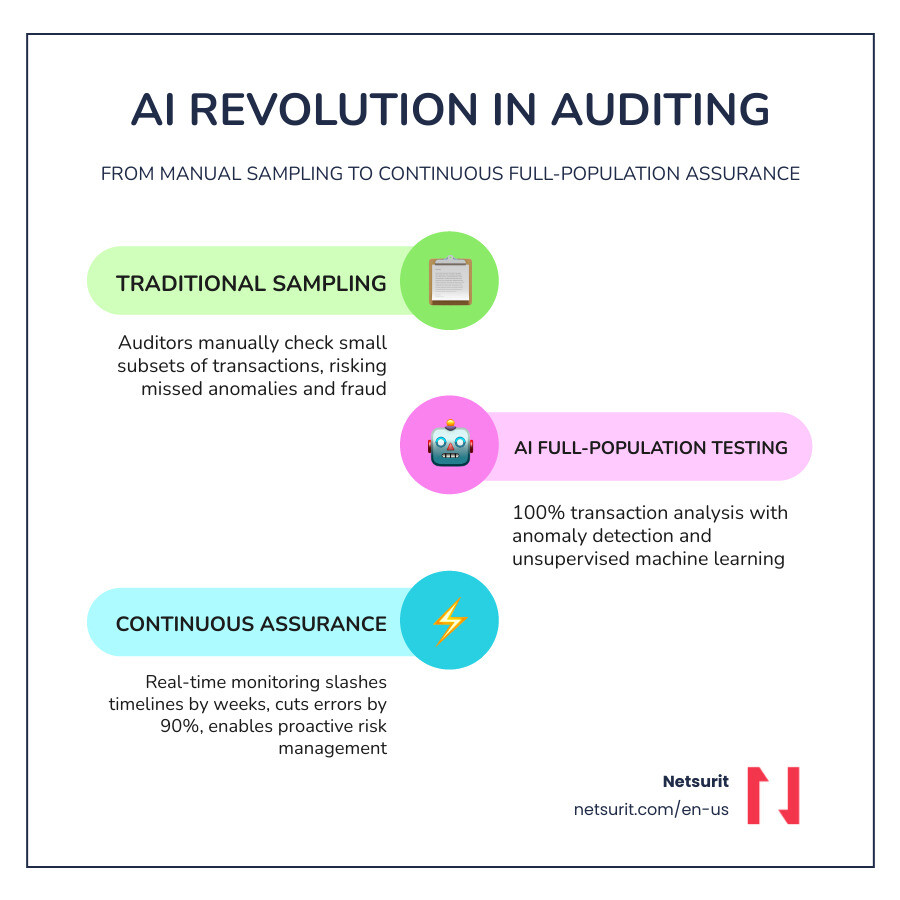
    The shift from manual sampling to AI-driven, full-population testing is real and measurable. Teams are cutting manual data-entry errors by up to 90%, slashing audit timelines by weeks, and identifying fraud risks that traditional spot-checks would miss entirely. But these tools are not plug-and-play — choosing the wrong one, or deploying without proper training and human oversight, creates new problems rather than solving old ones.

    This article breaks down the tools, trade-offs, and implementation realities so you can make a confident decision.

    I’m Orrin Klopper, CEO and co-founder of Netsurit, a global IT services and digital transformation company — and over nearly three decades of working alongside finance and accounting leaders, I’ve seen how the right technology decisions (and the wrong ones) shape outcomes when it comes to financial auditing AI tools. That experience is what drives this guide: practical, honest, and built for leaders who need answers, not hype.

    Infographic showing transition from traditional audit sampling to AI-driven continuous full-population assurance in 2026

    Financial auditing AI tools vocab to learn:

    How AI Transforms Traditional Financial Auditing Processes

    The core promise of financial auditing AI tools is the move from “looking for a needle in a haystack” to “analyzing the entire haystack in seconds.” Historically, auditors relied on statistical sampling—testing a small fraction of transactions and hoping it represented the whole. By April 2026, this method is increasingly viewed as a liability.

    AI transforms the workflow through three primary mechanisms:

    1. Full-Population Testing: Instead of sampling 50 invoices, AI scans 100% of the General Ledger (GL). This eliminates the risk of missing material anomalies hidden in the “untested” 95% of data.
    2. Predictive Analytics: By analyzing historical trends, AI flags deviations before the books even close. This proactive stance moves auditing from a post-mortem exercise to a due diligence role that adds real business value.
    3. Anomaly Detection: Unsupervised machine learning identifies patterns that humans cannot see, such as unusual timing of entries or rounding patterns that suggest fraud.

    Houston-Area Example: A mid-sized accounting firm in Sugarland, TX, recently deployed autonomous AI agents to handle high-volume transaction testing for a local retail chain. By automating the matching of purchase orders to bank statements, they reduced manual testing hours by 70%, allowing their senior auditors to focus on complex valuation issues instead of data entry.

    Trade-offs: AI Audit Implementation

    • Works best when: Dealing with high-volume, structured data across multiple ERP systems.
    • Avoid when: Data is highly qualitative or requires deep subjective “professional judgment” without supporting documentation.
    • Risks: Algorithmic bias where the AI ignores certain transaction types it wasn’t trained on, or “black box” logic that cannot be explained to a regulator.
    • Mitigations: Use platforms that offer deterministic scoring and always maintain a “human-in-the-loop” to override or validate AI conclusions.

    The future is now for those ready to embrace automated assurance.

    Top Financial Auditing AI Tools for 2026

    Selecting the right platform depends on your firm’s size, your clients’ complexity, and your existing tech stack. In 2026, the market has bifurcated into “Assistive AI” (chatbots) and “Agentic AI” (tools that actually execute tasks).

    MindBridge: The Standard for Risk Discovery with Financial Auditing AI Tools

    MindBridge remains a global leader in AI-powered financial intelligence. Its primary strength lies in risk discovery. Using unsupervised machine learning, it monitors 100% of financial transactions across all systems to surface errors and policy breaches early.

    For finance leaders, MindBridge provides an “independent oversight layer.” As more companies use AI agents to automate their own bookkeeping, MindBridge acts as the watchdog, ensuring those agents haven’t introduced new forms of financial leakage or fraud. It provides contextual explainability, meaning it doesn’t just flag a transaction; it provides the auditable reasoning and chain of evidence for why it was flagged.

    Trullion: Auditable AI for Accounting Teams using Financial Auditing AI Tools

    Trullion focuses on what they call “Auditable AI.” Built by former Big Four CPAs, the platform is designed to be vertical-specific rather than generic. It excels at unifying structured data (like ERP entries) with unstructured data (like lease contracts or PDF invoices).

    Their agentic assistant, “Trulli,” helps teams make financial statements smarter by automating data extraction and testing. One of Trullion’s most cited metrics is a 25% reduction in reporting time and a 30% saving on software costs by consolidating disparate tools into one traceable platform.

    Fieldguide: End-to-End Workflow Automation

    Fieldguide is designed for the modern audit firm that wants to reimagine its entire practice. It isn’t just a point solution; it’s an end-to-end platform. Their “Field Agents” can automate up to 70% of testing hours, handling everything from trial balance management to risk assessments.

    A standout feature is the domain-specific AI chat, which is tuned to a firm’s specific methodologies. This ensures that the AI doesn’t just give generic advice but follows the exact standards and workflows your firm has established. It also includes a seamless tax export, bridging the gap between audit and tax teams.

    DataSnipper: Intelligent Excel Integration for Auditors

    For many auditors, Excel is home. DataSnipper understands this and builds its AI directly into the Excel interface. It specializes in “sniping” data—extracting and cross-referencing information from source documents like invoices or bank statements directly into your workpapers.

    Firms using DataSnipper report cutting audit prep time by up to 50%. It is particularly effective for internal audits where teams need to perform rapid tests of details, payroll testing, or cash confirmations without leaving their spreadsheets.

    Ensuring Compliance and Security in the AI Era

    Adopting financial auditing AI tools is not just about speed; it is about staying compliant with evolving standards like SOX, PCAOB, and ISQM. Regulators in 2026 are increasingly skeptical of “black box” AI. If you cannot explain how your AI reached a conclusion, that conclusion is not auditable.

    Conroe, TX Example: A local firm specializing in government contracting recently moved to an AI-native audit workspace to comply with strict regulatory frameworks. They utilized Cortea to manage IT audits because the platform natively understands over 22 audit frameworks, including ISO 27001 and GDPR. By using “framework-aware” AI, they ensured that every automated test was mapped directly to a regulatory requirement.

    One of the most significant emerging risks is the rise of AI-generated fraudulent documents. As bad actors use GenAI to create perfect-looking fake invoices, auditors must use tools like AuditFlow or CoAuditor that feature synthetic document detection. These tools look for digital fingerprints and metadata patterns that indicate a file was manipulated, helping you audit your way out of a potential disaster.

    Don’t mess with Texas algorithms—ensure your AI tools provide a full, immutable audit trail where every extraction is timestamped and linked back to the original source coordinate.

    Implementation Strategy and Frequently Asked Questions

    The biggest mistake firms make is treating AI as a “set it and forget it” solution. Successful implementation requires a “human-in-the-loop” strategy. This means AI handles the data-heavy lifting, but a certified auditor reviews all “amber” or “red” flags.

    Katy, TX Example: A local accounting firm integrated AI agents with Microsoft Dynamics 365 Business Central to automate their monthly bank reconciliations. While the AI reduced the task from hours to minutes, they kept a senior accountant in the loop to review any exceptions. This allowed them to sleep soundly knowing their risk was drastically reduced without losing the human touch.

    Common Adoption Mistakes to Avoid:

    • Underestimating Training: AI tools are intuitive, but understanding how to interpret AI-risk scores requires a new skillset.
    • Ignoring Integration: If your AI tool doesn’t talk to your ERP (like SAP, Oracle, or Business Central), you’re just creating another data silo.
    • Price-Only Decisions: A “cheap” tool that lacks SOC 2 or ISO 27001 certification is a massive security liability.

    What is the typical ROI for AI audit tools in 2026?

    Most firms see an immediate ROI through time reduction. For example, Finspectors.ai claims a 50% reduction in administrative tasks and an average audit timeline reduction of two weeks. This translates to roughly 100+ hours saved per audit. In terms of hard numbers, some firms report a 30% increase in reporting efficiency and a significant boost to profit margins by increasing capacity without adding headcount.

    Can AI tools integrate with existing Excel workflows?

    Yes. Tools like DataSnipper and Audentum are built specifically for this. Audentum, for instance, uses AI for the extraction layer but keeps downstream processing in deterministic SQL. This means your data remains in a structured, queryable format that works seamlessly with Excel or Google Sheets, maintaining workflow continuity for your team.

    How do these tools handle AI-generated fraudulent documents?

    Modern tools like Arvexi Cortex use pattern matching and cross-cycle analysis to spot anomalies. Cortex, for example, investigates accounts autonomously and provides a confidence score. If it sees a pattern that matches a known synthetic document profile or a suspicious timing variance, it flags it for human investigation. Arvexi Cortex can investigate 224 accounts in just 32 minutes, identifying risks that would take a human weeks to find.

    Conclusion

    The era of manual, sample-based auditing is closing. By April 2026, financial auditing AI tools have become the essential engine for accuracy and growth in the accounting profession. Whether you are looking to automate your internal audits or scale your firm’s external audit capacity, the technology is ready.

    At Netsurit, we act as an elite tech partner for firms across Houston, New York, and beyond. We provide the managed IT, cybersecurity, and AI solutions needed to crush downtime and unlock business momentum. If you’re ready to modernize your practice, explore our Netsurit Accounting Firm IT Services to see how we can help you scale.

    What to watch next: Keep an eye on “Autonomous Agents” that don’t just flag issues but actually perform the reconciliation and draft the final report for review. The “Commentator” AI of 2024 has become the “Investigator” of 2026—and the “Controller” AI is just around the corner.

  • The Ultimate Guide to ERP System Integration Benefits

    The Ultimate Guide to ERP System Integration Benefits

    ERP System Integration: What It Is and Why It Matters in 2026

    ERP system integration is the process of connecting your core ERP software to the other applications your business runs on — think CRM, e-commerce, HR, payroll, and BI tools — so data flows automatically between them in real time.

    If your team re-enters the same order data in three systems, waits 24 hours for inventory numbers to update, or reconciles spreadsheets at month-end because your ERP doesn’t talk to your billing platform, you’re already feeling the cost of poor integration.

    Here’s the short version of what ERP integration does:

    What It Connects What It Fixes
    ERP ↔ CRM Eliminates manual order entry; syncs customer data
    ERP ↔ E-commerce Keeps inventory accurate across sales channels
    ERP ↔ HR / Payroll Automates onboarding, PTO, and payroll feeds
    ERP ↔ BI / Reporting Delivers real-time dashboards instead of stale exports
    ERP ↔ Supply Chain Triggers alerts for delays and automates reordering

    The business case is clear: IDG research shows that 44% of transactional data in ERP systems comes from external sources. Without integration, that data enters manually — slowly, inconsistently, and with errors.

    This is not just an IT problem. Almost half of senior procurement executives name poor integration as one of their top three operational headaches. When systems don’t share data, decisions slow down, errors multiply, and customer experience suffers.

    This guide walks you through every dimension of ERP integration — from architecture choices to security requirements to a phased deployment roadmap — so you can make a confident decision about where to start.

    I’m Orrin Klopper, CEO and co-founder of Netsurit, and over 30 years of guiding businesses through IT transformation projects — including complex ERP system integration initiatives across North America, South Africa, and Europe — I’ve seen which approaches deliver lasting results and which ones create expensive technical debt. The sections ahead reflect what actually works.

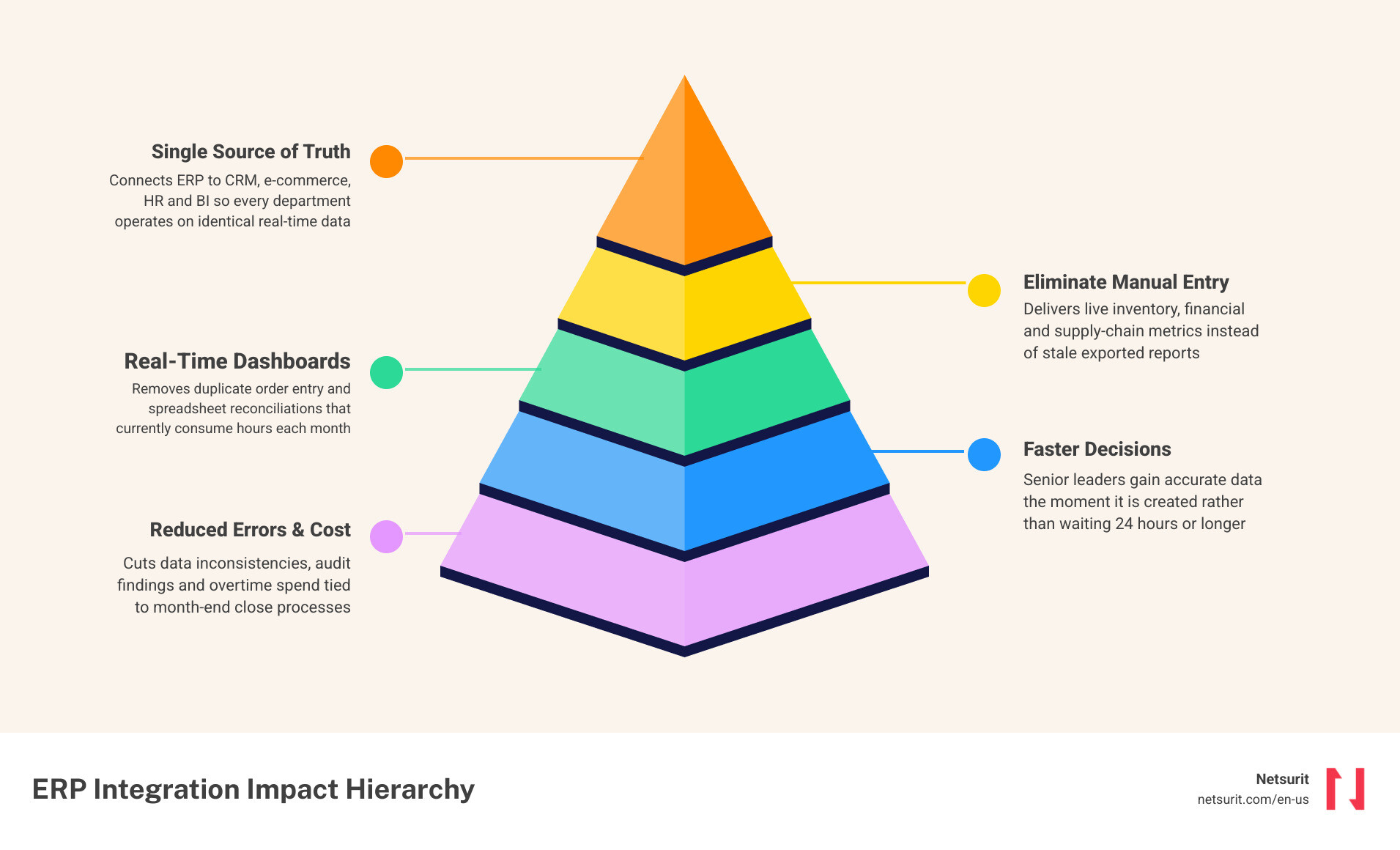
    ERP integration architecture showing connected systems and data flows infographic

    Erp system integration helpful reading:

    • global it solutions provider
    • it managed service providers platform
    • it services and solutions provider

    Why ERP System Integration Dictates Mid-Market Growth in 2026

    Relying on disconnected software in June 2026 is an active drag on your business growth. In the mid-market, speed and accuracy are the only real differentiators. When your customer-facing tools, inventory ledgers, and financial systems operate in silos, your operational velocity drops.

    ERP system integration acts as the central nervous system of your business. It establishes a “single source of truth,” ensuring that every department accesses the exact same data. If a customer changes their billing address in your CRM, the update propagates to your ERP instantly, preventing shipping or invoicing errors.

    Relying on manual data transfers to bridge these gaps is a failing strategy. Manual data entry introduces human error, creates processing backlogs, and limits executive visibility to a rearview mirror perspective. To build a resilient operations model, your technology stack must communicate autonomously. Aligning your infrastructure with your long-term expansion goals requires a structured IT roadmap. Our IT Strategy Services help mid-market organizations design integration pathways that scale smoothly as transaction volumes grow.

    In highly regulated markets or complex operating environments, custom integration strategies are no longer optional. For example, public sector entities in the Northeast rely on robust managed infrastructure to keep operations running smoothly, as seen in how the CGI Selected to Host/Manage ERP System for State of Maine initiative secures critical public data. Similarly, growing mid-market enterprises across the Southwest utilize specialized expertise to bridge disparate software environments, leveraging local Systems Integration in New Mexico — Hire Experts | FreedomDev teams to streamline complex legacy workflows.

    Eliminate Manual Data Entry and Accelerate Financial Reporting

    The primary benefit of a successful erp system integration is the immediate elimination of manual data entry. Removing human touchpoints from routine transactions minimizes data transcription errors, decreases invoice cycle times, and frees up your staff for high-value analysis. Real-time data visibility allows leadership teams to make strategic decisions based on live operating metrics rather than month-old reports.

    Accounting remains the most critical business function. According to industry surveys, 89% of respondents consider accounting the most critical ERP function. When your financial ledger connects seamlessly with operational applications, month-end closing cycles shrink from weeks to days.

    To see this in action, consider a tax and accounting firm in the Houston, Texas metro area. During peak tax season, the firm faces a massive influx of new client registrations, document submissions, and billing updates. By integrating their front-office CRM with their back-office billing ERP, they automate client onboarding and real-time data synchronization. When a new client signs an engagement letter in the CRM, the integration automatically provisions their account in the billing ERP, sets up the correct tax entity structures, and schedules the initial retainer invoice. This eliminates double-entry errors and ensures the firm processes client files without administrative delays.

    To successfully implement these workflow improvements, you need a structured approach to change management. We use our Digital Transformation Framework to help organizations systematically map their processes, identifying manual bottlenecks and replacing them with automated, integrated workflows that drive measurable ROI. If you run complex manufacturing or distribution operations alongside your financial systems, working with specialized deployment partners like Epicor Implementation & Business Consulting in Houston-DESSS ensures your shop floor data connects seamlessly with your corporate ledger.

    Choosing Your Architecture: Comparing the 4 Main Integration Methods

    Selecting the correct architecture is the most critical technical decision in your integration journey. The wrong choice can lead to a fragile network of custom code that breaks during every minor software update.

    The four primary integration methods used by mid-market businesses in 2026 are:

    • Point-to-Point (P2P): Direct custom connections written between two applications.
    • Enterprise Service Bus (ESB): A centralized communication architecture where applications connect to a shared data highway.
    • API Management: Utilizing structured application programming interfaces managed through a central gateway.
    • Integration Platform as a Service (iPaaS): A cloud-native platform providing prebuilt connectors, visual workflow designers, and managed hosting.
    Feature Point-to-Point (P2P) Enterprise Service Bus (ESB) API Management iPaaS (Integration Platform)
    Upfront Cost Low High Medium Medium
    Complexity High (over time) High Medium Low
    Scalability Poor Good (on-premises) Excellent Outstanding (hybrid/cloud)
    Maintenance High High Medium Low
    Best Used For Linking two static apps Legacy enterprise setups Developer-led API ecosystems Rapid cloud-first scaling

    To simplify cloud-first deployments, organizations often look to modern platforms like the NetSuite Integration Platform | NetSuite to establish prebuilt connections. For developers building custom connectors, open-source repositories like virbahu/erp-integration-connectors provide highly valuable foundational code. When evaluating cost-effective options, reviewing the ERP Integration for $99/Month 2026 | SAP, NetSuite, Dynamics, Sage model can help mid-market businesses understand how standardized packages compare to complex custom builds.

    Mitigating the Risks of Data Mapping and Legacy System Failures

    ERP integrations often stumble due to poor data mapping, security vulnerabilities, or legacy system performance bottlenecks. If your source data is disorganized, integrating your systems will only distribute bad data faster.

    Consider a multi-partner accounting firm in Conroe, Texas. The firm decided to migrate from a legacy on-premises database to a modern cloud-based ERP. The primary challenge was mapping twenty years of historical client audit trails, custom tax classification fields, and complex billing histories without disrupting active client accounts.

    To mitigate this risk, the firm ran a comprehensive data cleansing project prior to migration. They established strict data translation rules, defining how legacy fields would map to the new cloud database schema. By executing the migration in structured phases, they ensured that active tax preparation pipelines remained entirely unaffected.

    For businesses moving away from legacy on-premises infrastructure, a structured Cloud Migration strategy is essential to prevent data loss and preserve system performance. For a deeper dive into how modern automation tools can simplify this process and protect your operational continuity, read our guide on Cloud Transformation: How Automation Turns Your Digital Migration into a Joyride.

    Solving Data Translation and API Limit Bottlenecks

    Data translation mismatches occur when two systems define the same data point differently. For example, one system might record a date as DD/MM/YYYY while your ERP expects YYYY-MM-DD. Without a translation layer, the transfer fails. Furthermore, SaaS applications impose strict API rate limits to protect their performance. If your integration sends too many requests simultaneously, the host system will block the connection.

    Consider a financial services office in Katy, Texas. During high-volume, end-of-month reconciliation cycles, their automated billing sync consistently hit the API limits of their financial ledger, causing synchronization failures. They resolved this bottleneck by implementing queued batch processing. Instead of sending transactions individually in real time, the integration platform groups transactions and pushes them in optimized batches during off-peak hours.

    When off-the-shelf integration tools cannot handle these complex API limits or custom business rules, partnering with local experts for Katy Custom Software Development – Custom Information Services ensures your middleware is custom-engineered to handle your specific transactional volumes.

    Securing Financial Data and Meeting SOC 2 Standards

    Integrating systems expands your attack surface. If an API endpoint is poorly secured, it can expose sensitive financial records, employee data, or client tax documents to unauthorized access. Protecting this data requires end-to-end encryption, multi-factor authentication, and secure credential storage.

    For example, a CPA firm in Sugar Land, Texas must comply with strict federal regulations regarding client data privacy. To secure their automated workflows, they implemented secure API gateways with automated credential rotation and role-based access controls. This architecture ensures that only authenticated systems can query the ERP, and every transaction is logged in an immutable audit trail.

    For firms handling highly sensitive data, working with specialized developers who understand local compliance landscapes is critical. Utilizing Sugar Land Custom Software Development services ensures that your integration workflows are architected to meet SOC 2, HIPAA, or other industry-specific security standards from day one.

    A Phased Roadmap to Deploy Your ERP Integration Without Downtime

    To minimize operational disruption, we recommend a phased deployment roadmap. A “big bang” launch where you turn on all integration points simultaneously carries a high risk of system downtime.

    A structured integration project follows these four distinct phases:

    1. Discovery and Scoping: Document all business processes, system endpoints, and data fields that require integration.
      • Owner: Business Analyst / Lead Architect
    2. Data Cleansing and Standardization: Clean and format source data to ensure compatibility with target system schemas.
      • Owner: Database Administrator / Data Steward
    3. Pilot Testing: Deploy the integration in a staging environment using a representative subset of data to validate translation rules and error handling.
      • Owner: QA Engineering Team
    4. Phased Rollout: Deploy the integration to production in waves, starting with non-critical data flows before moving to core transactional pipelines.
      • Owner: DevOps Team / Systems Integrator

    Once your integration is live, maintaining its performance requires continuous monitoring, security patching, and error resolution. Our Application Managed Services team provides ongoing support to keep your integrated systems running smoothly. For organizations built on Microsoft environments, leveraging Microsoft Solutions ensures your Office 365, Dynamics, and Power Platform applications are natively aligned with your ERP. To explore our full suite of implementation, security, and consulting services, visit Our Services page.

    Answering Critical ERP Integration Questions

    How long does a typical ERP integration project take?

    An ERP integration project can take anywhere from a few weeks to several months, depending heavily on system complexity, data quality, and the number of endpoints. A basic connection using prebuilt iPaaS adapters can go live within 2 to 4 weeks. Conversely, a complex multi-system integration involving legacy on-premises databases and custom business logic typically requires 3 to 6 months of development and rigorous testing.

    To accelerate your timeline and reduce risk, we strongly advocate for a phased approach. By deploying high-priority connections first — such as your CRM-to-ERP sync — you can deliver immediate business value while building out more complex workflows over time.

    Can we integrate legacy on-premises systems with cloud ERPs?

    Yes. You do not need to migrate your entire infrastructure to the cloud to achieve seamless integration. Modern hybrid cloud architectures bridge on-premises databases and cloud applications securely. This is typically achieved by installing a secure, outbound-only local integration agent on your local server. This agent communicates with your cloud ERP via encrypted APIs without requiring you to open inbound ports in your corporate firewall.

    For detailed technical guidelines on configuring these hybrid data flows, consult the Administrator’s Guide – SAP ERP, Supply Chain or review prepackaged integration scenarios via the Prepackaged Integration with SAP ERP guide. For manufacturers and distributors seeking to connect legacy shop floor systems, understanding these hybrid setups is simplified by reading the Understanding ERP System Integration Services By WM Synergy FAQ.

    How does ERP integration support regulatory compliance?

    ERP integration automates compliance reporting by establishing consistent, tamper-proof data flows across your entire software ecosystem. Instead of relying on manual spreadsheet exports — which can be altered or deleted — integrated systems generate immutable audit trails that log exactly when data was created, modified, or transferred.

    When your financial ledger connects directly with your operational tools, regulatory reports are generated automatically using live, validated data. If your business operates in highly regulated sectors like medical device manufacturing, aerospace, or industrial distribution, utilizing specialized platforms from vendors like AI Powered Industry Specific ERP and Business Management … ensures your integration workflows natively support strict quality control and traceability standards.

    Conclusion

    Integrating your ERP system with your broader software ecosystem is the most effective way to eliminate operational friction, secure your financial data, and build business momentum. By replacing manual data entry with automated, real-time data flows, you give your leadership team the clear visibility needed to make confident decisions.

    Partnering with an experienced IT strategist ensures your integration is secure, compliant, and architected to scale. To learn how we can help you design and execute a successful ERP integration project tailored to your business, explore Netsurit Our Services.

  • A Practical Guide to Keyword Analytics in Cyber Security

    A Practical Guide to Keyword Analytics in Cyber Security

    Reactive Security Is a Liability for Houston Accounting Firms

    Analytics in cyber security is the practice of collecting, correlating, and analyzing security data to detect and stop threats before they cause damage — and for tax and accounting firms in the Houston metro, it is no longer optional.

    Here is what it means in practice:

    What It Does Why It Matters to Your Firm
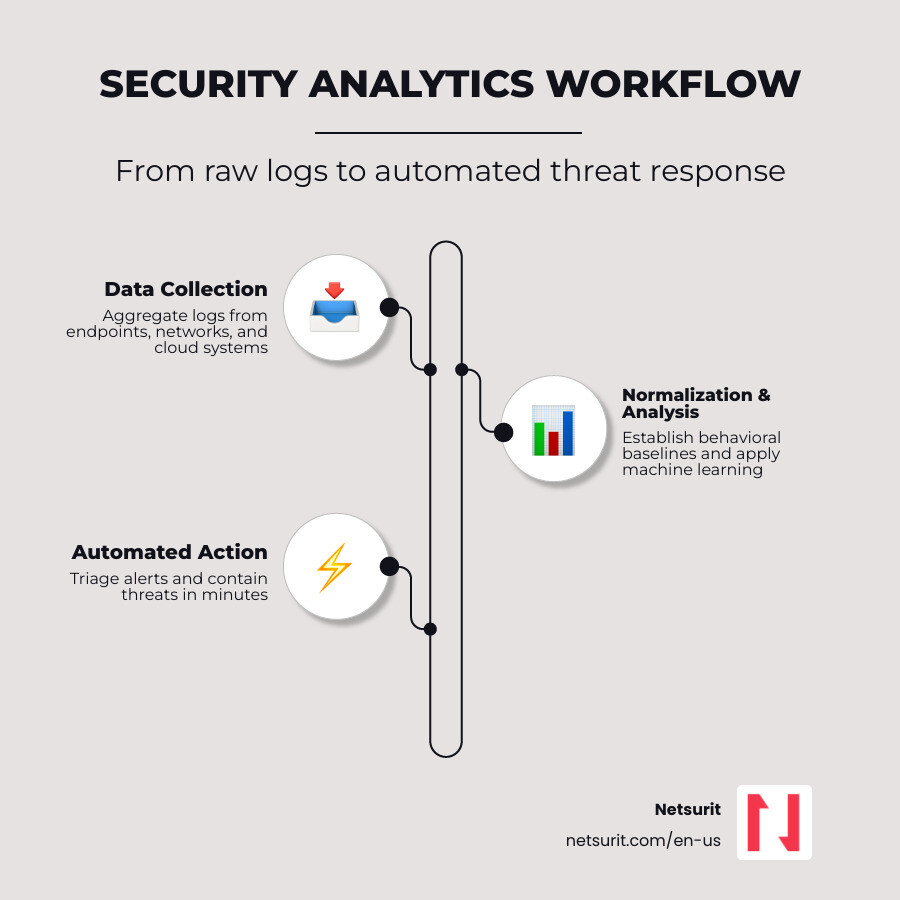
    Collects logs from endpoints, networks, and cloud systems Gives you full visibility into who accesses client financial data
    Establishes normal behavioral baselines for users and devices Flags anomalies like a 2:00 AM login during tax season
    Applies machine learning to reduce false alarms Lets your team focus on real threats, not noise
    Automates initial response actions Cuts breach containment time from hours to minutes
    Supports compliance reporting for HIPAA, PCI DSS, and similar frameworks Reduces audit burden and regulatory risk

    The stakes are concrete. The average data breach now costs $4.88 million. In regulated industries like financial services, that number climbs higher. Accounting firms hold Social Security numbers, tax returns, and banking credentials — exactly the data attackers target. Yet most mid-market firms still run reactive security: they respond after something breaks.

    That is the gap security analytics closes.

    Cybercrime damages are projected to reach $10.5 trillion globally by 2025. Firms that treat security as a checkbox — rather than a continuous, data-driven process — are exposed during their highest-risk periods, including tax season.

    I’m Orrin Klopper, CEO and co-founder of Netsurit, and over nearly three decades of building IT and security programs for more than 300 client organizations across North America, I’ve seen how analytics in cyber security separates firms that contain incidents quickly from those that don’t recover at all. In this guide, I’ll walk you through exactly how it works and what your firm needs to do next.

    Infographic showing security analytics workflow: Data Collection to Normalization to Analysis to Automated Action infographic

    Discover more about analytics in cyber security:

    • Airtel Cyber Security
    • CSMS Cyber Security Management System
    • Cyber Security Filtering

    Cybersecurity vs. Data Analytics: Key Differences for Houston Firms

    Many leadership teams confuse general business data analytics with security analytics. They assume that because they have a strong business intelligence (BI) team or robust tax-modeling software, their data infrastructure is naturally secure. This is a dangerous operational blind spot.

    While both disciplines work with large datasets, they require entirely different mindsets, tools, and objectives. Traditional data analytics is opportunity-driven, focusing on business growth, client insights, and operational efficiency. Security analytics, on the other hand, is risk-driven and defensive. It assumes an active, intelligent adversary is already trying to exploit the system.

    Understanding these differences is critical for proper budget allocation and risk management.

    Feature Data Analytics (Business Intelligence) Cybersecurity Analytics (Risk & Defense)
    Primary Goal Optimize operations, predict revenue, and find market opportunities. Detect threats, mitigate risk, and protect sensitive digital assets.
    Core Mindset Exploratory, optimistic, and business-value oriented. Skeptical, defensive, and focused on adversarial behavior.
    Data Sources CRM, ERP, billing systems, and client transaction records. Firewalls, endpoint logs, identity providers, and network flows.
    Key Tools Power BI, Tableau, SQL databases, and Python libraries. SIEM, SOAR, UEBA, and network traffic analyzers.
    Success Metric Increased revenue, higher efficiency, and better client retention. Reduced Mean Time to Detect (MTTD) and Mean Time to Respond (MTTR).

    Consider a practical scenario: A CPA firm in Katy, Texas uses advanced predictive modeling tools to forecast client tax-filing volumes and staff requirements for the upcoming season. This is a classic data analytics application that helps the firm scale its operations.

    However, those operational tools will not alert the firm if an attacker uses compromised credentials to download hundreds of client folders in the middle of the night. For that, the firm needs specialized network security monitoring systems running analytics in cyber security. Understanding Why Is Cyber Security Important means recognizing that growth analytics and protective analytics must run on separate tracks, even if they occasionally share data. For professionals looking to bridge this gap, programs like the Master of Science in Cybersecurity and Business Analytics highlight how academic institutions are training the next generation to handle both sides of the coin.

    Defining Data Analytics in the Financial Sector

    Within accounting and tax firms, data analytics is primarily used to extract value from client financial records. Firms analyze historical tax filings, cash flow statements, and market trends to provide proactive advisory services.

    During the high-stress tax season, operational analytics helps partners monitor staff utilization rates, identify bottlenecks in document processing, and optimize client onboarding. The focus is entirely on business growth, client satisfaction, and operational efficiency. The data processed here is structured, predictable, and clean.

    Defining Analytics in Cyber Security

    In contrast, analytics in cyber security focuses on finding anomalies within massive, chaotic streams of machine-generated data. Security analytics platforms ingest raw log files, network packet captures, and API telemetry from every corner of your IT infrastructure.

    Instead of looking for business trends, security analytics looks for indicators of compromise (IOCs) and subtle behavioral deviations. If an employee who normally logs in from Conroe suddenly authenticates from a foreign IP address, or if an endpoint begins scanning internal network ports, security analytics flags the event. It provides the forensic timeline needed for rapid incident response and risk mitigation before data exfiltration occurs.

    Securing Financial Data: How Analytics in Cyber Security Prevents Accounting Breaches

    For accounting firms holding high-value financial data, security analytics acts as an active, automated shield. Attackers no longer just launch loud, obvious attacks; they use stealthy, low-and-slow techniques that blend in with normal administrative traffic. Security analytics platforms solve this by correlating disparate events that seem harmless in isolation but point to a coordinated attack when viewed together.

    Imagine an accounting firm based in Sugar Land, Texas during the peak of tax season in March 2026. At 2:00 AM, an administrative account attempts to access a legacy database containing historical client tax records. Under traditional security setups, this might not trigger an alarm because the credentials used are technically valid.

    However, a modern security analytics platform analyzes the event in context. It notes that the administrator has never accessed this database before, the request originates from an unrecognized device, and the data transfer volume is abnormally high. The system immediately flags this as an unauthorized credential abuse attempt, locks the account, and alerts the security team, preventing a major breach before the firm opens the next morning. Implementing these protective measures is a core part of how modern platforms help you Protect Your Organization How AI Can Help You Manage Risks effectively.

    Big Data Security Analytics and Threat Detection

    The sheer volume of security logs generated by a mid-sized accounting firm can easily overwhelm a small, internal IT department. Every firewall, cloud application, and employee laptop generates thousands of log lines every hour. This is where big data security analytics becomes essential.

    By using cloud-native log aggregation and machine learning, modern security analytics platforms ingest terabytes of data without slowing down operations. Advanced platforms can reduce false positives by up to 99% using over 3,000 specialized machine learning models. Instead of forcing human analysts to sift through thousands of daily alerts, the system isolates the single genuine threat that requires immediate human intervention.

    Entity Analytics and Behavioral Anomaly Detection

    One of the most difficult threats to detect is credential theft. When an attacker steals an accountant’s password, traditional firewalls and antivirus tools see a legitimate user logging in.

    Security analytics addresses this through advanced Entity analytics, which continuously evaluates the risk posture of every user, host, and service. The platform establishes a behavioral baseline for each entity over time. If a user’s risk score spikes due to unusual file access patterns, atypical login times, or strange network requests, the platform flags the behavior. This behavioral anomaly detection is critical for stopping both external attackers using valid credentials and malicious insiders attempting to exfiltrate proprietary client data.

    Building a Modern Security Analytics Workflow to Stop Threats

    To build a security posture that actually stops modern threats, organizations must move away from isolated security tools. A modern security analytics workflow relies on a continuous pipeline: collecting data, normalizing it into a standard format, analyzing it for threats, and executing a rapid response.

    For a multi-office accounting firm with locations in Conroe, Katy, and downtown Houston, establishing this workflow is the key to unified visibility. Instead of managing separate security tools at each location, the firm routes all firewall, endpoint, and identity logs into a centralized cloud-native data lake. This ensures that a threat detected on a laptop in Katy immediately informs the security defenses protecting the servers in Conroe. Implementing centralized SIEM Services allows the firm to maintain complete control and visibility over this entire pipeline from a single pane of glass.

    Machine Learning and Automated Response

    When a cyberattack occurs, response times are measured in seconds, not hours. If a ransomware strain begins encrypting files on an endpoint, waiting for an IT manager to read an email alert and manually isolate the machine is a recipe for disaster.

    Modern security analytics platforms solve this by integrating machine learning with Security Orchestration, Automation, and Response (SOAR) playbooks. When the analytics engine detects a high-confidence threat—such as active data exfiltration or a known malware signature—it triggers an automated playbook. The system can instantly isolate the compromised endpoint, disable the affected user account, and block the malicious external IP address at the firewall. By automating these repetitive, high-speed tasks, human analysts are freed up to focus on complex investigation and forensic analysis.

    Choosing the Right Tools for Analytics in Cyber Security

    Selecting the right security analytics platform requires careful evaluation of your firm’s technical infrastructure, compliance needs, and available internal resources.

    Tool Selection Trade-offs

    • Works best when: Your organization has centralized cloud infrastructure, standardized log sources, and access to dedicated security analysts who can interpret and act on complex alerts.
    • Avoid when: Your firm relies heavily on legacy, on-premises software that cannot export standardized log formats, or if you lack the operational budget to maintain and tune the platform.
    • Risks: High implementation costs, vendor lock-in, and severe alert fatigue if the machine learning models and detection rules are misconfigured.
    • Mitigations: Partner with a managed Security Operations Center (SOC) provider to handle the daily alert triage, tool configuration, and continuous model tuning.

    Career Paths: Transitioning into Security Analytics Roles

    The rapid rise of cyber threats has created a significant regional talent shortage in the security space. For information security analysts, the job market is projected to grow by 29% between 2024 and 2034, with a median annual pay of $124,910 in the United States. Similarly, data scientist roles are expected to grow by 34% over the same period. This demand makes security analytics one of the most lucrative and stable career paths in the technology sector.

    For data professionals living in the Greater Houston area, this talent gap represents a massive career opportunity. Local energy vendors, financial institutions, and healthcare providers are constantly searching for analysts who can apply mathematical and analytical rigor to complex security datasets. You can explore the active regional market by researching the Top Houston, TX Cybersecurity Companies 2026 | Built In to see which firms are driving local hiring and technological innovation.

    Transitioning from Data Analyst to Cybersecurity Data Analyst

    If you are already working as a general data analyst, you already possess 80% of the foundational skills required to transition into security analytics. Core technical skills like SQL database querying, Python scripting, and statistical pattern recognition are highly transferable.

    The primary gap is domain-specific security knowledge. To make the transition, you must learn how network protocols work, how to interpret firewall and active directory logs, and how common cyberattacks are structured. If you are looking for local opportunities to start your transition, checking listings for It Security Specialist jobs in Sugar Land – LinkedIn can give you a clear picture of the specific technical requirements and toolsets local employers are looking for.

    Essential Certifications and Regional Training Programs

    While formal degrees are valuable, the cybersecurity industry heavily prioritizes practical skills and recognized certifications.

    To accelerate your career transition, consider pursuing industry-standard credentials such as:

    • CompTIA Security+: Excellent for mastering foundational security concepts.
    • Certified Information Systems Security Professional (CISSP): The gold standard for advanced security management.
    • Certified Ethical Hacker (CEH): Focuses on understanding the offensive tactics used by threat actors.

    For those living in Montgomery County, exploring specialized academic pathways like the Conroe, Texas Cybersecurity Degree Programs & Colleges can provide structured, local educational resources to help you gain hands-on lab experience and prepare for these professional exams.

    Frequently Asked Questions About Security Analytics

    How does security analytics differ from traditional SIEM?

    Traditional Security Information and Event Management (SIEM) systems rely heavily on static, correlation-based rules (e.g., “if X happens five times in ten minutes, trigger an alert”). These systems generate massive amounts of noise and struggle to detect novel, complex attacks. Modern security analytics platforms use machine learning, historical behavioral baselines, and entity risk scoring to identify advanced threats and anomalies without relying on pre-defined, rigid signatures.

    What are the main challenges of implementing cybersecurity analytics?

    The primary hurdles are data quality, integration complexity, and the specialized skill gap. Security analytics platforms require clean, structured data from across your entire IT stack to work effectively. If your firewalls, identity systems, and cloud applications use incompatible formats, normalization becomes difficult. Additionally, configuring, tuning, and responding to the alerts generated by these tools requires highly specialized security engineering talent that many mid-market firms struggle to hire and retain internally.

    How does machine learning reduce false positives in threat detection?

    Machine learning reduces false positives by establishing dynamic behavioral baselines for every user and device on your network. Instead of triggering an alert every time an employee downloads a large file or logs in outside of normal business hours, the system evaluates the action in context. It considers the user’s historical patterns, peer group behavior, and asset criticality. This context allows the platform to ignore normal operational spikes and surface only high-confidence, genuine anomalies for human review.

    Conclusion

    Implementing advanced analytics in cyber security is the definitive line between a resilient financial firm and one vulnerable to devastating, reputation-ruining breaches. As cyber threats grow more sophisticated, relying on traditional, reactive defenses is no longer a viable business strategy.

    We can help you evaluate your current security posture, consolidate your disparate log sources, and deploy a fully managed security analytics solution tailored to your compliance needs. To safeguard your client data and build a proactive defense, explore our comprehensive Cybersecurity services today.

  • A Comprehensive Guide to Best App Development Courses

    A Comprehensive Guide to Best App Development Courses

    The Best App Development Courses in 2026: A Quick Guide for Business Leaders

    If you’re evaluating the best app development courses available right now, here’s a direct answer before we go deeper:

    Top App Development Courses in 2026

    Course Platform Focus Level
    iOS & Swift Complete Bootcamp (Dr. Angela Yu) Udemy Native iOS Beginner–Intermediate
    Meta Android Developer Certificate Coursera Native Android Beginner
    IBM iOS & Android Developer Certificate Coursera Cross-platform Beginner
    Android Basics with Compose Google Native Android Absolute Beginner
    Flutter & Dart: The Complete Guide Udemy Cross-platform Beginner–Intermediate
    CS50’s Mobile App Dev with React Native edX/Harvard Cross-platform Intermediate
    Codecademy iOS Developer Path Codecademy Native iOS Beginner

    Mobile apps are no longer a nice-to-have. They’re how your clients, customers, and staff expect to interact with your business. Smartphone users are projected to grow by 1.5 billion — more than 30% — by 2029. That means businesses that build capable, reliable mobile apps now will have a real edge over those that don’t.

    But picking the right course to get there is harder than it looks. The options range from free Google training to 14-course professional certificates from IBM and Meta. Some teach native iOS with Swift. Others focus on Android with Kotlin. Many cover cross-platform frameworks like Flutter or React Native. Each path has real trade-offs in time, depth, and career outcomes.

    This guide cuts through the noise. It compares the top courses by platform, depth, cost, and what you’ll actually be able to build when you’re done.

    I’m Orrin Klopper, CEO and co-founder of Netsurit — a global IT services and digital transformation company — and my 30 years of experience helping businesses modernize their technology has shown me why choosing the right foundation matters when pursuing the best app development courses. Whether you’re developing internal tools, client portals, or customer-facing apps, the course you choose shapes the quality of what you ship.

    App development learning paths from beginner to advanced, covering iOS, Android, and cross-platform frameworks infographic

    Best app development courses terms you need:

    • android game development company
    • android system programming
    • app development company near me

    Build Native iOS Applications with Swift and SwiftUI

    To build high-performance software for Apple hardware, native development is your best option. Writing native iOS apps means using Swift 6 and SwiftUI within Xcode, Apple’s integrated development environment (IDE). Native apps run faster, access device hardware more reliably, and adapt naturally to iOS updates.

    Consider a practical example. A boutique tax firm in Conroe, Texas, needs a secure mobile client portal. The firm’s clients must upload sensitive tax documents, sign engagement letters, and track their return status in real-time. Building this natively with Swift 6 and SwiftUI ensures that biometric authentication (Face ID) works flawlessly, local document storage uses Apple’s robust file system encryption, and the user interface remains completely responsive during heavy file uploads.

    By utilizing native components, the Conroe tax firm avoids the sluggishness often associated with generic, web-packaged containers.

    Master Apple Ecosystems with the Best App Development Courses for iOS

    If you want your team to master the Apple ecosystem, several structured learning paths stand out:

    • The Complete iOS 26 Developer Course : This comprehensive course focuses on iOS development using Swift 6 and SwiftUI. It balances core programming concepts with practical application, guiding you through building functional clones of popular social media platforms. It also integrates modern workflows, such as AI-assisted development using Cursor, Claude, and ChatGPT, which helps developers write, debug, and optimize code faster.
    • Dr. Angela Yu’s iOS & Swift Course: Known for its deep instructional clarity, this bootcamp teaches the fundamentals of Swift and UIKit alongside SwiftUI. It is highly regarded for taking absolute beginners and teaching them the architectural patterns required for enterprise-ready applications.
    • Codecademy’s 40-Hour iOS Developer Path: For a highly structured, interactive experience, this path provides browser-based coding environments that eliminate initial setup friction. It covers intermediate Swift concepts, Core Data for permanent local storage, and the step-by-step processes required for App Store deployment.

    Master Native Android Development Using Kotlin and Jetpack Compose

    Android occupies a massive share of the global mobile market. To build native applications for Android, the modern industry standard is Kotlin paired with Jetpack Compose. Jetpack Compose is Google’s modern declarative UI toolkit that replaces older XML layouts, allowing developers to build responsive interfaces with significantly less code.

    For example, a financial services firm in Sugar Land, Texas, wants to launch a real-time tax refund tracker app for its clients. The app must fetch live data from internal databases, handle push notifications when a refund status changes, and display interactive charts showing financial projections.

    Using Android Studio with Kotlin and Jetpack Compose allows the Sugar Land firm to build a fluid, reactive UI. The app can utilize local SQLite databases via Room to cache user data securely, ensuring the app remains functional even when the client has a weak cellular signal.

    Top-Rated Android Training Paths and Professional Certificates

    To gain these competencies, consider these highly structured training programs:

    • Meta Android Developer Professional Certificate | Coursera : This 12-course series is designed to take learners from zero programming experience to job-ready status. It covers Kotlin fundamentals, Android Studio, UI/UX design principles in Figma, and database management. Crucially, it includes a capstone project where you build a fully functional native Android app from scratch and prepares you for technical coding interviews.
    • Google’s Android Basics with Compose: This is Google’s official, free training path for absolute beginners. It requires no prior programming experience. It teaches Kotlin and Jetpack Compose through hands-on codelabs, guiding you through building basic apps that fetch network data and handle user input.
    • Kotlin Multiplatform (KMP) Courses: For forward-looking developers, learning KMP is becoming essential. KMP allows your team to share core business logic (such as data serialization and network requests) between iOS and Android while still building completely native user interfaces on both platforms.

    Scale Efficiently with Cross-Platform Frameworks

    While native development offers maximum performance, building and maintaining two separate codebases (Swift for iOS and Kotlin for Android) can strain smaller development teams and budgets. Cross-platform frameworks solve this by allowing developers to write a single codebase that runs on both operating systems.

    Let’s look at a CPA firm in Katy, Texas, that wants to deploy a multi-platform client communication app. The app needs a unified secure chat interface, an appointment scheduler, and a basic document scanner.

    Instead of hiring separate iOS and Android developers, the Katy firm can use a cross-platform framework like Flutter (using the Dart language) or React Native (using JavaScript). This approach cuts development and maintenance costs in half. A single developer can manage the entire application, deploy updates simultaneously to both the Apple App Store and Google Play Store, and integrate the app with a unified Firebase backend.

    Choose the Best App Development Courses for Multi-Platform Deployment

    If cross-platform development aligns with your business goals, these courses offer the most rigorous preparation:

    • IBM iOS and Android Mobile App Developer Professional Certificate | Coursera : This comprehensive 14-course program provides a thorough introduction to the entire mobile development lifecycle. It covers native basics but focuses heavily on cross-platform frameworks, specifically Flutter and React Native. You will learn to design interfaces in Figma, manage code with Git and GitHub, and integrate cloud databases and push notifications.
    • The Ultimate React Course 2025: React, Next.js, Redux & More : If you choose React Native for your mobile apps, your developers must first master React. This course teaches modern React, state management (Redux Toolkit), and API integration. Because React Native uses the exact same design philosophy as React, this course serves as an exceptional foundation before transitioning into mobile-specific React Native development.

    Compare the Best App Development Courses in 2026

    Choosing among these options requires balancing your team’s current skill level, your budget, and your specific project requirements.

    The table below outlines how the leading courses compare:

    Course / Program Primary Platform/Language Estimated Duration Credential Offered Best Suited For
    The Complete iOS 26 Developer Course (Udemy) iOS (Swift 6, SwiftUI) ~55 hours Certificate of Completion Developers wanting to build native iOS apps with AI-assisted workflows.
    Meta Android Developer Certificate (Coursera) Android (Kotlin) 8 months (7 hrs/week) Professional Certificate Beginners seeking a structured, career-focused path in native Android.
    IBM iOS & Android Developer Certificate (Coursera) Cross-Platform (Flutter & React Native) 6 months (10 hrs/week) Professional Certificate Teams needing to launch apps on both platforms rapidly using a single codebase.
    Android Basics with Compose (Google) Android (Kotlin) Self-paced Badges / Play Store Certificate Absolute beginners looking for a free, official introduction to Android.
    The Ultimate React Course (Udemy) Web to Mobile Foundation (React, Next.js) ~84 hours Certificate of Completion Developers who want to master React before building apps with React Native.
    Codecademy iOS Developer Path iOS (Swift, SwiftUI) ~40 hours Career Path Certificate Learners who prefer hands-on, interactive coding within the browser.

    Selecting the Right Path for Your Business

    When deciding on a training path for your internal team or evaluating the skills of an external agency, keep these selection criteria in mind:

    1. Project Scope: If your application requires intensive hardware usage (such as AR/VR or high-performance graphics), choose native courses. For standard business utilities, database access, and communication portals, choose cross-platform courses.
    2. Existing Tech Stack: If your team already writes JavaScript or React for your web applications, React Native is the logical choice. If they are starting fresh, Flutter offers excellent performance and highly consistent UI rendering.
    3. Foundational Alternatives: If your team needs broader programming skills before diving into mobile specifics, consider foundational bootcamps like The Complete Full-Stack Web Development Bootcamp or 100 Days of Code™: The Complete Python Pro Bootcamp to build strong computational thinking.

    Trade-offs: Native vs. Cross-Platform App Development

    To help guide your strategy, weigh these structural trade-offs:

    • Works best when:
      • Native: You need deep integration with device hardware (Apple Watch, Face ID, local file systems) and maximum execution speed.
      • Cross-Platform: You have a tight timeline, a single developer, and need to support both iOS and Android with identical feature sets.
    • Avoid when:
      • Native: You have limited budget and must launch on both platforms simultaneously.
      • Cross-Platform: Your app relies heavily on real-time processing, complex animations, or immediate adoption of brand-new OS features.
    • Risks:
      • Native: Higher long-term maintenance costs because you are managing two independent codebases.
      • Cross-Platform: Third-party frameworks can introduce security vulnerabilities or performance bottlenecks if not updated regularly.
    • Mitigations: Partner with an experienced IT consultancy to audit your app’s architecture and security protocols before deploying to production.

    Local Ecosystem and Regional Resources

    If you prefer to work with specialized regional bootcamps, localized training programs, or vetted development agencies, outstanding resources exist across our primary service regions:

    Conclusion

    Building a mobile application is a powerful way to modernize your business, improve client retention, and streamline operations. However, training an internal team or managing a custom software build requires significant time, technical oversight, and strategic planning.

    At Netsurit, we act as an elite technology partner for businesses across New York, New Jersey, Texas, and Seattle. We provide managed IT, advanced cybersecurity, and strategic AI solutions to eliminate downtime and accelerate your growth. If you are ready to scale your business with custom mobile applications but want to avoid the common pitfalls of self-taught development, we can help you design, secure, and deploy your software successfully.

    Discover how we can support your digital transformation goals by visiting Netsurit IT Services.

  • Step-by-Step Guide to Data Transformation Strategy

    Step-by-Step Guide to Data Transformation Strategy

    Your Data Is Worthless Without a Strategy to Transform It

    A data transformation strategy is the structured plan that determines how your organization collects, processes, and converts raw data into formats your teams can actually use to make decisions.

    If you want the short answer on what it covers:

    Component What It Means
    Data alignment Connecting data goals to business outcomes
    Technical approach Choosing ETL, ELT, or hybrid pipelines
    Governance Enforcing quality, security, and compliance
    Culture Building teams that trust and use data
    Measurement Tracking ROI, accuracy, and adoption

    Every second, your business generates data — from client records and transactions to operational logs. But businesses generate 2.5 quintillion bytes of data daily, and 90% of it remains unstructured and unusable. That gap between data volume and data value is where most organizations lose ground.

    The cost is real. Research shows that successful data transformations realize only 67% of their financial potential — with value lost during target-setting and execution. Meanwhile, companies that execute well on data-driven transformation are 26% more profitable and carry a 12% higher market valuation than peers who don’t.

    This is not a data problem. It is a strategic one.

    For business leaders managing complex IT environments — especially those running accounting, finance, or professional services operations — the gap between raw data and reliable intelligence creates direct risks: slow decisions, compliance exposure, and systems that fight each other instead of working together.

    This guide walks you through each step of building a data transformation strategy that works in 2026: from choosing the right pipeline architecture to governing sensitive data and measuring real ROI.

    I’m Orrin Klopper, CEO and co-founder of Netsurit, and over nearly three decades of helping businesses modernize their IT and data infrastructure, I’ve seen how a well-executed data transformation strategy separates firms that scale confidently from those that stay stuck in reactive mode. I’ll draw on that experience throughout this guide to give you practical, field-tested direction — not theory.

    5-step data transformation lifecycle infographic showing discovery, mapping, execution, validation, and review infographic

    Defining Your Data Transformation Strategy for 2026

    In May 2026, a data transformation strategy is no longer just about moving files. It is a comprehensive roadmap covering datasets, technology stacks, and team skills. To succeed, you must move beyond “collecting everything” and start “structuring with purpose.”

    A modern Data Platform Modernization Strategy begins with a cold, hard look at your business goals. Are you trying to reduce the time it takes to close monthly books? Or are you looking to use AI to predict client churn? Your technical choices—how you convert raw data and profile your sources—must serve these specific outcomes. Without this alignment, you end up with a “data swamp” that costs money but provides zero clarity.

    Why Traditional Management Fails Modern Accounting Firms

    Traditional data management often relies on “siloed” data. In this old model, the tax department has its database, the audit team has theirs, and the payroll group uses a separate legacy system. These systems don’t talk to each other, leading to static reporting that is out of date the moment it hits your inbox.

    The Houston Scenario: Consider a mid-sized accounting firm in Sugar Land. They are trying to reconcile legacy ERP data with a modern cloud-based tax engine. Because the data structures don’t match—one uses a MM/DD/YYYY date format while the other uses DD/MM/YY—the partners spend four hours every Friday manually fixing Excel sheets instead of advising clients. This is a failure of strategy, not software. Implementing a Digital Transformation Framework allows such firms to automate these reconciliations, turning hours of manual labor into seconds of automated processing.

    Bridging the Gap Between Raw Data and AI Readiness

    By 2026, the primary “customer” of your data isn’t just a human analyst; it’s an AI agent. AI requires highly structured, clean data to be effective. If you feed an AI “dirty” data, you get “garbage in, garbage out” (GIGO).

    A robust data transformation strategy focuses on “feature engineering”—the process of using domain knowledge to create variables that help machine learning models work better. According to the AI Data Transformation Guide, this is the bridge to a competitive advantage. When your data is structured for usability, your firm can deploy AI agents that monitor audit risks in real-time, providing a level of service that legacy firms simply cannot match.

    Technical Execution: Choosing Between ETL and ELT

    The “how” of your data transformation strategy usually comes down to two acronyms: ETL and ELT. Choosing the wrong one can lead to massive cloud bills or sluggish performance.

    Feature ETL (Extract, Transform, Load) ELT (Extract, Load, Transform)
    Process Data is transformed before reaching the warehouse. Data is loaded raw, then transformed inside the warehouse.
    Best For On-premises systems or sensitive data requiring pre-cleansing. Large, unstructured datasets and cloud environments.
    Speed Slower ingestion; faster querying of clean data. Faster ingestion; relies on cloud compute for transformation.
    Flexibility Rigid; you must define the structure upfront. High; you can decide how to use the data later.

    For many of our clients in the Houston metro area, a hybrid approach often works best. You might use ETL for sensitive payroll data that must be masked before it hits the cloud, while using ELT for high-volume transaction logs. Referencing a Cloud Migration Checklist is vital here to ensure your staging areas and distributed processing engines are configured for maximum efficiency.

    Selecting Tools for a Scalable Data Transformation Strategy

    Modern tools have moved beyond manual scripting. We now see widespread use of:

    • Apache Spark: For massive, parallel processing of complex data.
    • AWS Glue: A serverless integration service that simplifies data preparation.
    • Snowflake: A cloud data platform that excels at ELT workflows.
    • dbt (data build tool): Allows data analysts to write transformation logic using simple SQL.

    According to Snowflake’s guide on techniques and best practices, orchestration is the key. You need a system that automatically triggers transformations as soon as new data arrives, ensuring your dashboards are never more than a few minutes behind reality.

    Trade-offs in Pipeline Architecture

    Every architectural choice has a “so what?” factor. Here is how to weigh your options:

    • Works best when: You are handling high-velocity streaming data (like real-time stock market feeds) or messy, unstructured client records that need AI-driven categorization.
    • Avoid when: You are operating on-premises with limited compute resources. ELT will choke your local servers; stick to ETL to do the heavy lifting before storage.
    • Risks: “Data drift” occurs when source systems change (e.g., a software update adds a new column), breaking your pipeline. Cloud environments also carry the risk of cost overruns if transformations aren’t optimized.
    • Mitigations: Use automated observability tools to alert you the moment a pipeline fails. Implement “FinOps” monitoring to track exactly how much each transformation job costs in cloud credits.

    Governance and Security: Protecting Houston’s Financial Data

    In the accounting world, data isn’t just information; it’s a liability if mishandled. Your data transformation strategy must include “private-by-default” settings. As noted in our Digital Transformation Report, governance is a precondition for migration, not a “clean-up” task you do later.

    Ensuring Quality in Your Data Transformation Strategy

    Data quality is the foundation of trust. If a partner doesn’t trust the dashboard, they’ll go back to their “shadow” Excel sheets.

    1. Normalization: Ensuring “IBM,” “I.B.M.,” and “International Business Machines” are all recorded as a single entity.
    2. Deduplication: Removing the three different entries for the same client that exist because of a typo in the CRM.
    3. Validation Rules: Setting up “gatekeepers” that reject any data that doesn’t meet specific criteria (e.g., a tax ID must have 9 digits).

    Using best practices for data transformation involves implementing schema registries. These act as a “contract” between your systems, ensuring that if the source data changes, the transformation process doesn’t quietly produce incorrect results.

    Compliance Guardrails for Tax and Accounting

    For firms in Katy or Conroe, 2026 brings tighter enforcement of HIPAA (for healthcare clients) and PCI DSS (for retail clients).

    The Katy Scenario: A local accounting firm automates the ingestion of client medical billing data. Their data transformation strategy includes an automated “masking” step. Before the data is stored for analysis, all Personally Identifiable Information (PII) like social security numbers and names are encrypted or replaced with tokens. This ensures that even if a data breach occurs, the sensitive client information remains unreadable, keeping the firm in compliance with 2026 regulations.

    Cultural Shift: Upskilling Teams for Data-Driven Decisions

    You can have the most expensive tools in Texas, but if your staff doesn’t know how to interpret a data visualization, the investment is wasted. Building a data-driven culture requires breaking down the silos between the “IT people” and the “business people.”

    Fostering Collaboration Between IT and Business Leaders

    We advocate for multidisciplinary teams. A tax manager should be in the room when a data engineer builds a pipeline. Why? Because the tax manager knows that “Revenue” in one system might include sales tax, while in another, it doesn’t.

    To drive digital transformation in Houston, start with “quick wins.” Don’t try to transform the whole firm at once. Pick one painful process—like 1099 processing—and apply a focused data transformation strategy to it. When the team sees they’ve saved 40 hours of work, they will become your biggest advocates for the next phase.

    Training for the 2026 AI-Driven Economy

    By 2026, “basic computer skills” include understanding how to prompt an AI and how to spot data bias.

    • Apprenticeships: Pair junior staff with data leads to learn hands-on transformation techniques.
    • Bootcamps: Short, intensive workshops on SQL or data visualization tools like Power BI.
    • Statistical Methods: Teaching staff not just what the data says, but why it might be misleading (e.g., understanding sample sizes).

    Measuring ROI and Avoiding the 67% Value Trap

    As we mentioned, many firms lose 33% of the potential value of their data projects. This usually happens because they don’t define what “success” looks like before they start.

    Financial dashboard showing ROI and transformation KPIs infographic

    Tracking Metrics That Matter to Stakeholders

    Don’t just track technical metrics like “uptime.” Track business outcomes:

    • Transformation Time: How long does it take for raw data to become a usable report? (Target: Minutes, not days).
    • Data Accuracy: What percentage of records require manual correction? (Target: <1%).
    • User Adoption: How many staff members are actually logging into the data platform daily?
    • ROI Calculation: Compare the cost of the data platform against the billable hours saved through automation.

    According to Number Analytics, firms that track these KPIs enjoy a significantly higher market valuation because their operations are “transparent” and scalable.

    Continuous Improvement and Scalability

    A data transformation strategy is not a “one and done” project. It is a loop. As your firm grows—perhaps expanding from Houston to Albuquerque—your infrastructure must be ready to scale.

    1. Infrastructure Readiness: Use cloud-native tools that can handle a 10x increase in data volume without crashing.
    2. Monitoring Dashboards: Build internal dashboards that track the health of your data pipelines.
    3. Feedback Loops: Regularly ask your accountants: “Is this data helping you advise your clients better?” Use their answers to refine your transformation rules.

    Frequently Asked Questions about Data Transformation

    What is the difference between data transformation and data migration?

    Data migration is essentially “moving house”—you take your data from System A and put it in System B, usually without changing it much. Data transformation is “renovating the house”—you change the format, clean the records, and restructure the information so it is actually useful for modern analytics.

    How long does a typical transformation project take in 2026?

    Small, focused pipelines for a single department can be up and running in 2 to 8 weeks. However, an enterprise-wide modernization for a Houston-based accounting firm—covering all departments and legacy systems—typically spans 3 to 6 months to ensure proper governance and testing.

    Can data transformation be fully automated?

    Mostly, yes. In 2026, AI tools can suggest how to map data from one system to another and even write the transformation code. However, “human-in-the-loop” review is essential, especially for financial firms. A human must still validate that the transformation logic aligns with accounting standards and regulatory requirements.

    Conclusion

    At Netsurit, we believe that being an “elite tech partner” means more than just fixing broken computers. It means helping you turn your data into a momentum-building asset. A successful data transformation strategy requires a delicate balance: you need the technical “muscle” of ELT pipelines, the “shield” of rigorous governance, and the “brain” of a data-literate culture.

    The “what to watch next” for 2026 is the rise of Agentic AI—AI that doesn’t just answer questions but takes actions across your systems. These agents will only be as good as the data transformation pipelines that feed them.

    Start your journey by auditing your current data silos. Identify exactly where your firm is losing time to manual data entry or “dirty” records. That is where your financial potential is leaking—and that is where your transformation should begin.

    Learn more about digital transformation accounting and how to secure your firm’s future.

  • AI Compliance Consultant Houston: Everything You Need to Know

    AI Compliance Consultant Houston: Everything You Need to Know

    65% of Houston Businesses Use AI Without Governance — Here’s What That Costs You

    An AI compliance consultant in Houston helps businesses adopt AI tools without exposing themselves to regulatory fines, data breaches, or legal liability. An AI compliance consultant performs the following functions:

    What an AI Compliance Consultant Does Why It Matters
    Audits AI tools already in use across your organization Uncovers “shadow AI” before it becomes a liability
    Maps your AI use to frameworks like HIPAA, TDPSA, SOC 2, CMMC Keeps you compliant with industry-specific regulations
    Builds usage policies, data governance rules, and access controls Prevents sensitive data from leaking into public AI models
    Conducts risk assessments and gap analyses Identifies your biggest exposures before auditors or regulators do
    Provides ongoing monitoring and incident response planning Keeps compliance current as AI tools and regulations evolve

    Houston businesses are adopting AI fast, yet over 65% of local SMBs operate without formal governance. This gap creates direct exposure to regulatory penalties and data leakage that auditors will scrutinize heavily in 2026. The Texas Data Privacy and Security Act (TDPSA) is now in full effect, and HIPAA enforcement is tightening around AI-assisted clinical tools.

    For a tax firm in Katy, using an unvetted AI tool to process client returns could lead to a catastrophic data breach and permanent loss of trust. Companies implementing structured AI governance see an average 30% reduction in compliance-related incidents within the first year.

    I’m Orrin Klopper, CEO of Netsurit. Since 1995, we have helped over 300 organizations navigate complex technology and compliance challenges. This guide draws on our experience guiding Houston-area businesses through the AI compliance consulting landscape to provide a practical roadmap.

    Key steps and benefits of AI compliance consulting for Houston businesses infographic

    Why Your Business Needs an AI Compliance Consultant in Houston

    Houston is a top 10 U.S. metro area for AI and data privacy growth, with a 42% increase in local compliance roles between 2023 and 2025. AI is already inside your business, whether approved or not. When we provide IT Consulting Houston, we often find that “Shadow AI” is the biggest unmanaged risk. An AI compliance consultant Houston bridges the gap between innovation and legal safety by ensuring your growth is sustainable and legally sound.

    The Role of an AI Compliance Consultant Houston

    An AI compliance consultant builds governance frameworks that define tool usage, data inputs, and output verification. This involves:

    • Baseline Readiness: Assessing current infrastructure and data maturity.
    • Risk Mitigation: Identifying where AI might produce biased results or leak trade secrets.
    • Ethical Oversight: Ensuring AI use aligns with emerging US regulations.

    Differentiating AI Compliance from General IT

    General IT focuses on performance; AI compliance focuses on fairness, transparency, and legality. Traditional cybersecurity protects your perimeter, while AI compliance protects your data from being absorbed into public training sets.

    • Algorithmic Fairness: Auditing models to ensure they don’t discriminate in hiring or lending.
    • Data Lineage: Tracking the origin of data used to train or prompt an AI.
    • Model Transparency: Explaining how an AI reached a specific conclusion, a 2026 regulatory requirement.
    • Risk Management: Using specialized strategies to manage risks.

    Example: A Houston Accounting Firm A tax firm in Sugarland wants to use AI to categorize expenses. A general IT consultant might just install the software. An AI compliance consultant Houston ensures the software doesn’t send client Social Security numbers to a public server and verifies that the AI’s logic meets IRS standards.

    By May 2026, the regulatory environment requires proactive compliance. The Texas Data Privacy and Security Act (TDPSA) has fundamentally changed how Houston firms handle consumer data. If you serve customers in Texas, you are likely subject to these rules, which mirror the strictest parts of the CCPA and GDPR.

    Compliance requires aligning legal and technical strategies. Professionals like Bart Huffman emphasize that AI contracting now involves complex issues of data ownership and enrichment. Understanding The Importance of Cybersecurity Compliance is the first step in avoiding heavy monetary penalties.

    Managing SOC 2 and CMMC in the AI Era

    For Houston’s defense contractors and SaaS providers, SOC 2 and CMMC 2.0 are the gold standards. AI adds complexity; auditors now want to see how you control AI access and monitor for “model drift.” Our Cybersecurity Services in Houston include continuous monitoring and evidence collection tailored for AI.

    Industry-Specific Mandates for Houston Firms

    Generic compliance fails in specialized economies.

    • Energy Sector: Focuses on protecting critical infrastructure and meeting CMMC requirements.
    • Healthcare: With the rise of AI-driven diagnostics, HIPAA compliance is under a microscope. Experts like Cyndi Baily point out that AI tools must be evaluated for clinical accuracy and patient privacy simultaneously.
    • Finance: The SEC has introduced AI Compliance SEC Rules to prevent market manipulation.

    Example: A Houston Tax Practice A tax practice in the Energy Corridor must comply with TDPSA when processing client data through AI. An AI compliance consultant Houston helps them implement data ownership clauses in their AI vendor contracts, ensuring they retain rights to their proprietary tax strategies while remaining HIPAA compliant for their healthcare-sector clients.

    Building a Robust AI Governance Framework

    A governance framework is the rulebook for AI in your office. Without it, employees make independent legal decisions for the firm. The goal is to prevent data leakage and eliminate “shadow AI.” Attorneys like Anokhy Desai argue that even strong defenses leave businesses exposed without practical, achievable compliance steps.

    Feature Public AI (e.g., Free ChatGPT) Private Enterprise AI
    Data Privacy Data may be used to train future models. Data is siloed and private.
    Compliance Rarely meets HIPAA or TDPSA standards. Built for specific regulatory frameworks.
    Risk High risk of trade secret leakage. Controlled via enterprise-grade security.
    Cost Free or low-cost. Requires investment in licenses.

    Strategic Policy Development

    Effective policy development focuses on practical, high-impact rules:

    • Approved Tool List: Defining which AI tools are vetted and safe.
    • Prohibited Use Cases: Restricting the upload of unredacted client contracts to any AI.
    • Vendor Risk Management: Ensuring AI vendors absorb their share of the risk.

    Data Governance and Access Control

    AI compliance relies on Zero Trust principles. Marketing staff should not have AI-powered access to HR payroll data. Implementing MFA and strict data classification ensures that AI tools only see authorized data. As noted in AI Governance and Data Protection, governance allows safe data use without total restriction.

    Trade-offs of AI Governance:

    • Works best when: Leadership is committed to training and enforcement.
    • Avoid when: You are looking for a “set it and forget it” solution; AI requires active management.
    • Risks: Over-restriction can lead to employees bypassing controls to stay productive.
    • Mitigation: Provide “safe” enterprise alternatives like Microsoft 365 Copilot.

    Example: A Conroe CPA Firm A CPA firm in Conroe implements a policy where only redacted documents are used for AI-driven analysis. This allows them to use AI for trend spotting without violating client confidentiality.

    The 180-Day Roadmap to AI Readiness and Compliance

    While full compliance takes time, businesses see measurable ROI within 90 days. A structured roadmap prevents technical overwhelm and prioritizes immediate risks.

    Phase 1: Visibility and Risk Assessment (Days 0–30)

    Visibility is the prerequisite for security.

    • Tool Discovery: Run network scans to identify AI sites and plugins in use.
    • Stakeholder Alignment: Align legal, IT, and department heads.
    • Gap Analysis: Compare current state against TDPSA and industry mandates. John P. Tomaszewski suggests a good compliance answer should solve security, efficiency, and legal standing simultaneously.

    Phase 2: Controls and Policy Implementation (Days 30–90)

    This phase focuses on implementation.

    • Technical Guardrails: Configure web filters and data loss prevention (DLP) rules.
    • Employee Training: Train teams on safe prompting techniques.
    • Model Integration: Ensure any custom tools are compliant by design, focusing on UX/UI and data handling.

    Phase 3: Monitoring and ROI Optimization (Days 90–180)

    Phase 3 focuses on continuous monitoring.

    • Performance Audits: Monitor for accuracy and algorithmic bias.
    • Incident Response: Include AI-specific scenarios, such as hallucinations, in breach response plans.
    • Refinement: Use AI to monitor your own financial compliance.

    Example: A Houston Accounting Firm A mid-sized accounting firm in the Energy Corridor audits its tools in Phase 1 and discovers three different departments using unapproved AI for data entry. By Phase 2, they migrate these teams to a secure enterprise environment, reducing risk while maintaining productivity.

    Frequently Asked Questions about AI Compliance

    How long does a typical AI compliance assessment take?

    Most Houston firms complete an initial assessment within 4 to 10 weeks. If you are a small business in Katy with a simple tech stack, we can often identify your primary risks in under a month. Larger enterprises in the Energy Corridor with custom-built models will naturally take longer to audit.

    What are the biggest risks for Houston SMBs using AI?

    The “big three” are:

    1. Invisible Data Leakage: Employees pasting sensitive client data into public LLMs.
    2. Vendor Risk: Using AI startups that don’t have robust security or may go out of business, taking your data with them.
    3. TDPSA Non-Compliance: Failing to provide Texas consumers with the required disclosures about how their data is used in automated decision-making.

    How does AI compliance differ for the energy and healthcare sectors?

    In Houston, these are our two pillars. Healthcare compliance is driven by patient outcomes and HIPAA; if an AI makes a diagnostic error, the liability is massive. Energy compliance is driven by national security and uptime; if an AI-driven maintenance tool fails, it could lead to physical infrastructure damage or CMMC de-certification.

    Conclusion

    Effective AI adoption requires balancing rapid deployment with a “governance-first” mindset to avoid long-term legal and operational liabilities. You don’t have to choose between being fast and being safe. By partnering with an AI compliance consultant Houston, you can build a framework that protects your data while empowering your team to use the most advanced tools available. Netsurit provides the specialized expertise Houston businesses need to implement secure, audit-ready AI frameworks that drive measurable ROI within 90 days.

    More info about AI security services

  • A–Z Guide to Automated Financial Reporting AI

    A–Z Guide to Automated Financial Reporting AI

    Financial Reporting Takes Too Long — Here’s What AI Does About It

    Automated financial reporting AI uses machine learning and natural language processing to replace manual data entry, reconciliation, and statement preparation with systems that run faster, catch more errors, and close the books in days instead of weeks.

    How automated financial reporting AI works — quick answer:

    1. Connects to your ERP, accounting system, or data sources in real time
    2. Extracts and validates financial data across accounts, entities, and currencies
    3. Reconciles transactions automatically, flagging anomalies for human review
    4. Generates financial statements, variance commentary, and disclosures
    5. Delivers audit-ready reports with full traceability and governance controls

    This matters now. According to KPMG, nearly 72% of companies are already piloting or using AI in financial reporting — and that number is expected to hit 99% within a year. Yet most organizations are still stuck in experimentation mode, running manual closes that cost time and introduce errors.

    The stakes are real. EY’s global corporate reporting survey found that 96% of finance leaders have concerns about data integrity. Meanwhile, McKinsey found that 70% of CFOs say already demanding workloads are the main reason automation efforts stall — not lack of interest, but lack of capacity to change.

    This guide cuts through the noise. It covers what AI financial reporting tools actually do, which platforms are worth evaluating, how to implement them without derailing your team, and what governance controls you need to stay compliant.

    There are trade-offs to understand and pitfalls to avoid — we cover those too.

    I’m Orrin Klopper, CEO and co-founder of Netsurit, a global IT services and digital transformation company that has spent over two decades helping organizations modernize their operations — including deploying automated financial reporting AI solutions for accounting firms and finance teams across North America. In that time, I’ve seen which implementations deliver real efficiency gains and which ones stall due to poor data foundations or missing governance structures.

    Traditional vs AI financial reporting workflow steps and time savings comparison infographic

    Basic Automated financial reporting AI vocab:

    What is Automated Financial Reporting AI and How It Redefines the Close

    Historically, corporate financial reporting was a backward-looking exercise. Accounting teams spent the first two weeks of every month gathering data, correcting manual entry mistakes, and wrestling with Excel formulas. By the time leadership received the financial statements, the data was already stale.

    Using financial statements made smarter with AI shifts this dynamic from reactive assembly to proactive oversight. Modern platforms operate directly on top of your ledger systems, continuously analyzing transactions as they occur. Instead of waiting for month-end to run reconciliations, the system matches transactions daily. This continuous close model reduces the end-of-period workload, allowing finance leaders to focus on strategic capital allocation rather than manual data verification.

    Traditional Workflows vs. Automated Financial Reporting AI

    The core difference between legacy close processes and AI-driven workflows lies in how they handle unstructured data. Traditional financial reporting relies on highly structured ledger inputs. When invoices, lease contracts, or purchase orders arrive in unstructured formats (like PDFs or scanned images), human operators must manually extract and key the data into the ERP.

    By contrast, what is financial reporting automation? – IBM defines modern systems by their ability to ingest both structured and unstructured inputs simultaneously. AI tools parse contract terms, read invoices, and validate shipping documents using advanced Optical Character Recognition (OCR) and natural language processing.

    A human-in-the-loop architecture ensures that if the model’s confidence score drops below a pre-set threshold (e.g., 95%), the transaction is routed to a human reviewer. This eliminates the bottleneck of manual data entry while maintaining rigorous accuracy standards. For a CPA firm in the Houston metro area managing multi-entity accounts, this shift alone can cut close times from 11 days to 3 days.

    Core Capabilities of Modern Intelligent Accounting Tools

    To move beyond basic automation, modern platforms utilize specialized machine learning models that understand accounting logic. This is not generic text generation; these systems are trained on accounting standards, chart of accounts relationships, and general ledger structures.

    Key capabilities include:

    • Automated GL Mapping: The system automatically maps transactional data from disparate operational systems to the correct general ledger dimensions, accelerating consolidation.
    • Real-Time Data Extraction: Extracting key dates, payment terms, and dollar amounts from vendor agreements without manual tagging.
    • Intelligent Insights: As explained in crunching numbers not napping: How AI transforms financial insights, AI-driven systems continuously monitor data feeds to identify historical patterns, unusual spend velocity, and budget variances.

    Key Use Cases: From Anomaly Detection to Statement Creation

    Deploying AI in corporate finance yields immediate returns when applied to highly repetitive, rules-based workflows that require high precision.

    Automating Financial Statement Creation and Reconciliation

    Manually drafting balance sheets, profit and loss (P&L) statements, and cash flow reports requires meticulous cross-checking. AI platforms automate these steps by pulling live ledger balances and compiling statements instantly.

    For instance, platforms utilizing AI Features – Calculom Financial Reporting allow users to build complex reports from natural language prompts, eliminating manual formula errors. The system automatically handles multi-entity consolidations, intercompany eliminations, and foreign currency conversions at the correct closing or average rates.

    Scenario: A multi-unit retail group based in Sugar Land, Texas, operates 15 distinct legal entities across different point-of-sale systems. Instead of an accounting clerk spending three days manually reconciling intercompany transfers and currency variances, an automated platform processes these eliminations in real time, presenting a consolidated balance sheet daily.

    Predictive Forecasting and Real-Time Cash Flow Analysis

    Traditional forecasting relies on historical averages and static spreadsheets. AI models leverage predictive analytics to combine internal ledger trends with external market signals (such as interest rates, regional economic data, or supply chain indicators).

    With tools like cash flow crystal ball: AI-driven forecasting for treasury, treasury departments can run dynamic multi-scenario simulations. Platforms like Planir — FP&A Platform for Mid-Market Finance Teams | Plan, Report, Analyse provide automated financial health assessments, helping teams analyze margin expansion and profitability ratios across different business units.

    Scenario: A manufacturing firm in Katy, Texas, uses machine learning models to forecast cash requirements. The system analyzes raw material price fluctuations, historical customer payment cycles, and seasonal demand. This allows the CFO to optimize working capital and make precise inventory purchasing decisions 90 days in advance.

    Evaluating the Leading AI Financial Reporting Platforms

    Selecting the right platform requires balancing feature depth, integration complexity, and your organization’s transaction volume.

    Platform Primary Focus Best For Key Strengths ERP Integration
    Trullion Lease accounting, revenue recognition, audit readiness Mid-market to Enterprise Exceptional contract extraction (ASC 606/842), clear audit trails NetSuite, SAP, Sage Intacct
    Numeric Month-end close management, reconciliations Growing mid-market teams Real-time close checklists, automated flux analysis Direct API to major cloud ERPs
    Netgain Specialized asset and lease accounting NetSuite-centric businesses Deep native integration, complex amortization schedules Built natively on NetSuite
    DataSnipper Audit and reconciliation automation CPA firms and internal audit teams Excel-native automation, matches supporting docs to sheets Integrates directly into MS Excel
    MindBridge Risk profiling, anomaly detection, audit analytics Large CPA firms and enterprises Ingests 100% of ledger transactions to flag risk ERP agnostic via file ingestion

    To achieve true automation, platforms like Maximor Brings Autonomous Finance to the CFO Office utilize specialized agents that layer directly over your existing ERP. This allows teams to automate contract ingestion and revenue recognition without undergoing a costly IT overhaul.

    Evaluating Platforms for Automated Financial Reporting AI

    When choosing a solution, focus on platforms that offer deep vertical specialization rather than general-purpose automation.

    • Trullion excels at translating raw contracts into structured journal entries, making it highly valuable for compliance-heavy environments.
    • Numeric focuses on close collaboration, helping teams monitor outstanding tasks and automate variance explanations.
    • DataSnipper is the industry standard for audit teams who want to remain inside Excel but automate the tedious process of “snapping” supporting invoices and bank statements to ledger entries.

    Selection Criteria for Houston-Area CFOs

    For mid-market enterprises in Conroe, Katy, or Sugar Land, evaluating software must go beyond a feature checklist. CFOs should prioritize three main criteria:

    1. Auditability: Can an external auditor trace an AI-generated journal entry back to the source document in a single click?
    2. ERP Integration: Does the platform integrate via native APIs, or does it require manual CSV exports?
    3. Data Security: Does the vendor meet SOC 2 Type II and ISO 27001 standards?

    Platforms like AI Finance Software | Prophix provide highly governed, role-based access controls that ensure sensitive financial data remains protected while giving leadership on-demand visibility.

    Governance, Risk Management, and Compliance (GRC) in the AI Era

    As machine learning models take on more accounting tasks, the need for robust internal controls increases. Organizations cannot delegate compliance responsibility to an algorithm.

    Establishing Entity-Level Controls and Audit Trails

    According to the Guide: AI and automation in financial reporting – KPMG International, companies must design and implement specific entity-level controls for intelligent tools. This includes establishing clear IT governance policies, system controls, and ongoing model validation protocols.

    For companies in the Houston energy sector, where regulatory scrutiny is intense, maintaining a complete audit trail is non-negotiable. Every automated adjustment must be stamped with:

    • The specific AI model version that processed the transaction.
    • The training data parameters utilized.
    • The explicit approval of the human reviewer who authorized the posting.

    By leveraging reporting made easy: simplifying regulatory reporting with AI copilots, finance teams can automate compliance tracking and ensure that all reporting outputs align with internal control frameworks.

    Compliance with complex accounting standards like ASC 606 (Revenue from Contracts with Customers) and ASC 842 (Lease Accounting) requires analyzing hundreds of pages of legal agreements.

    AI models are highly effective at scanning lease portfolios to extract commencement dates, renewal options, and payment escalations. For a real estate development firm in Sugar Land managing hundreds of commercial leases, AI automation ensures that all lease liabilities are accurately calculated and represented on the balance sheet, reducing the risk of material restatements.

    Step-by-Step Implementation and Mitigating Common Pitfalls

    Successful AI integration is an iterative process, not a one-time software installation.

    A Phased Roadmap for Houston-Area Accounting Firms

    To successfully adopt automated financial reporting AI, we recommend a structured, four-step rollout:

    1. Process Assessment: Document your existing close workflow. Identify the specific manual bottlenecks (e.g., bank reconciliations or intercompany matching) that consume the most hours.
    2. Data Preparation: Clean your ledger data. Standardize naming conventions, eliminate duplicate vendor profiles, and resolve outstanding ledger discrepancies before connecting any AI tool.
    3. Pilot Program: Select a single, low-risk process—such as accounts receivable matching—and run the AI tool in parallel with your traditional manual process for 30 to 60 days.
    4. Scale and Monitor: Once the pilot meets your accuracy KPIs, expand the platform to more complex areas like variance commentary and automated disclosure drafting.

    Overcoming Data Integrity Issues and Employee Resistance

    The transition to AI can trigger anxiety among accounting staff. Many fear displacement, while others struggle with the technical learning curve. This resistance is a primary driver behind the 70% automation stall rate cited by CFOs.

    To mitigate this, frame AI adoption as a capacity-building initiative. As highlighted in AI in Accounting 2026: From Practical Automation to Strategic Advantage, the goal of these tools is to handle repetitive, low-value tasks, freeing up professionals to focus on interpretation, variance analysis, and strategic advisory work. Provide comprehensive upskilling programs to help your team transition from data entry operators to financial data analysts.

    We are moving rapidly beyond basic copilot assistants into the era of Agentic AI in corporate finance. While traditional AI tools wait for a user prompt, agentic systems proactively monitor workflows, identify anomalies, and execute multi-step tasks autonomously.

    As announced in the Prophix® Launches Next Wave of Prophix One™ Agents, Defining the Delegation Era for Finance, finance teams can now delegate entire operational cycles to specialized agents. For instance, an AI Reconciliation Agent can continuously match bank statements, resolve variances, and draft the corresponding journal entries, presenting only the exceptions to the controller.

    Furthermore, generative AI is transforming how financial narratives are written. Rather than spending days drafting the Management’s Discussion and Analysis (MD&A) section of a financial report, tools covered in the Automated Financial Reporting with AI Online Class – LinkedIn can analyze ledger variances and instantly draft professional, compliance-aligned narratives for stakeholders.

    What to watch next: Expect deeper integration of domain-specific AI agents directly into standard communication platforms like Microsoft Teams, allowing executives to query real-time financial metrics using simple voice commands.

    Frequently Asked Questions about Automated Financial Reporting AI

    How does AI handle data security and privacy in financial reporting?

    Enterprise-grade financial AI tools do not use your proprietary financial data to train public models. They operate within secure, isolated cloud environments utilizing bank-level encryption, multi-factor authentication, and strict role-based access controls. Always choose vendors that are SOC 1, SOC 2 Type II, and ISO 27001 certified.

    Can generative AI completely replace human CPAs and auditors?

    No. AI lacks the capacity for professional skepticism, ethical reasoning, and complex qualitative judgment. The technology serves to augment human capabilities by automating data aggregation and anomaly detection, allowing CPAs to focus their expertise on high-risk areas, complex transactions, and strategic advisory.

    What is the typical ROI and implementation timeline for AI reporting tools?

    Most mid-market organizations achieve a full return on investment within 6 to 12 months of deployment, primarily driven by a 50% to 70% reduction in close times and the elimination of manual reconciliation errors. A standard implementation takes between 4 and 8 weeks, depending on the complexity of your existing ERP setup.

    Conclusion

    Adopting automated financial reporting AI is no longer a luxury for forward-thinking firms—it is a operational necessity to remain competitive, compliant, and agile. However, the success of these advanced tools depends entirely on the strength of your underlying IT infrastructure, data pipelines, and cybersecurity protocols.

    We help mid-market enterprises and CPA firms navigate this digital transition safely. To ensure your systems, networks, and data structures are fully optimized for secure AI integration, partner with an elite managed service provider.

    Explore our Managed IT Services for Accounting Firms to schedule an infrastructure assessment and unlock your team’s operational momentum.