Author: Orrin Klopper

  • The Ultimate Proactive Vulnerability Assessment Plan: Staying Two Steps Ahead of Hackers

    The Ultimate Proactive Vulnerability Assessment Plan: Staying Two Steps Ahead of Hackers

    Your Organization Is Already a Target — Here’s How to Stop Reacting andStart Preventing

    A proactive vulnerability assessment plan is a continuous, structured process for finding, prioritizing, and fixing security weaknesses before attackers exploit them — not after a breach has already occurred.

    Here’s the core framework at a glance:

    Stage What Happens
    1. Pre-discovery planning Define scope, assign ownership, classify assets
    2. Asset inventory Discover everything on your network, including shadow IT
    3. Vulnerability scanning Run automated scans (authenticated and unauthenticated)
    4. Contextual assessment Evaluate findings against business impact, not just CVSS scores
    5. Risk-based prioritization Rank by exploitability, asset criticality, and exposure
    6. Remediation Patch, mitigate, or formally accept risk with compensating controls
    7. Verification and monitoring Rescan, validate fixes, and feed results back into the next cycle

    The stakes are concrete. In December 2021, the Log4Shell vulnerability was weaponized within hours of public disclosure. That window — between a flaw becoming known and an attacker using it — has not widened since. It has shrunk. Meanwhile, CISA’s December 2022 findings confirmed that exploits against public-facing applications remain the single most common entry point for cybercriminals. Exploit activity targeting cloud apps grew 95% between 2021 and 2022 alone.

    The math is unforgiving: 60% of organizations hit by a breach had known, unpatched vulnerabilities sitting on their systems. The problem is rarely finding threats — it’s having a repeatable system to act on them fast enough.

    This guide gives you that system.

    I’m Orrin Klopper, CEO and co-founder of Netsurit, and over nearly three decades of building IT infrastructure for more than 300 organizations across North America and beyond, I’ve seen how the absence of a proactive vulnerability assessment plan turns manageable risks into costly crises. What follows is the practical framework we use to help our clients stay two steps ahead.

    Shifting from Reactive Patching to a Proactive Vulnerability Assessment Plan

    Most IT teams operate in a “firefighter” mode. They wait for a vendor to announce a patch, wait for their scanner to flag a “Critical” alert, and then scramble to deploy updates. This is reactive management. It assumes you have time. In reality, CISA identified exploits against public-facing applications and external remote services (like VPNs) as the primary initial attack vectors for cybercriminals. By the time you react to a notification, the exploit may already be inside your perimeter.

    A proactive vulnerability assessment plan flips this script. Instead of waiting for the fire, we look for the gas leaks. This involves network vulnerability assessment practices that run continuously, identifying weaknesses in configuration, outdated software, and unauthorized “Shadow IT” devices before a hacker does.

    Feature Reactive Management Proactive Prevention
    Trigger Breach or patch release Continuous scheduled discovery
    Focus Known CVEs with patches Configuration, assets, and exploits
    Speed Slow; follows the attacker Fast; anticipates the attacker
    Outcome Damage control Risk reduction

    The High Cost of Security Debt

    Security debt is the accumulation of unpatched vulnerabilities over time. According to a Ponemon Institute study, 60% of organizations hit by a breach had vulnerabilities that were known but left unremediated. This isn’t just a technical failure; it’s a financial one.

    When you ignore a “Medium” risk today, it becomes a “Critical” risk tomorrow when an exploit script hits the dark web. However, there is a silver lining for those who modernize: companies utilizing AI scans and automation to find and fix flaws early cut their cybersecurity costs by an average of $2.2 million. They prevent the “debt interest”—the massive cost of a full-scale breach—from ever coming due.

    Why Modern Threats Demand Continuous Discovery

    The digital landscape is expanding faster than most IT inventories. Exploit activity targeting cloud apps exploded by 288% between 2021 and 2022. This growth means a once-a-quarter scan is no longer sufficient.

    Consider the “Log4Shell” event of late 2021. The time between the vulnerability being disclosed and threat actors launching active exploits was measured in hours, not days. If your plan relies on monthly cycles, you are effectively leaving your front door unlocked for 29 days out of 30. To counter this, we track CISA’s KEV Catalog daily. As we look toward 2026, the trend is clear: automation and continuous discovery are the only ways to shrink the “exploit window” to a size that human defenders can actually manage.

    The 7-Stage Lifecycle for Continuous Risk Reduction

    A successful proactive vulnerability assessment plan isn’t a one-time project; it’s a circular lifecycle. If you stop at stage 3 (scanning), you’ve only identified the problem without solving it. If you skip stage 2 (discovery), you’re only protecting the half of your network you can see.

    Our approach integrates cyber risk assessment into every phase to ensure that technical findings are tied to business realities.

    Building a Comprehensive Asset Inventory for Discovery

    You cannot secure what you do not know exists. This is the biggest hurdle for firms in growing hubs like Houston and Seattle. “Shadow IT”—unauthorized cloud instances or personal devices connected to the network—creates blind spots.

    We recommend a “Network Ownership and Visibility Initiative” (NOVI). This involves:

    1. Discovery Scans: Identifying every IP address and device.
    2. Ownership Assignment: Determining who is responsible for each asset (e.g., the accounting department’s local server).
    3. Authenticated Scans: Using credentials to look inside the OS for deep-seated flaws, rather than just pinging the outside (unauthenticated).

    By maintaining a cloud security assessment routine, you ensure that even temporary dev environments are accounted for in your master inventory.

    Prioritizing Your Proactive Vulnerability Assessment Plan with Threat Intelligence

    Not all “Critical” vulnerabilities are created equal. A “Critical” flaw on an isolated guest Wi-Fi router is less dangerous than a “High” flaw on your primary database.

    To prioritize effectively, we look at the Exploit Prediction Scoring System. This tool predicts which vulnerabilities are actually likely to be weaponized.

    Example: Imagine a mid-sized accounting firm in Houston. A scan reveals two issues:

    • A SQL injection vulnerability on a server containing client tax data.
    • A firmware vulnerability on an internal printer in their Sugarland satellite office.

    Common sense (and a good proactive vulnerability assessment plan) dictates that the tax server gets fixed within hours, even if the printer flaw has a higher technical “score.” We prioritize based on Business Impact + Exploit Likelihood.

    Remediation Strategies for High-Stakes Environments

    Once you’ve found the holes, you have to plug them. This usually means patching, but in complex business environments, it’s rarely that simple. Sometimes a patch breaks an essential application. In those cases, we look at network security alternatives like Web Application Firewalls (WAFs) or network segmentation to “wall off” the vulnerability until a permanent fix is safe.

    Trade-offs in Remediation Tactics

    Every security decision involves a trade-off between protection and productivity.

    • Works best when: Your systems are modern, vendor-supported (like Microsoft 365 or Azure), and have redundant failovers that allow for patching without downtime.
    • Avoid when: You are running legacy software. For example, an accounting firm in Conroe might rely on legacy SCADA or tax software that only runs on a specific, older OS version. Forced patching could break the business logic.
    • Risks: The primary risks are system downtime and application incompatibility. No one wants a “reboot loop” on April 14th during the height of tax season.
    • Mitigations: If you can’t patch, you must mitigate. This includes “virtual patching” via an Intrusion Prevention System (IPS), air-gapping the legacy host so it can’t talk to the internet, or requiring strict Multi-Factor Authentication (MFA) for any access.

    Leveraging AI and DevSecOps for Future-Proof Security

    The future of the proactive vulnerability assessment plan is automated. By integrating security into the development pipeline (DevSecOps), we “shift left.” This means catching a vulnerability while the code is being written, rather than after it is deployed.

    As we move toward 2026, Software Bill of Materials (SBOM) tracking will become standard. This allows us to see every “ingredient” in your software. If a new vulnerability is found in a tiny sub-component (like Log4j), we can instantly see every application that uses it. This cybersecurity consulting approach reduces the Mean Time to Remediation (MTTR) from weeks to minutes.

    Overcoming Common Implementation Challenges

    Building this plan isn’t without friction. Most organizations face “tool fatigue”—having too many security dashboards and not enough people to read them.

    • Staffing Gaps: There aren’t enough security pros to go around. Managed services help bridge this gap.
    • False Positives: Scanners often flag things that aren’t actually risks. Continuous tuning is required to keep the data clean.
    • Executive Buy-in: Security is often seen as a cost center. We use IT audits and assessments to show leadership exactly how much risk is being reduced in dollar terms, helping meet regulatory standards like HIPAA or PCI DSS.

    Frequently Asked Questions about Proactive Vulnerability Management

    How often should we run vulnerability scans?

    At a minimum, you should run automated scans weekly for critical, internet-facing assets. For internal, standard infrastructure, a monthly cadence is often sufficient. However, you should always perform ad hoc scans after any major environment change or when a significant zero-day vulnerability is disclosed globally.

    What is the difference between a vulnerability assessment and a penetration test?

    Think of a vulnerability assessment as a regular health check-up—it’s automated, continuous, and looks for a broad range of known issues across your whole system. A penetration test is more like a specialized stress test; it’s a manual, periodic (usually annual) exercise where an expert tries to actually break into your systems to see how far they can get.

    How do we handle vulnerabilities that cannot be patched?

    If a patch isn’t available or would break a mission-critical system, you must document the risk in a formal register. Implement compensating controls—such as micro-segmentation or enhanced monitoring—to reduce the likelihood of exploitation. Finally, obtain executive sign-off for “risk acceptance,” and set a mandatory review date (usually every 6 months) to see if a better solution has become available.

    Conclusion

    At Netsurit, we believe that the only way to win the cybersecurity arms race is to stop playing catch-up. A proactive vulnerability assessment plan replaces guesswork with data-driven defense, ensuring your organization remains resilient against the next Log4Shell-scale event. Whether you are a firm in Katy or a healthcare provider in Tacoma, the goal is the same: absolute visibility and rapid response.

    Don’t wait for a breach to tell you where your weaknesses are. Start by auditing your current asset visibility and moving toward a risk-based prioritization model today. Secure your infrastructure with a proactive vulnerability assessment plan and turn your security posture into a competitive advantage.
  • The Security Guard That Never Sleeps: SOC as a Service Explained

    The Security Guard That Never Sleeps: SOC as a Service Explained

    What Is SOC as a Service — and Why It Matters for Your Business

    SOC as a service is an outsourced security model where a third-party provider runs 24/7 threat monitoring, detection, and incident response across your endpoints, networks, cloud, and identity systems — delivered via subscription, with no on-premises infrastructure required.

    If you’re evaluating whether to outsource your security operations, here’s what you need to know upfront:

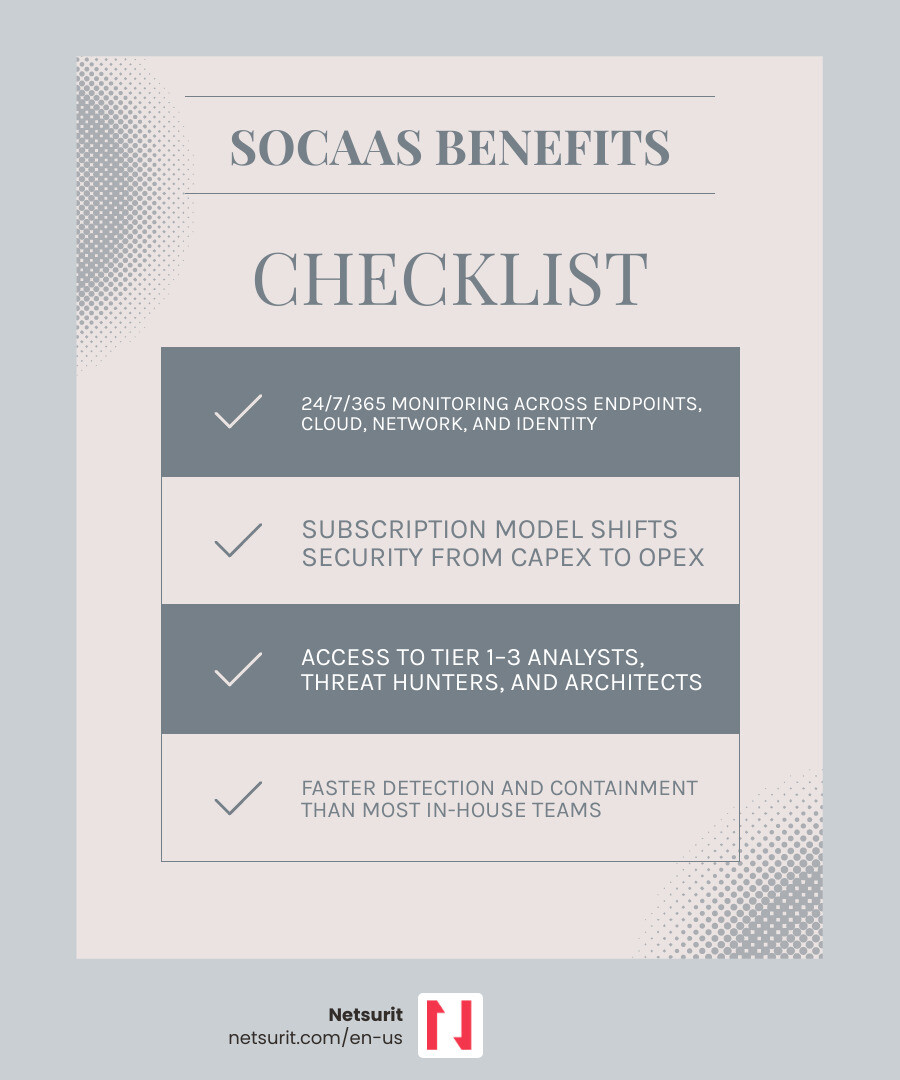
    Factor What SOCaaS Delivers
    Coverage 24/7/365 monitoring across endpoints, cloud, network, and identity
    Model Subscription-based; shifts security from capital expense to operational cost
    Team Access to Tier 1–3 analysts, threat hunters, and security architects
    Speed Faster detection and containment than most internal teams can achieve
    Fit Best for organizations without the budget or staff to build an in-house SOC

    Most businesses don’t suffer breaches because they lacked a firewall. They suffer breaches because no one was watching at 2:00 AM on a Sunday.

    Building a security operations center (SOC) in-house means hiring 6–12 specialists, investing months in setup, and then managing the very real problem of burnout — 71% of SOC analysts report feeling burned out on the job. The result is gaps in coverage, high turnover, and a security posture that looks strong on paper but struggles under real pressure.

    SOC as a service solves this directly. You get a dedicated security team, proven detection tooling, and continuous monitoring — without the hiring headaches or capital outlay of an internal build.

    That said, SOCaaS is not a silver bullet. It introduces trade-offs around data visibility, provider dependency, and customization that are worth understanding before you commit.

    I’m Orrin Klopper, CEO and co-founder of Netsurit, and over nearly 30 years of delivering managed IT and security services to businesses across the US, I’ve seen how the right SOC as a service model can transform an organization’s security posture — and where the wrong fit causes friction. Let’s break down exactly how it works.

    SOCaaS value proposition: 24/7 monitoring, expert team, subscription model, faster response - soc as a service infographic

    Defining SOC as a Service for Modern Threats

    Modern cyber threats do not observe business hours. While your team sleeps, automated bots and state-sponsored actors are scanning your perimeter for unpatched software or leaked credentials. SOC as a service functions as a cloud-delivered extension of your team, providing a high-fidelity “eye in the sky” that monitors your entire digital footprint 24/7/365.

    This model is built on a subscription framework, eliminating the need for heavy upfront investments in hardware or proprietary software licenses. Instead of buying a SIEM (Security Information and Event Management) platform and hoping you can find someone to run it, you subscribe to a finished outcome: a secure environment.

    The human element is perhaps the most critical component. According to research, 71% of SOC analysts feel burned out on the job, often due to “alert fatigue”—the relentless bombardment of low-priority notifications. By using an outsourced provider, you offload the “noise” to a team of remote experts who use sophisticated threat intelligence to distinguish between a routine system update and a genuine ransomware intrusion.

    Why Houston Accounting Firms Need SOC as a Service

    For accounting firms in the Houston metro area—from downtown high-rises to offices in Sugarland and Conroe—the stakes are uniquely high. You handle sensitive financial data, Social Security numbers, and corporate tax records that are prime targets for identity theft and wire fraud.

    During peak tax season (January through April), your staff is stretched thin, making them more susceptible to phishing attempts. Furthermore, firms must comply with IRS Publication 4557, which mandates the protection of taxpayer data. SOC as a service provides the continuous monitoring required to meet these federal standards without forcing a mid-sized CPA firm to hire a full-time cybersecurity department.

    The Financial Reality of SOCaaS vs. In-House Builds

    Building an internal SOC is a massive undertaking. Beyond the cost of the technology stack, you face a brutal talent market where 42% of organizations admit they lack the adequate skills for security operations.

    According to IDC’s analysis on security outsourcing, many organizations now prefer to outsource specific security functions to focus their internal personnel on strategic initiatives. This shifts security from a Capital Expenditure (CapEx)—buying servers and software—to an Operational Expenditure (OpEx), providing predictable monthly costs and immediate access to a mature security posture.

    Operational Mechanics: From Log Ingestion to Incident Response

    The “magic” of soc as a service lies in its workflow. It begins with log ingestion, where telemetry from your firewalls, cloud environments (like Microsoft 365 or Azure), and endpoints is streamed to the provider’s platform.

    To prevent analysts from drowning in data, providers use AI-driven noise reduction. For example, SentinelOne sets the standard with 100% detection and 88% fewer alerts than the median across vendors in MITRE evaluations. This ensures that when an analyst does call you, it is because of a high-severity event, not a false positive. Even federal entities recognize the efficiency of this model; the DOJ’s cybersecurity shared services catalog highlights how centralized monitoring enables rapid detection and investigation across vast networks.

    SOC Tiers and Responsibilities

    A professional SOC team is structured into specific roles to ensure no threat is missed:

    • Tier 1 Triage: The first line of defense. These analysts monitor the dashboard, validate alerts, and escalate suspicious activity.
    • Tier 2 Investigation: Deep-dive specialists who determine the scope of an attack and begin the containment process.
    • Tier 3 Threat Hunting: Proactive experts who search for hidden threats that haven’t triggered an alert yet.
    • Security Architect: The person who designs the integration between your tools and the SOC platform.
    • SOC Manager: Oversees operations and ensures all Service Level Agreements (SLAs) are met.

    Real-World Scenario: Containing a Breach in Katy, TX

    Imagine a boutique investment firm in Katy. At 2:00 AM on a Tuesday, an attacker uses a stolen identity token to access a partner’s Microsoft 365 account. Within minutes, the soc as a service platform detects the “impossible travel” (a login from an unusual geographic location) and suspicious PowerShell commands being executed.

    The Tier 1 analyst validates the threat and escalates it to Tier 2. By 2:15 AM, the SOC has automatically isolated the compromised laptop and locked the partner’s account, stopping the attacker before they could pivot to the firm’s client database. A full forensic report is on the partner’s desk by 8:00 AM, showing exactly what was blocked.

    Comparing SOCaaS with In-House SOC and MDR

    Choosing the right model requires understanding the nuances of visibility and response.

    Feature In-House SOC MDR (Managed Detection & Response) SOC as a Service
    Cost Extremely High (CapEx) Moderate (Subscription) Moderate (Subscription)
    Visibility Full Environment Primarily Endpoints Full Stack (Logs, Cloud, Network)
    Setup Time 6–18 Months Days to Weeks Weeks
    Tooling You Own/Manage Provider’s Proprietary Tools Often Tool-Agnostic

    While MDR is excellent for stopping malware on a laptop, soc as a service provides broader visibility. It looks at your firewall logs, your cloud audit trails, and your network traffic. This holistic view is often required by state policies, such as the California SAM 5335 monitoring policy, which emphasizes continuous security monitoring for all state entities—a standard many private firms now adopt as a best practice.

    Trade-offs of Outsourced Security

    Outsourcing your “nerve center” is a strategic decision that comes with specific considerations:

    • Works best when: You have a cloud-heavy workload (Azure/AWS), a hybrid workforce, and need to satisfy compliance audits quickly.
    • Avoid when: You have highly sensitive data that is legally prohibited from leaving a physical, air-gapped on-premise server.
    • Risks: You are dependent on the provider’s uptime. If their platform goes down, your visibility may be limited. There is also the risk of “black box” logic, where you don’t know why an alert was suppressed.
    • Mitigations: Only partner with providers who offer transparent playbooks and real-time dashboard access. Demand regular SLA audits to ensure they are meeting response time targets (e.g., 15 minutes for high-severity alerts).

    The Business Case for Houston Tax and Accounting Firms

    For a Houston firm, soc as a service is more than just a security tool; it’s a growth enabler. When you can prove to a high-net-worth client or a corporate partner that you have 24/7 proactive monitoring, you differentiate your firm from competitors who are still relying on basic antivirus.

    This level of protection helps satisfy stringent requirements like the Gramm-Leach-Bliley Act (GLBA) and HIPAA if you handle medical-related accounting. By leveraging managed SOC services, you ensure that a single security incident doesn’t result in a reputation-destroying data breach. We focus on crushing downtime so you can focus on your clients’ financial success.

    Selecting and Onboarding Your Partner

    The process of narrowing your vendor focus should start with an audit of your current “tech stack.” Does the provider integrate with your existing firewall? Can they ingest logs from your specific line-of-business applications?

    What to watch next: As we move toward 2026, look for providers who are moving beyond simple detection into autonomous response. This means using AI to not only flag a threat but to actively “heal” the system by reversing unauthorized changes in seconds.

    During onboarding, expect a “tuning” phase. For the first 30 days, the SOC team will learn your network’s “normal” behavior to reduce false positives. Clear communication channels—usually a mix of a client portal, email, and emergency phone lines—must be established on day one.

    Frequently Asked Questions about SOCaaS

    How much does SOCaaS typically cost?

    While we don’t list specific prices, costs generally scale based on the number of endpoints (laptops/servers), the volume of data (logs) ingested daily, and the level of response you require. It is significantly more affordable than the $500k+ annual budget required to run a basic 24/7 in-house SOC.

    Does SOCaaS replace my existing IT team?

    No. Think of it as a partnership. Your IT team handles day-to-day operations, user support, and strategy. The SOC team handles the “eyes-on-glass” monitoring and emergency threat containment. They provide the data your IT team needs to make better infrastructure decisions.

    How long does the onboarding process take?

    Most organizations can be integrated and “active” within two to four weeks. This includes deploying sensors, configuring log forwarding, and establishing the escalation playbooks.

    Conclusion

    When threats never sleep, your security shouldn’t either. For businesses in Houston, Sugarland, and Katy, soc as a service offers a shortcut to enterprise-grade security maturity without the enterprise-grade price tag.

    At Netsurit, we act as an elite tech partner to help you secure your business and unlock momentum. By combining proactive defense with 24/7 vigilance, we help you crush downtime and stay focused on your aspirations. Reach out to our team today to see how we can protect your firm’s future.

  • The Security Guard That Never Sleeps: SOC as a Service Explained

    The Security Guard That Never Sleeps: SOC as a Service Explained

    What Is SOC as a Service — and Why It Matters for Your Business

    SOC as a service is an outsourced security model where a third-party provider runs 24/7 threat monitoring, detection, and incident response across your endpoints, networks, cloud, and identity systems — delivered via subscription, with no on-premises infrastructure required.

    If you’re evaluating whether to outsource your security operations, here’s what you need to know upfront:

    Factor What SOCaaS Delivers
    Coverage 24/7/365 monitoring across endpoints, cloud, network, and identity
    Model Subscription-based; shifts security from capital expense to operational cost
    Team Access to Tier 1–3 analysts, threat hunters, and security architects
    Speed Faster detection and containment than most internal teams can achieve
    Fit Best for organizations without the budget or staff to build an in-house SOC

    Most businesses don’t suffer breaches because they lacked a firewall. They suffer breaches because no one was watching at 2:00 AM on a Sunday.

    Building a security operations center (SOC) in-house means hiring 6–12 specialists, investing months in setup, and then managing the very real problem of burnout — 71% of SOC analysts report feeling burned out on the job. The result is gaps in coverage, high turnover, and a security posture that looks strong on paper but struggles under real pressure.

    SOC as a service solves this directly. You get a dedicated security team, proven detection tooling, and continuous monitoring — without the hiring headaches or capital outlay of an internal build.

    That said, SOCaaS is not a silver bullet. It introduces trade-offs around data visibility, provider dependency, and customization that are worth understanding before you commit.

    I’m Orrin Klopper, CEO and co-founder of Netsurit, and over nearly 30 years of delivering managed IT and security services to businesses across the US, I’ve seen how the right SOC as a service model can transform an organization’s security posture — and where the wrong fit causes friction. Let’s break down exactly how it works.

    SOCaaS value proposition: 24/7 monitoring, expert team, subscription model, faster response - soc as a service infographic

    Defining SOC as a Service for Modern Threats

    Modern cyber threats do not observe business hours. While your team sleeps, automated bots and state-sponsored actors are scanning your perimeter for unpatched software or leaked credentials. SOC as a service functions as a cloud-delivered extension of your team, providing a high-fidelity “eye in the sky” that monitors your entire digital footprint 24/7/365.

    This model is built on a subscription framework, eliminating the need for heavy upfront investments in hardware or proprietary software licenses. Instead of buying a SIEM (Security Information and Event Management) platform and hoping you can find someone to run it, you subscribe to a finished outcome: a secure environment.

    The human element is perhaps the most critical component. According to research, 71% of SOC analysts feel burned out on the job, often due to “alert fatigue”—the relentless bombardment of low-priority notifications. By using an outsourced provider, you offload the “noise” to a team of remote experts who use sophisticated threat intelligence to distinguish between a routine system update and a genuine ransomware intrusion.

    Why Houston Accounting Firms Need SOC as a Service

    For accounting firms in the Houston metro area—from downtown high-rises to offices in Sugarland and Conroe—the stakes are uniquely high. You handle sensitive financial data, Social Security numbers, and corporate tax records that are prime targets for identity theft and wire fraud.

    During peak tax season (January through April), your staff is stretched thin, making them more susceptible to phishing attempts. Furthermore, firms must comply with IRS Publication 4557, which mandates the protection of taxpayer data. SOC as a service provides the continuous monitoring required to meet these federal standards without forcing a mid-sized CPA firm to hire a full-time cybersecurity department.

    The Financial Reality of SOCaaS vs. In-House Builds

    Building an internal SOC is a massive undertaking. Beyond the cost of the technology stack, you face a brutal talent market where 42% of organizations admit they lack the adequate skills for security operations.

    According to IDC’s analysis on security outsourcing, many organizations now prefer to outsource specific security functions to focus their internal personnel on strategic initiatives. This shifts security from a Capital Expenditure (CapEx)—buying servers and software—to an Operational Expenditure (OpEx), providing predictable monthly costs and immediate access to a mature security posture.

    Operational Mechanics: From Log Ingestion to Incident Response

    The “magic” of soc as a service lies in its workflow. It begins with log ingestion, where telemetry from your firewalls, cloud environments (like Microsoft 365 or Azure), and endpoints is streamed to the provider’s platform.

    To prevent analysts from drowning in data, providers use AI-driven noise reduction. For example, SentinelOne sets the standard with 100% detection and 88% fewer alerts than the median across vendors in MITRE evaluations. This ensures that when an analyst does call you, it is because of a high-severity event, not a false positive. Even federal entities recognize the efficiency of this model; the DOJ’s cybersecurity shared services catalog highlights how centralized monitoring enables rapid detection and investigation across vast networks.

    SOC Tiers and Responsibilities

    A professional SOC team is structured into specific roles to ensure no threat is missed:

    • Tier 1 Triage: The first line of defense. These analysts monitor the dashboard, validate alerts, and escalate suspicious activity.
    • Tier 2 Investigation: Deep-dive specialists who determine the scope of an attack and begin the containment process.
    • Tier 3 Threat Hunting: Proactive experts who search for hidden threats that haven’t triggered an alert yet.
    • Security Architect: The person who designs the integration between your tools and the SOC platform.
    • SOC Manager: Oversees operations and ensures all Service Level Agreements (SLAs) are met.

    Real-World Scenario: Containing a Breach in Katy, TX

    Imagine a boutique investment firm in Katy. At 2:00 AM on a Tuesday, an attacker uses a stolen identity token to access a partner’s Microsoft 365 account. Within minutes, the soc as a service platform detects the “impossible travel” (a login from an unusual geographic location) and suspicious PowerShell commands being executed.

    The Tier 1 analyst validates the threat and escalates it to Tier 2. By 2:15 AM, the SOC has automatically isolated the compromised laptop and locked the partner’s account, stopping the attacker before they could pivot to the firm’s client database. A full forensic report is on the partner’s desk by 8:00 AM, showing exactly what was blocked.

    Comparing SOCaaS with In-House SOC and MDR

    Choosing the right model requires understanding the nuances of visibility and response.

    Feature In-House SOC MDR (Managed Detection & Response) SOC as a Service
    Cost Extremely High (CapEx) Moderate (Subscription) Moderate (Subscription)
    Visibility Full Environment Primarily Endpoints Full Stack (Logs, Cloud, Network)
    Setup Time 6–18 Months Days to Weeks Weeks
    Tooling You Own/Manage Provider’s Proprietary Tools Often Tool-Agnostic

    While MDR is excellent for stopping malware on a laptop, soc as a service provides broader visibility. It looks at your firewall logs, your cloud audit trails, and your network traffic. This holistic view is often required by state policies, such as the California SAM 5335 monitoring policy, which emphasizes continuous security monitoring for all state entities—a standard many private firms now adopt as a best practice.

    Trade-offs of Outsourced Security

    Outsourcing your “nerve center” is a strategic decision that comes with specific considerations:

    • Works best when: You have a cloud-heavy workload (Azure/AWS), a hybrid workforce, and need to satisfy compliance audits quickly.
    • Avoid when: You have highly sensitive data that is legally prohibited from leaving a physical, air-gapped on-premise server.
    • Risks: You are dependent on the provider’s uptime. If their platform goes down, your visibility may be limited. There is also the risk of “black box” logic, where you don’t know why an alert was suppressed.
    • Mitigations: Only partner with providers who offer transparent playbooks and real-time dashboard access. Demand regular SLA audits to ensure they are meeting response time targets (e.g., 15 minutes for high-severity alerts).

    The Business Case for Houston Tax and Accounting Firms

    For a Houston firm, soc as a service is more than just a security tool; it’s a growth enabler. When you can prove to a high-net-worth client or a corporate partner that you have 24/7 proactive monitoring, you differentiate your firm from competitors who are still relying on basic antivirus.

    This level of protection helps satisfy stringent requirements like the Gramm-Leach-Bliley Act (GLBA) and HIPAA if you handle medical-related accounting. By leveraging managed SOC services, you ensure that a single security incident doesn’t result in a reputation-destroying data breach. We focus on crushing downtime so you can focus on your clients’ financial success.

    Selecting and Onboarding Your Partner

    The process of narrowing your vendor focus should start with an audit of your current “tech stack.” Does the provider integrate with your existing firewall? Can they ingest logs from your specific line-of-business applications?

    What to watch next: As we move toward 2026, look for providers who are moving beyond simple detection into autonomous response. This means using AI to not only flag a threat but to actively “heal” the system by reversing unauthorized changes in seconds.

    During onboarding, expect a “tuning” phase. For the first 30 days, the SOC team will learn your network’s “normal” behavior to reduce false positives. Clear communication channels—usually a mix of a client portal, email, and emergency phone lines—must be established on day one.

    Frequently Asked Questions about SOCaaS

    How much does SOCaaS typically cost?

    While we don’t list specific prices, costs generally scale based on the number of endpoints (laptops/servers), the volume of data (logs) ingested daily, and the level of response you require. It is significantly more affordable than the $500k+ annual budget required to run a basic 24/7 in-house SOC.

    Does SOCaaS replace my existing IT team?

    No. Think of it as a partnership. Your IT team handles day-to-day operations, user support, and strategy. The SOC team handles the “eyes-on-glass” monitoring and emergency threat containment. They provide the data your IT team needs to make better infrastructure decisions.

    How long does the onboarding process take?

    Most organizations can be integrated and “active” within two to four weeks. This includes deploying sensors, configuring log forwarding, and establishing the escalation playbooks.

    Conclusion

    When threats never sleep, your security shouldn’t either. For businesses in Houston, Sugarland, and Katy, soc as a service offers a shortcut to enterprise-grade security maturity without the enterprise-grade price tag.

    At Netsurit, we act as an elite tech partner to help you secure your business and unlock momentum. By combining proactive defense with 24/7 vigilance, we help you crush downtime and stay focused on your aspirations. Reach out to our team today to see how we can protect your firm’s future.

  • Cash Flow Crystal Ball: AI-Driven Forecasting for Treasury

    Cash Flow Crystal Ball: AI-Driven Forecasting for Treasury

    Why AI in Treasury Management Is Now a Business Necessity

    AI in treasury management transforms how finance teams forecast cash flow, prevent fraud, and manage liquidity risk — moving them from reactive spreadsheet work to real-time, predictive decision-making.

    Here is what AI delivers for treasury operations today:

    Capability What It Does Measurable Impact
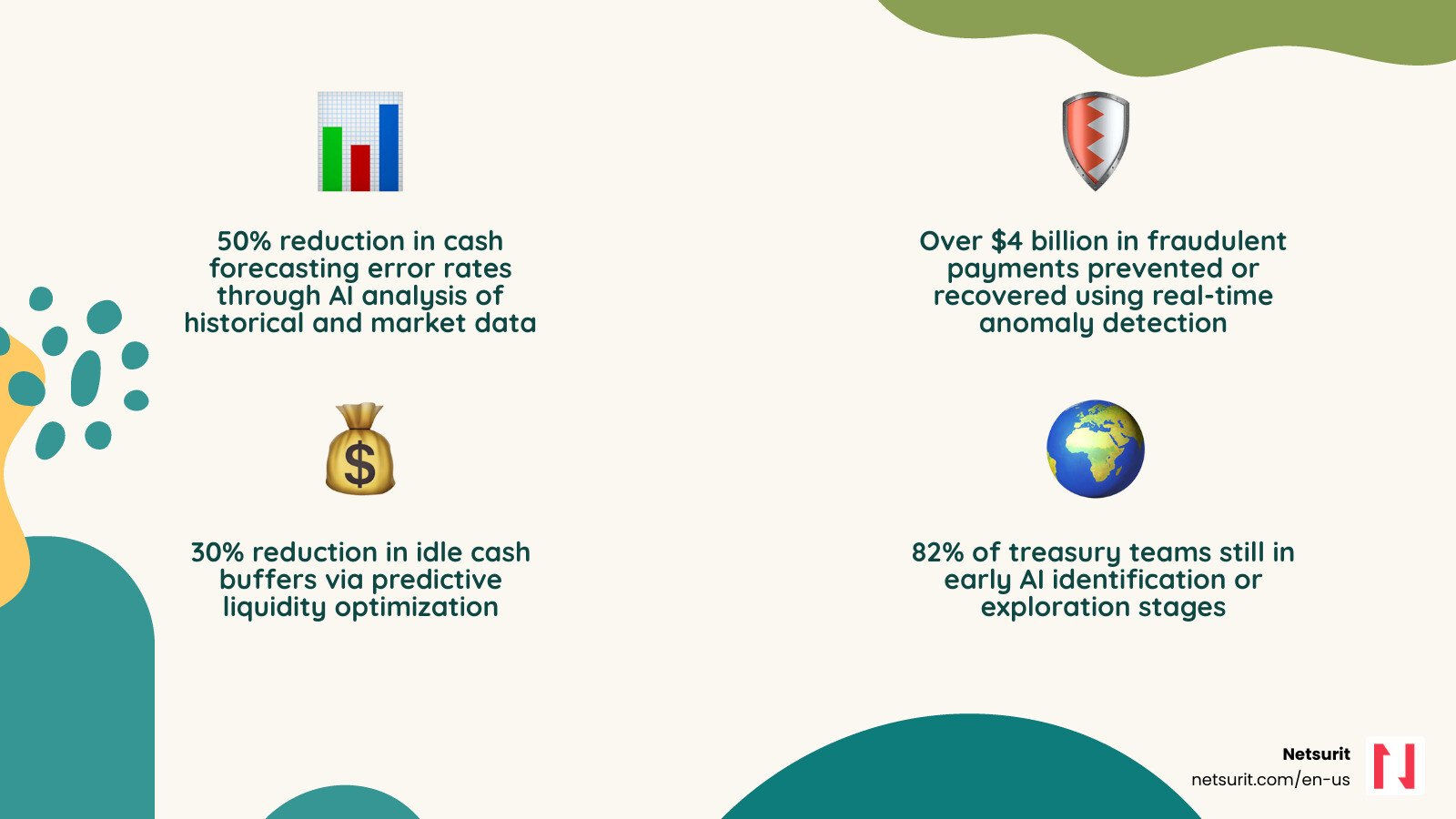
    Cash flow forecasting Analyzes historical payments, seasonal patterns, and market data Up to 50% reduction in forecasting error rates
    Fraud prevention Flags suspicious transactions and checks in real time Over $4 billion in fraudulent payments prevented or recovered in fiscal 2024
    Liquidity planning Predicts cash buffer needs and optimizes deployment 30% reduction in idle cash buffers
    FX risk management Simulates currency exposure scenarios automatically Faster, more informed hedging decisions
    Sanctions screening Digitizes signatory data via OCR for real-time compliance Reduced manual processing and compliance risk

    Traditional treasury relies on lagging data, manual spreadsheets, and fragmented systems. That combination leaves firms exposed — to fraud, to cash shortfalls, and to costly hedging mistakes — especially in volatile markets.

    The core problem is not a lack of data. It is that the data arrives too late, in the wrong format, from too many disconnected sources.

    Despite AI’s clear potential, adoption is still early. 82% of corporate treasury teams are only in the identification or exploration stage, and just 5% have scaled AI to full production. That gap represents both a risk for laggards and a real competitive opening for firms that move now.

    This guide explains how AI works in treasury, which tools lead the market, what barriers to expect, and how to implement AI in a phased, practical way — without replacing the human judgment that treasury still requires.

    I’m Orrin Klopper, CEO and co-founder of Netsurit, and over 30 years of leading IT and digital transformation initiatives for hundreds of organizations, I have seen how the right technology foundation — including AI in treasury management — separates firms that scale from those that stall. That experience shapes every recommendation in this guide.

    Infographic showing the shift from traditional manual treasury management (fragmented spreadsheets, lagging data, reactive decisions, high error rates) to AI-driven treasury management (real-time cash visibility, predictive liquidity forecasting, automated fraud detection, 50% fewer forecasting errors, 30% lower cash buffers), with a horizontal timeline arrow and four labeled outcome pillars: Accuracy, Speed, Security, and Strategic Insight - AI in treasury management infographic 4_facts_emoji_nature

    Relevant articles related to AI in treasury management:

    • AI-powered financial analysis
    • AI for financial planning
    • Automate accounts payable

    Moving Beyond Excel: How AI in Treasury Management Predicts Liquidity

    Neural network overlaying financial ledger data - AI in treasury management

    For decades, the “gold standard” for treasury has been a complex web of Excel workbooks. While functional, these models are inherently backward-looking. They rely on what happened last month to guess what might happen next week. AI in treasury management flips this script by using predictive analytics to provide real-time liquidity visibility.

    Traditional methods often fail because they cannot account for the sheer volume of unstructured data—news feeds, social media sentiment, or sudden supply chain shifts. AI thrives here. It integrates data from ERP systems, CRM platforms, and market feeds to create a living, breathing model of your firm’s financial health. By reducing manual data entry in accounting, teams can stop chasing numbers and start analyzing them.

    Transforming Cash Flow with AI in Treasury Management

    The most immediate win for any treasury team is the precision gain in cash flow forecasting. Statistical modeling and machine learning (ML) allow systems to recognize subtle patterns that a human eye—or a standard Excel formula—would miss.

    Research shows that AI-powered forecasting models can reduce error rates by up to 50% compared to traditional methods. These models use neural networks and Long Short-Term Memory (LSTM) networks to analyze time-series data. Instead of a flat projection, you get a dynamic curve that adjusts as new invoices are issued or market conditions shift. You can explore these concepts further in our AI in Finance Webinar.

    Scenario Analysis and Stress Testing

    Volatility is the only constant in modern finance. Whether it is a sudden currency devaluation or a supply chain disruption, treasurers need to know “what if” in seconds, not days. AI enhances Monte Carlo simulations by generating thousands of potential scenarios based on historical data and current market volatility.

    This capability is particularly vital for integrating Environmental, Social, and Governance (ESG) factors into liquidity planning. If a major supplier faces a climate-related disruption, AI can simulate the impact on your cash position immediately. It’s about moving from a “best guess” to a ready-to-work smarter posture.

    Example: A tax firm in Sugarland, TX, managing high-volume seasonal inflows, uses AI to predict the exact date cash buffers can be moved into high-yield short-term investments, rather than leaving them idle in low-interest accounts. This precision allows them to capture an extra 15–20 basis points of yield that would otherwise be lost to “safety” buffers.

    Trade-offs for AI Forecasting Details
    Works best when Historical data is clean, tagged, and spans at least 24 months.
    Avoid when The firm is undergoing a major merger or structural change that renders historical patterns irrelevant.
    Risks “Black box” models that provide results without explainable logic.
    Mitigations Run parallel Excel models for 90 days to validate AI outputs before full transition.

    Leading AI-Powered Systems and Real-World Impact

    Choosing the right Treasury Management System (TMS) is no longer just about bank connectivity; it is about the “intelligence” baked into the platform. Several leaders have emerged, each offering unique AI capabilities.

    Platform Standout AI Feature Core Benefit
    GTreasury GSmart AI Learning forecasts and intelligent orchestration across $12.5T in volume.
    Kyriba OPR Index Quantifies CFO confidence through Optimism, Preparedness, and Risk pillars.
    FIS Neural Treasury Cloud-native suite with “Treasury GPT” for guided decision support.

    The impact of these systems is not theoretical. For instance, the global giant Bosch utilized AI for predictive liquidity planning and successfully reduced its cash buffer by 30%. This freed up millions in capital for strategic reinvestment. Similarly, Navigating the AI Wave reveals that AI is shifting treasury from a back-office cost center to a strategic innovation hub.

    Fraud Prevention and Risk Management

    Fraud is becoming more sophisticated, but AI is fighting back. The U.S. Department of the Treasury prevented and recovered over $4 billion in fraudulent and improper payments in fiscal 2024 alone by using machine learning to detect check fraud.

    AI uses anomaly detection and behavioral analytics to flag transactions that deviate from established patterns. By employing Optical Character Recognition (OCR) to digitize signatory data, banks and firms can perform real-time sanctions screening and payment security checks. This is a classic case of AI to the rescue, fixing business problems before they hit the bottom line.

    Optimizing Liquidity with Intelligent TMS

    Beyond fraud, AI streamlines the unglamorous parts of treasury: bank statement processing and automated reconciliation. Modern TMS providers use AI to recognize and categorize transactions automatically, even when the data is messy.

    By automating these “quick fix” tasks, firms achieve up to 30% cost savings. However, as discussed in our BDO Webinar, the goal isn’t just a fast patch; it’s a fundamental shift in how the accounting and treasury functions interact.

    Example: An accounting practice in Katy, TX, implemented AI-driven anomaly detection to flag duplicate vendor payments across multiple client accounts, reducing manual audit time by 15 hours per week. This allowed their senior staff to focus on high-level tax strategy rather than clerical errors.

    Overcoming Barriers to AI Adoption in Treasury

    If AI is so effective, why are only 5% of firms optimizing it? The barriers are usually internal rather than technical. 59% of treasury professionals cite limited resources as the top hurdle, followed closely by data quality issues.

    Data Governance and Quality Control

    AI is only as good as the data you feed it. If your historical cash flows are mislabeled—for example, marking an M&A outflow as “payroll”—the AI will predict a massive payroll spike every year.

    To scale safely, firms must implement strict data governance. This includes:

    • Sensitivity Labels: Classifying data (Public, Internal, Confidential) so AI assistants don’t expose sensitive info.
    • Content Lifecycles: Proactively archiving old data so it doesn’t skew current models.
    • Least Privilege Access: Ensuring the AI only accesses the specific ledgers it needs for a task.

    Effective automation for accounting firms requires centralizing these data silos first.

    The Skills Gap and Mindset Shift

    The role of the treasurer is changing. Instead of being an Excel wizard, the modern professional needs to be an “AI Co-pilot.” This requires a shift toward an “AI-first” mindset and new skills like prompt engineering—the ability to ask AI the right questions to get precise financial insights.

    Example: A mid-sized firm in Conroe, TX, found that AI adoption stalled not because of the software, but because their data was siloed in three different legacy ERPs. They had to centralize their data architecture before the AI could provide a reliable “single version of truth.” Without that foundation, the AI’s forecasts were consistently 20% off.

    A Phased Roadmap for Implementing AI in Treasury

    We recommend a four-stage framework to ensure AI delivers ROI without disrupting daily operations. You can find more on driving AI productivity here.

    1. Identification: Pinpoint repetitive, data-intensive tasks like daily cash positioning or bank reconciliation.
    2. Exploration: Run a low-risk pilot. Use AI to generate a “second opinion” on your current cash forecast.
    3. Transformation: Redesign your workflows. If AI handles the data pull, what should your team do with the extra 10 hours a week?
    4. Optimization: Scale the solution and integrate Agentic AI—systems that can proactively suggest FX hedges or move funds between accounts based on pre-set rules.

    The Role of Generative AI in Treasury Management

    Generative AI, like “Treasury GPT” or Copilot for Business Central, allows you to query your financial data using natural language. Instead of building a report, you simply ask, “What is our net interest expense this month compared to our forecast?” and get an answer in seconds. This provides a layer of decision support that was previously impossible without a dedicated data science team.

    Scaling from Pilot to Production

    As you move into production, focus on building feedback loops. AI models need to be validated and refined continuously. This is where “Agentic AI” comes in—moving from a tool that answers questions to a partner that collaborates on strategic execution across the enterprise.

    Frequently Asked Questions about AI in Treasury

    How does AI improve cash forecasting accuracy?

    AI models like LSTM networks analyze thousands of variables simultaneously—including seasonal trends, market volatility, and historical payment behavior—to reduce forecasting error rates by up to 50% compared to manual methods. Unlike linear Excel models, AI can spot non-linear correlations between external market events and internal cash flows.

    Is AI going to replace treasury professionals?

    No. AI acts as a “co-pilot” that automates repetitive data entry and reconciliation, allowing treasurers to shift from “firefighting” to strategic activities like FX hedging and capital allocation. The goal is to augment human intelligence, not replace the nuanced judgment required for high-stakes financial decisions.

    What are the biggest risks of using AI in treasury?

    The primary risks include data privacy breaches, “hallucinations” in generative models (where the AI provides a confident but incorrect answer), and a lack of explainability in complex algorithms. These are mitigated through robust data governance, keeping a “human-in-the-loop” for final approvals, and running parallel models during the initial rollout.

    Conclusion

    AI is no longer a futuristic concept but a necessary operating system for modern treasury departments to maintain liquidity and prevent fraud in an increasingly volatile market. By following a phased implementation roadmap and prioritizing data quality, firms can turn their treasury function into a competitive advantage.

    Netsurit provides the specialized AI solutions and cybersecurity guardrails necessary for financial teams to scale these technologies safely and effectively. Whether you are in Houston, Katy, or Sugarland, we are here to help you navigate this transition.

    Unlock your momentum with Netsurit’s Digital Transformation for Accounting

  • Cash Flow Crystal Ball: AI-Driven Forecasting for Treasury

    Cash Flow Crystal Ball: AI-Driven Forecasting for Treasury

    Why AI in Treasury Management Is Now a Business Necessity

    AI in treasury management transforms how finance teams forecast cash flow, prevent fraud, and manage liquidity risk — moving them from reactive spreadsheet work to real-time, predictive decision-making.

    Here is what AI delivers for treasury operations today:

    Capability What It Does Measurable Impact
    Cash flow forecasting Analyzes historical payments, seasonal patterns, and market data Up to 50% reduction in forecasting error rates
    Fraud prevention Flags suspicious transactions and checks in real time Over $4 billion in fraudulent payments prevented or recovered in fiscal 2024
    Liquidity planning Predicts cash buffer needs and optimizes deployment 30% reduction in idle cash buffers
    FX risk management Simulates currency exposure scenarios automatically Faster, more informed hedging decisions
    Sanctions screening Digitizes signatory data via OCR for real-time compliance Reduced manual processing and compliance risk

    Traditional treasury relies on lagging data, manual spreadsheets, and fragmented systems. That combination leaves firms exposed — to fraud, to cash shortfalls, and to costly hedging mistakes — especially in volatile markets.

    The core problem is not a lack of data. It is that the data arrives too late, in the wrong format, from too many disconnected sources.

    Despite AI’s clear potential, adoption is still early. 82% of corporate treasury teams are only in the identification or exploration stage, and just 5% have scaled AI to full production. That gap represents both a risk for laggards and a real competitive opening for firms that move now.

    This guide explains how AI works in treasury, which tools lead the market, what barriers to expect, and how to implement AI in a phased, practical way — without replacing the human judgment that treasury still requires.

    I’m Orrin Klopper, CEO and co-founder of Netsurit, and over 30 years of leading IT and digital transformation initiatives for hundreds of organizations, I have seen how the right technology foundation — including AI in treasury management — separates firms that scale from those that stall. That experience shapes every recommendation in this guide.

    Infographic showing the shift from traditional manual treasury management (fragmented spreadsheets, lagging data, reactive decisions, high error rates) to AI-driven treasury management (real-time cash visibility, predictive liquidity forecasting, automated fraud detection, 50% fewer forecasting errors, 30% lower cash buffers), with a horizontal timeline arrow and four labeled outcome pillars: Accuracy, Speed, Security, and Strategic Insight - AI in treasury management infographic 4_facts_emoji_nature

    Relevant articles related to AI in treasury management:

    • AI-powered financial analysis
    • AI for financial planning
    • Automate accounts payable

    Moving Beyond Excel: How AI in Treasury Management Predicts Liquidity

    Neural network overlaying financial ledger data - AI in treasury management

    For decades, the “gold standard” for treasury has been a complex web of Excel workbooks. While functional, these models are inherently backward-looking. They rely on what happened last month to guess what might happen next week. AI in treasury management flips this script by using predictive analytics to provide real-time liquidity visibility.

    Traditional methods often fail because they cannot account for the sheer volume of unstructured data—news feeds, social media sentiment, or sudden supply chain shifts. AI thrives here. It integrates data from ERP systems, CRM platforms, and market feeds to create a living, breathing model of your firm’s financial health. By reducing manual data entry in accounting, teams can stop chasing numbers and start analyzing them.

    Transforming Cash Flow with AI in Treasury Management

    The most immediate win for any treasury team is the precision gain in cash flow forecasting. Statistical modeling and machine learning (ML) allow systems to recognize subtle patterns that a human eye—or a standard Excel formula—would miss.

    Research shows that AI-powered forecasting models can reduce error rates by up to 50% compared to traditional methods. These models use neural networks and Long Short-Term Memory (LSTM) networks to analyze time-series data. Instead of a flat projection, you get a dynamic curve that adjusts as new invoices are issued or market conditions shift. You can explore these concepts further in our AI in Finance Webinar.

    Scenario Analysis and Stress Testing

    Volatility is the only constant in modern finance. Whether it is a sudden currency devaluation or a supply chain disruption, treasurers need to know “what if” in seconds, not days. AI enhances Monte Carlo simulations by generating thousands of potential scenarios based on historical data and current market volatility.

    This capability is particularly vital for integrating Environmental, Social, and Governance (ESG) factors into liquidity planning. If a major supplier faces a climate-related disruption, AI can simulate the impact on your cash position immediately. It’s about moving from a “best guess” to a ready-to-work smarter posture.

    Example: A tax firm in Sugarland, TX, managing high-volume seasonal inflows, uses AI to predict the exact date cash buffers can be moved into high-yield short-term investments, rather than leaving them idle in low-interest accounts. This precision allows them to capture an extra 15–20 basis points of yield that would otherwise be lost to “safety” buffers.

    Trade-offs for AI Forecasting Details
    Works best when Historical data is clean, tagged, and spans at least 24 months.
    Avoid when The firm is undergoing a major merger or structural change that renders historical patterns irrelevant.
    Risks “Black box” models that provide results without explainable logic.
    Mitigations Run parallel Excel models for 90 days to validate AI outputs before full transition.

    Leading AI-Powered Systems and Real-World Impact

    Choosing the right Treasury Management System (TMS) is no longer just about bank connectivity; it is about the “intelligence” baked into the platform. Several leaders have emerged, each offering unique AI capabilities.

    Platform Standout AI Feature Core Benefit
    GTreasury GSmart AI Learning forecasts and intelligent orchestration across $12.5T in volume.
    Kyriba OPR Index Quantifies CFO confidence through Optimism, Preparedness, and Risk pillars.
    FIS Neural Treasury Cloud-native suite with “Treasury GPT” for guided decision support.

    The impact of these systems is not theoretical. For instance, the global giant Bosch utilized AI for predictive liquidity planning and successfully reduced its cash buffer by 30%. This freed up millions in capital for strategic reinvestment. Similarly, Navigating the AI Wave reveals that AI is shifting treasury from a back-office cost center to a strategic innovation hub.

    Fraud Prevention and Risk Management

    Fraud is becoming more sophisticated, but AI is fighting back. The U.S. Department of the Treasury prevented and recovered over $4 billion in fraudulent and improper payments in fiscal 2024 alone by using machine learning to detect check fraud.

    AI uses anomaly detection and behavioral analytics to flag transactions that deviate from established patterns. By employing Optical Character Recognition (OCR) to digitize signatory data, banks and firms can perform real-time sanctions screening and payment security checks. This is a classic case of AI to the rescue, fixing business problems before they hit the bottom line.

    Optimizing Liquidity with Intelligent TMS

    Beyond fraud, AI streamlines the unglamorous parts of treasury: bank statement processing and automated reconciliation. Modern TMS providers use AI to recognize and categorize transactions automatically, even when the data is messy.

    By automating these “quick fix” tasks, firms achieve up to 30% cost savings. However, as discussed in our BDO Webinar, the goal isn’t just a fast patch; it’s a fundamental shift in how the accounting and treasury functions interact.

    Example: An accounting practice in Katy, TX, implemented AI-driven anomaly detection to flag duplicate vendor payments across multiple client accounts, reducing manual audit time by 15 hours per week. This allowed their senior staff to focus on high-level tax strategy rather than clerical errors.

    Overcoming Barriers to AI Adoption in Treasury

    If AI is so effective, why are only 5% of firms optimizing it? The barriers are usually internal rather than technical. 59% of treasury professionals cite limited resources as the top hurdle, followed closely by data quality issues.

    Data Governance and Quality Control

    AI is only as good as the data you feed it. If your historical cash flows are mislabeled—for example, marking an M&A outflow as “payroll”—the AI will predict a massive payroll spike every year.

    To scale safely, firms must implement strict data governance. This includes:

    • Sensitivity Labels: Classifying data (Public, Internal, Confidential) so AI assistants don’t expose sensitive info.
    • Content Lifecycles: Proactively archiving old data so it doesn’t skew current models.
    • Least Privilege Access: Ensuring the AI only accesses the specific ledgers it needs for a task.

    Effective automation for accounting firms requires centralizing these data silos first.

    The Skills Gap and Mindset Shift

    The role of the treasurer is changing. Instead of being an Excel wizard, the modern professional needs to be an “AI Co-pilot.” This requires a shift toward an “AI-first” mindset and new skills like prompt engineering—the ability to ask AI the right questions to get precise financial insights.

    Example: A mid-sized firm in Conroe, TX, found that AI adoption stalled not because of the software, but because their data was siloed in three different legacy ERPs. They had to centralize their data architecture before the AI could provide a reliable “single version of truth.” Without that foundation, the AI’s forecasts were consistently 20% off.

    A Phased Roadmap for Implementing AI in Treasury

    We recommend a four-stage framework to ensure AI delivers ROI without disrupting daily operations. You can find more on driving AI productivity here.

    1. Identification: Pinpoint repetitive, data-intensive tasks like daily cash positioning or bank reconciliation.
    2. Exploration: Run a low-risk pilot. Use AI to generate a “second opinion” on your current cash forecast.
    3. Transformation: Redesign your workflows. If AI handles the data pull, what should your team do with the extra 10 hours a week?
    4. Optimization: Scale the solution and integrate Agentic AI—systems that can proactively suggest FX hedges or move funds between accounts based on pre-set rules.

    The Role of Generative AI in Treasury Management

    Generative AI, like “Treasury GPT” or Copilot for Business Central, allows you to query your financial data using natural language. Instead of building a report, you simply ask, “What is our net interest expense this month compared to our forecast?” and get an answer in seconds. This provides a layer of decision support that was previously impossible without a dedicated data science team.

    Scaling from Pilot to Production

    As you move into production, focus on building feedback loops. AI models need to be validated and refined continuously. This is where “Agentic AI” comes in—moving from a tool that answers questions to a partner that collaborates on strategic execution across the enterprise.

    Frequently Asked Questions about AI in Treasury

    How does AI improve cash forecasting accuracy?

    AI models like LSTM networks analyze thousands of variables simultaneously—including seasonal trends, market volatility, and historical payment behavior—to reduce forecasting error rates by up to 50% compared to manual methods. Unlike linear Excel models, AI can spot non-linear correlations between external market events and internal cash flows.

    Is AI going to replace treasury professionals?

    No. AI acts as a “co-pilot” that automates repetitive data entry and reconciliation, allowing treasurers to shift from “firefighting” to strategic activities like FX hedging and capital allocation. The goal is to augment human intelligence, not replace the nuanced judgment required for high-stakes financial decisions.

    What are the biggest risks of using AI in treasury?

    The primary risks include data privacy breaches, “hallucinations” in generative models (where the AI provides a confident but incorrect answer), and a lack of explainability in complex algorithms. These are mitigated through robust data governance, keeping a “human-in-the-loop” for final approvals, and running parallel models during the initial rollout.

    Conclusion

    AI is no longer a futuristic concept but a necessary operating system for modern treasury departments to maintain liquidity and prevent fraud in an increasingly volatile market. By following a phased implementation roadmap and prioritizing data quality, firms can turn their treasury function into a competitive advantage.
    Netsurit provides the specialized AI solutions and cybersecurity guardrails necessary for financial teams to scale these technologies safely and effectively. Whether you are in Houston, Katy, or Sugarland, we are here to help you navigate this transition.

    Unlock your momentum with Netsurit’s Digital Transformation for Accounting

  • The High-Flying Guide to Cloud Migration and Server Management

    The High-Flying Guide to Cloud Migration and Server Management

    Maximize Scalability with cloud migration services houston

    Scalability is the primary driver for Houston businesses moving to the cloud in 2025. Unlike traditional on-premises hardware, where you must purchase and rack physical servers to meet peak demand, the cloud offers resource elasticity. This means you can scale your computing power up during busy seasons and down during lulls, paying only for the capacity you actually use.

    For a Sugar Land tax firm, this elasticity is a financial lifesaver. During the frantic months leading up to April 15th, their server requirements might triple to handle tax preparation software and client portals. In May, those requirements drop. By utilizing cloud migration services houston providers offer, that firm avoids paying for idle hardware nine months out of the year. Beyond cost, the cloud provides ubiquitous access, allowing your team to work securely from a home office in Katy or a client’s site in Conroe without latency.

    The environmental impact is equally significant. Research indicates that migrating to the cloud creates more than a 20% improvement in your carbon footprint. This is due to higher server density and the sustainable practices, such as renewable energy, employed by major data centers. Furthermore, the Business Value of Cloud Modernization report highlights that 505 surveyed enterprises saw substantial gains in operational efficiency. One documented case saw a client optimize their cloud and disaster recovery plan, resulting in annual savings of more than $400,000.

    Trade-offs: Scalability vs. Cost Details
    Works best when You face seasonal demand spikes or rapid headcount growth.
    Avoid when You have legacy applications that require physical USB dongles or specialized local hardware.
    Risks Unmonitored “zombie” resources can lead to high egress fees and budget creep.
    Mitigations Set up automated cost monitoring alerts and cloud consulting to prune unused assets.

    Selecting Your Migration Pathway: From Lift-and-Shift to Re-architecting

    Not every application needs a total overhaul to live in the cloud. Choosing the right “R” (Re-host, Re-platform, or Re-architect) determines your project’s speed, cost, and long-term ROI. Many Houston firms start with a “Lift-and-Shift” (Re-hosting) to exit a failing data center quickly, then optimize later.

    Strategy Definition Best For
    Re-hosting (Lift-and-Shift) Moving applications as-is to the cloud. Rapid data center exits; low-complexity apps.
    Re-platforming Making minor adjustments to take advantage of cloud features. Moving databases to managed services like Azure SQL.
    Re-architecting Completely rewriting the app using cloud-native features. Maximum scalability; long-term cost efficiency.

    We often recommend Microsoft Azure services for Houston businesses already embedded in the Microsoft ecosystem. Transitioning to open-source technologies during migration can lead to a 70% reduction in licensing costs. For those willing to go further, adopting serverless architectures can result in a 39% reduction in IT spend because you stop paying for “always-on” virtual machines.

    Consider a Conroe-based manufacturing company with a legacy inventory system. A simple lift-and-shift gets them out of their dusty server closet in weeks. However, by eventually re-architecting that system into a cloud-native application, they can integrate real-time IoT data from the factory floor—something their old hardware could never handle.

    Trade-offs: Speed vs. Optimization Details
    Works best when You need a rapid exit from a physical data center due to a lease expiry or hardware failure.
    Avoid when The application code is undocumented or the original developers are no longer available.
    Risks “Lifting and shifting” technical debt can lead to higher monthly cloud bills than necessary.
    Mitigations Use a phased refactoring approach—migrate first, then optimize the most expensive workloads.

    Executing a Secure Project Step-by-Step

    A successful migration isn’t just a “file copy” to the cloud. It requires a rigorous, phased approach to ensure data integrity and security. The process begins with portfolio discovery and a migration readiness assessment (MRA). This identifies which workloads are ready for the move and which have dependencies that could cause a crash if moved in the wrong order.

    Security is the cornerstone of cloud migration services houston providers deliver. We implement layered security, including data encryption (both at rest and in transit) and identity management. For firms in regulated industries, maintaining HIPAA compliance or GDPR standards is non-negotiable. We’ve seen specialized migrations involving 12TB+ of MongoDB and Elasticsearch data moved to the cloud with a zero-downtime strategy, ensuring that the business remained operational throughout the entire transfer.

    A cloud security assessment is vital before the first byte moves. This ensures that your new environment isn’t just a copy of your old one, but a fortified version that meets 2025 security benchmarks.

    Trade-offs: Thoroughness vs. Timeline Details
    Works best when Data security and regulatory compliance are your highest priorities.
    Avoid when Internal stakeholders are not aligned on the project’s business goals.
    Risks Rushing the assessment phase can lead to data corruption or broken application links.
    Mitigations Perform rigorous validation testing in a sandbox environment before the final “cutover.”

    Minimizing Disruption with cloud migration services houston

    The biggest fear for a Katy accounting firm during tax season is downtime. To prevent this, we use phased rollouts and blue-green deployments. In a blue-green setup, we run two identical production environments. We migrate the data to the new “green” environment while the “blue” one stays live. Once we confirm the green environment is perfect, we flip the switch. If anything goes wrong, we flip it back instantly. This data replication strategy ensures your team never loses a minute of billable time.

    Post-Migration Support for cloud migration services houston

    The work doesn’t end on “Go-Live” day. Effective managed cloud services involve 24/7 monitoring and resource fine-tuning. Cloud environments are dynamic; what was efficient in month one might need adjustment by month six as your data grows. Looking ahead to 2026, we expect a massive surge in AI integration. By having your data in the cloud now, you’re positioning your business to use AI-driven analytics that can predict market trends or automate routine data entry.

    Overcoming Downtime and Cost Overruns

    Cloud migration projects typically take a minimum of two months, with complex, multi-site projects potentially taking several years. One of the most common pitfalls is “sticker shock” from unoptimized cloud spend. We’ve seen a FinTech startup reduce their monthly AWS spend by 30%—from approximately $44,000 down to $31,000—simply by right-sizing their instances and eliminating redundant storage.

    Choosing local Houston expertise over a faceless national firm offers a distinct advantage: we understand the local business climate and can provide on-site IT support Houston businesses need when physical hardware needs to be decommissioned. We take a vendor-agnostic approach, meaning we recommend the platform (Azure, AWS, or Google Cloud) that fits your specific needs, not the one that fits our sales quota.

    Trade-offs: DIY vs. Managed Migration Details
    Works best when Your internal IT team is overstretched or lacks specific cloud-native certifications.
    Avoid when Your budget is strictly fixed without any contingency for discovered technical debt.
    Risks Scope creep can extend timelines and inflate costs if the initial roadmap is vague.
    Mitigations Develop a detailed roadmap with clear milestones and “go/no-go” decision points.

    Frequently Asked Questions about Cloud Migration Services Houston

    How long does a typical Houston cloud migration take?

    The timeline varies based on the complexity of your data and the number of applications. A simple migration for a small office might take 2 to 3 months. For larger enterprises with legacy databases and hundreds of users, the process can span a year or more. The assessment phase alone usually takes 2 to 4 weeks.

    How do Houston providers ensure data security during the move?

    Security is handled through a combination of advanced encryption protocols and secure transfer tunnels. We also perform cloud-cybersecurity audits to ensure that identity and access management (IAM) roles are correctly configured, preventing unauthorized access during and after the move.

    Can cloud migration actually reduce my monthly IT spend?

    Yes, primarily by eliminating the need for capital-intensive hardware refreshes every 3 to 5 years. By moving to a pay-as-you-go model and utilizing cloud-hosting, many businesses see a 27% to 30% reduction in ongoing costs. Further savings come from reduced electricity bills and lower physical space requirements.

    Build Your Business Momentum in the Cloud

    Cloud migration is no longer a “someday” project; it is the foundation for business resilience in 2025 and beyond. By moving away from the limitations of physical hardware, Houston businesses can unlock the scalability, security, and cost-efficiency needed to compete in a global market. Whether you are looking to protect a Katy accounting firm from tax-season crashes or modernize a manufacturing plant in Conroe, the cloud provides the agility you need.

    At Netsurit, we act as your elite tech partner, helping you crush downtime and achieve your business aspirations through tailored managed IT services houston.

    Start your migration journey with a Netsurit cloud assessment today.

  • The High-Flying Guide to Cloud Migration and Server Management

    The High-Flying Guide to Cloud Migration and Server Management

    Maximize Scalability with cloud migration services houston

    Scalability is the primary driver for Houston businesses moving to the cloud in 2025. Unlike traditional on-premises hardware, where you must purchase and rack physical servers to meet peak demand, the cloud offers resource elasticity. This means you can scale your computing power up during busy seasons and down during lulls, paying only for the capacity you actually use.

    For a Sugar Land tax firm, this elasticity is a financial lifesaver. During the frantic months leading up to April 15th, their server requirements might triple to handle tax preparation software and client portals. In May, those requirements drop. By utilizing cloud migration services houston providers offer, that firm avoids paying for idle hardware nine months out of the year. Beyond cost, the cloud provides ubiquitous access, allowing your team to work securely from a home office in Katy or a client’s site in Conroe without latency.

    The environmental impact is equally significant. Research indicates that migrating to the cloud creates more than a 20% improvement in your carbon footprint. This is due to higher server density and the sustainable practices, such as renewable energy, employed by major data centers. Furthermore, the Business Value of Cloud Modernization report highlights that 505 surveyed enterprises saw substantial gains in operational efficiency. One documented case saw a client optimize their cloud and disaster recovery plan, resulting in annual savings of more than $400,000.

    Trade-offs: Scalability vs. Cost Details
    Works best when You face seasonal demand spikes or rapid headcount growth.
    Avoid when You have legacy applications that require physical USB dongles or specialized local hardware.
    Risks Unmonitored “zombie” resources can lead to high egress fees and budget creep.
    Mitigations Set up automated cost monitoring alerts and cloud consulting to prune unused assets.

    Selecting Your Migration Pathway: From Lift-and-Shift to Re-architecting

    Not every application needs a total overhaul to live in the cloud. Choosing the right “R” (Re-host, Re-platform, or Re-architect) determines your project’s speed, cost, and long-term ROI. Many Houston firms start with a “Lift-and-Shift” (Re-hosting) to exit a failing data center quickly, then optimize later.

    Strategy Definition Best For
    Re-hosting (Lift-and-Shift) Moving applications as-is to the cloud. Rapid data center exits; low-complexity apps.
    Re-platforming Making minor adjustments to take advantage of cloud features. Moving databases to managed services like Azure SQL.
    Re-architecting Completely rewriting the app using cloud-native features. Maximum scalability; long-term cost efficiency.

    We often recommend Microsoft Azure services for Houston businesses already embedded in the Microsoft ecosystem. Transitioning to open-source technologies during migration can lead to a 70% reduction in licensing costs. For those willing to go further, adopting serverless architectures can result in a 39% reduction in IT spend because you stop paying for “always-on” virtual machines.

    Consider a Conroe-based manufacturing company with a legacy inventory system. A simple lift-and-shift gets them out of their dusty server closet in weeks. However, by eventually re-architecting that system into a cloud-native application, they can integrate real-time IoT data from the factory floor—something their old hardware could never handle.

    Trade-offs: Speed vs. Optimization Details
    Works best when You need a rapid exit from a physical data center due to a lease expiry or hardware failure.
    Avoid when The application code is undocumented or the original developers are no longer available.
    Risks “Lifting and shifting” technical debt can lead to higher monthly cloud bills than necessary.
    Mitigations Use a phased refactoring approach—migrate first, then optimize the most expensive workloads.

    Executing a Secure Project Step-by-Step

    A successful migration isn’t just a “file copy” to the cloud. It requires a rigorous, phased approach to ensure data integrity and security. The process begins with portfolio discovery and a migration readiness assessment (MRA). This identifies which workloads are ready for the move and which have dependencies that could cause a crash if moved in the wrong order.

    Security is the cornerstone of cloud migration services houston providers deliver. We implement layered security, including data encryption (both at rest and in transit) and identity management. For firms in regulated industries, maintaining HIPAA compliance or GDPR standards is non-negotiable. We’ve seen specialized migrations involving 12TB+ of MongoDB and Elasticsearch data moved to the cloud with a zero-downtime strategy, ensuring that the business remained operational throughout the entire transfer.

    A cloud security assessment is vital before the first byte moves. This ensures that your new environment isn’t just a copy of your old one, but a fortified version that meets 2025 security benchmarks.

    Trade-offs: Thoroughness vs. Timeline Details
    Works best when Data security and regulatory compliance are your highest priorities.
    Avoid when Internal stakeholders are not aligned on the project’s business goals.
    Risks Rushing the assessment phase can lead to data corruption or broken application links.
    Mitigations Perform rigorous validation testing in a sandbox environment before the final “cutover.”

    Minimizing Disruption with cloud migration services houston

    The biggest fear for a Katy accounting firm during tax season is downtime. To prevent this, we use phased rollouts and blue-green deployments. In a blue-green setup, we run two identical production environments. We migrate the data to the new “green” environment while the “blue” one stays live. Once we confirm the green environment is perfect, we flip the switch. If anything goes wrong, we flip it back instantly. This data replication strategy ensures your team never loses a minute of billable time.

    Post-Migration Support for cloud migration services houston

    The work doesn’t end on “Go-Live” day. Effective managed cloud services involve 24/7 monitoring and resource fine-tuning. Cloud environments are dynamic; what was efficient in month one might need adjustment by month six as your data grows. Looking ahead to 2026, we expect a massive surge in AI integration. By having your data in the cloud now, you’re positioning your business to use AI-driven analytics that can predict market trends or automate routine data entry.

    Overcoming Downtime and Cost Overruns

    Cloud migration projects typically take a minimum of two months, with complex, multi-site projects potentially taking several years. One of the most common pitfalls is “sticker shock” from unoptimized cloud spend. We’ve seen a FinTech startup reduce their monthly AWS spend by 30%—from approximately $44,000 down to $31,000—simply by right-sizing their instances and eliminating redundant storage.

    Choosing local Houston expertise over a faceless national firm offers a distinct advantage: we understand the local business climate and can provide on-site IT support Houston businesses need when physical hardware needs to be decommissioned. We take a vendor-agnostic approach, meaning we recommend the platform (Azure, AWS, or Google Cloud) that fits your specific needs, not the one that fits our sales quota.

    Trade-offs: DIY vs. Managed Migration Details
    Works best when Your internal IT team is overstretched or lacks specific cloud-native certifications.
    Avoid when Your budget is strictly fixed without any contingency for discovered technical debt.
    Risks Scope creep can extend timelines and inflate costs if the initial roadmap is vague.
    Mitigations Develop a detailed roadmap with clear milestones and “go/no-go” decision points.

    Frequently Asked Questions about Cloud Migration Services Houston

    How long does a typical Houston cloud migration take?

    The timeline varies based on the complexity of your data and the number of applications. A simple migration for a small office might take 2 to 3 months. For larger enterprises with legacy databases and hundreds of users, the process can span a year or more. The assessment phase alone usually takes 2 to 4 weeks.

    How do Houston providers ensure data security during the move?

    Security is handled through a combination of advanced encryption protocols and secure transfer tunnels. We also perform cloud-cybersecurity audits to ensure that identity and access management (IAM) roles are correctly configured, preventing unauthorized access during and after the move.

    Can cloud migration actually reduce my monthly IT spend?

    Yes, primarily by eliminating the need for capital-intensive hardware refreshes every 3 to 5 years. By moving to a pay-as-you-go model and utilizing cloud-hosting, many businesses see a 27% to 30% reduction in ongoing costs. Further savings come from reduced electricity bills and lower physical space requirements.

    Build Your Business Momentum in the Cloud

    Cloud migration is no longer a “someday” project; it is the foundation for business resilience in 2025 and beyond. By moving away from the limitations of physical hardware, Houston businesses can unlock the scalability, security, and cost-efficiency needed to compete in a global market. Whether you are looking to protect a Katy accounting firm from tax-season crashes or modernize a manufacturing plant in Conroe, the cloud provides the agility you need.

    At Netsurit, we act as your elite tech partner, helping you crush downtime and achieve your business aspirations through tailored managed IT services houston.

    Start your migration journey with a Netsurit cloud assessment today.

  • The Lone Star Guide to AI Chatbot Development

    The Lone Star Guide to AI Chatbot Development

    Texas Businesses Are Automating Fast — Here’s How to Do It Right

    AI chatbot development Texas is one of the fastest-growing technology investments for businesses across Austin, Dallas, and Houston right now. If you need the short answer:

    How to develop an AI chatbot in Texas:

    1. Define your use case — customer support, lead capture, appointment scheduling, or internal helpdesk
    2. Choose your tech stack — NLP frameworks like Dialogflow or Rasa, or LLM-based agents using OpenAI models
    3. Select a Texas-based development partner — prioritize local expertise, CRM integration experience, and compliance knowledge (HIPAA, GDPR)
    4. Integrate with existing systems — Salesforce, SAP, or custom ERP platforms
    5. Deploy and train — most mid-market deployments go live within 4 to 6 weeks
    6. Monitor and iterate — track automation rates, customer satisfaction, and flag shadow AI risks

    Texas businesses are facing a real squeeze. Customer expectations for instant, 24/7 support are rising, while hiring more support staff gets more expensive every quarter. AI chatbots offer a concrete fix: businesses using them have cut support costs by 60% and slashed response times from six hours to 30 seconds. But a rushed or poorly planned deployment creates its own problems — data leaks, shadow AI adoption, and bots that frustrate customers instead of helping them.

    This guide gives you a practical, step-by-step roadmap to build and deploy AI chatbots that actually deliver measurable results in the Texas market — without the costly mistakes.

    I’m Orrin Klopper, CEO of Netsurit, and over nearly three decades of building IT and digital transformation solutions for businesses across North America — including right here in Texas — I’ve seen what separates AI chatbot development Texas projects that drive ROI from those that create expensive technical debt. Let’s get into it.

    6-week AI chatbot deployment lifecycle in Texas from planning to launch and optimization - ai chatbot development texas

    Texas’s Edge: Driving AI Chatbot Innovation and ROI

    Texas is no longer just the land of oil derricks and cattle; it has transformed into a global engine for artificial intelligence. From the “Silicon Hills” of Austin to the massive corporate headquarters in Dallas and the industrial powerhouses in Houston, the state provides a unique ecosystem for ai chatbot development texas.

    Businesses here are achieving an average of 94% customer satisfaction after implementing intelligent agents. By automating up to 85% of routine inquiries, companies are seeing a 60% reduction in support costs. This isn’t just about saving money; it’s about survival in a market where Austin is ranked #1 in US job growth, making the hunt for human talent increasingly competitive.

    The Rise of Silicon Hills and North Texas Tech

    The talent pipeline in Texas is a primary driver for this growth. Universities like UT Dallas and SMU are churning out data scientists and AI engineers who feed directly into the local tech economy. In Dallas, this has led to a surge in “agentic” AI—bots that don’t just talk but actually perform tasks like scheduling or processing orders.

    In Houston, the focus often shifts to regulated industries. Whether it is energy or healthcare, the demand for Managed IT Services Houston that incorporate secure AI is at an all-time high. These businesses require bots that can navigate complex supply chains or handle sensitive data without tripping over compliance hurdles.

    Local Advantages for Lone Star Businesses

    Why choose a local partner for ai chatbot development texas instead of an offshore firm? It comes down to context and speed. A developer in Houston understands the specific regulatory environment of the Texas Medical Center or the nuances of the energy sector.

    • Timezone Alignment: Real-time collaboration during the critical 4–6 week deployment phase.
    • Market Understanding: Local firms know the Texas consumer and business culture, ensuring the bot’s “personality” matches your brand.
    • Faster Support: When a critical integration with your CRM breaks, having a partner in the same state ensures faster resolution times.

    Building Your Bot: A Step-by-Step Implementation Guide

    Developing a successful AI agent requires moving beyond simple “if-then” logic. Modern ai chatbot development texas leverages Natural Language Processing (NLP) and Large Language Models (LLMs) to understand intent and sentiment.

    Many Texas firms are now moving toward Retrieval-Augmented Generation (RAG). This allows a bot to look at your specific company documents—like a Houston law firm’s case files or a Katy retail store’s inventory—to provide hyper-accurate answers instead of generic AI “hallucinations.” This shift significantly boosts AI Productivity by ensuring the bot is an expert on your business.

    Selecting the Right AI Chatbot Development Texas Partner

    Don’t get dazzled by a flashy demo. When vetting a partner, look for their ability to handle “Agentic AI”—systems that can actually do things, like update a record in your database.

    1. Technical Stack: Do they use flexible frameworks like Rasa or Python-based LLM chains?
    2. Customization: Avoid “one-size-fits-all” templates that can’t reflect your unique brand voice.
    3. Compliance: If you are in healthcare, ensure they understand HIPAA standards for Dallas healthcare.
    4. Local Presence: Can they meet you in Sugarland or Conroe to walk through the workflow?

    Integrating with Existing Texas Infrastructure

    A chatbot is only as good as the data it can access. To move beyond a basic FAQ bot, your AI needs to talk to your existing software. Seamless IT Consulting Houston ensures that your bot integrates with:

    • CRMs: Syncing lead data directly into Salesforce or HubSpot.
    • ERPs: Checking real-time shipping status in SAP for a logistics firm in Katy.
    • Calendars: Allowing the bot to book appointments directly into Microsoft Outlook or Google Calendar.
    Feature Rule-Based Bots AI Agents (LLM/NLP)
    Logic Fixed “If/Then” trees Context-aware reasoning
    Learning Manual updates only Improves via data & feedback
    Flexibility Breaks on typos/slang Understands intent & nuances
    Setup Time Quick but limited 4-6 weeks for full integration

    Maximizing ROI Across Texas Industries

    The “so what?” of AI is different for every sector. In the Texas market, we see the highest returns in industries that deal with high volumes of repetitive data or customer interactions.

    Specialized AI Chatbot Development Texas for Financial Services

    For accounting and tax firms in Sugarland or Houston, AI agents are becoming indispensable. They handle the “grunt work” of document collection and basic tax inquiries, allowing senior partners to focus on high-value advisory roles.

    By using Your Guide to AI in Tax and Accounting, firms can automate the intake process. Furthermore, AI is increasingly used for Catching Crooks with Code: How AI Stops Fraud in Its Tracks, identifying suspicious patterns in financial statements far faster than a human auditor could.

    Healthcare and HIPAA-Compliant Automation

    In the Houston and Dallas healthcare corridors, security is the top priority. AI bots here aren’t just for chatting; they are HIPAA-compliant voice and text agents that handle patient reminders and follow-ups.

    Working with Cybersecurity Services in Houston is essential here. A bot that accidentally leaks patient data isn’t an asset; it’s a massive liability. Secure implementations use 256-bit encryption and strict data residency protocols to ensure that patient information never leaves a protected environment.

    One of the most frequent questions we hear is: “How much?” While every project is custom, there are general benchmarks for ai chatbot development texas.

    • Basic No-Code Bots: These can start as low as $500. They are great for small startups in Austin looking to handle basic FAQs.
    • Mid-Market Solutions: Typically range from $5,000 to $10,000, involving basic CRM integrations.
    • Enterprise-Grade Agents: These start at $15,000+ and include full ERP sync, RAG models, and custom NLP training.

    Deployment usually takes 4 to 6 weeks. It’s a sprint, but a manageable one if you have your data organized. To understand the impact on your daily operations, it helps to look Beyond the Hype: What Copilot Actually Changes in Your Workday.

    Budgeting for Scalability and Maintenance

    The initial build is just the beginning. You must budget for:

    • Model Updates: LLMs evolve; your bot needs to stay current.
    • API Costs: Platforms like OpenAI or Google Cloud charge based on usage.
    • Bot Training: Reviewing logs to see where the bot got confused and “teaching” it the correct response.

    Security and Compliance Risks

    The biggest risk in 2025 isn’t the bot making a mistake; it’s “Shadow AI.” This happens when employees start using unapproved AI tools to handle company data because the official tools are too slow or clunky.

    Houston businesses, especially those in data-rich sectors like energy or legal, must be vigilant. Knowing How to Secure Client Tax Data from Ransomware Attacks Houston is a critical part of the broader AI security strategy. If your bot has access to your database, it must be protected as a Tier-1 asset.

    Trade-offs Box:

    • Works best when: You have a high volume of repetitive questions and a clean, digital knowledge base.
    • Avoid when: Your processes change daily or require deep emotional empathy and complex negotiation.
    • Risks: Data leakage via “prompt injection” or providing incorrect legal/medical advice.
    • Mitigations: Human-in-the-loop (HITL) reviews and strict “system prompts” that limit the bot’s scope.

    Frequently Asked Questions about Texas AI Development

    How long does it take to deploy an AI chatbot for a Texas business?

    Standard deployments for mid-sized firms in Houston or Dallas typically take 4 to 6 weeks. This timeline includes the initial consultation, data ingestion (using RAG models), CRM integration, and a testing phase to ensure the bot handles “Texas-specific” context correctly.

    Can small businesses and startups in Texas afford AI chatbot solutions?

    Yes. While enterprise systems are expensive, many Austin startups use no-code or low-code platforms that start around $500. These allow for basic lead capture and FAQ automation, which can be scaled as the business grows.

    How do Texas companies ensure AI chatbots remain HIPAA compliant?

    Compliance is achieved through a multi-layered approach: using 256-bit encryption for data in transit and at rest, ensuring no “training” occurs on sensitive patient data, and maintaining strict access logs. Developers also sign Business Associate Agreements (BAAs) to guarantee they meet federal standards.

    Conclusion

    Texas is currently at the center of the AI revolution. For businesses in Houston, Sugarland, Katy, and Conroe, the choice is no longer whether to automate, but how to do it without compromising security or brand integrity. By following a structured roadmap—from defining use cases to securing your data—you can turn AI from a buzzword into a high-performing member of your team.

    At Netsurit, we specialize in helping Texas businesses navigate this complexity. We provide the managed IT and AI expertise needed to ensure your chatbot isn’t just a novelty, but a driver of real business momentum.

    Ready to Work Smarter? Let’s Talk AI

  • The Lone Star Guide to AI Chatbot Development

    The Lone Star Guide to AI Chatbot Development

    Texas Businesses Are Automating Fast — Here’s How to Do It Right

    AI chatbot development Texas is one of the fastest-growing technology investments for businesses across Austin, Dallas, and Houston right now. If you need the short answer:

    How to develop an AI chatbot in Texas:

    1. Define your use case — customer support, lead capture, appointment scheduling, or internal helpdesk
    2. Choose your tech stack — NLP frameworks like Dialogflow or Rasa, or LLM-based agents using OpenAI models
    3. Select a Texas-based development partner — prioritize local expertise, CRM integration experience, and compliance knowledge (HIPAA, GDPR)
    4. Integrate with existing systems — Salesforce, SAP, or custom ERP platforms
    5. Deploy and train — most mid-market deployments go live within 4 to 6 weeks
    6. Monitor and iterate — track automation rates, customer satisfaction, and flag shadow AI risks

    Texas businesses are facing a real squeeze. Customer expectations for instant, 24/7 support are rising, while hiring more support staff gets more expensive every quarter. AI chatbots offer a concrete fix: businesses using them have cut support costs by 60% and slashed response times from six hours to 30 seconds. But a rushed or poorly planned deployment creates its own problems — data leaks, shadow AI adoption, and bots that frustrate customers instead of helping them.

    This guide gives you a practical, step-by-step roadmap to build and deploy AI chatbots that actually deliver measurable results in the Texas market — without the costly mistakes.

    I’m Orrin Klopper, CEO of Netsurit, and over nearly three decades of building IT and digital transformation solutions for businesses across North America — including right here in Texas — I’ve seen what separates AI chatbot development Texas projects that drive ROI from those that create expensive technical debt. Let’s get into it.

    6-week AI chatbot deployment lifecycle in Texas from planning to launch and optimization - ai chatbot development texas

    Texas’s Edge: Driving AI Chatbot Innovation and ROI

    Texas is no longer just the land of oil derricks and cattle; it has transformed into a global engine for artificial intelligence. From the “Silicon Hills” of Austin to the massive corporate headquarters in Dallas and the industrial powerhouses in Houston, the state provides a unique ecosystem for ai chatbot development texas.

    Businesses here are achieving an average of 94% customer satisfaction after implementing intelligent agents. By automating up to 85% of routine inquiries, companies are seeing a 60% reduction in support costs. This isn’t just about saving money; it’s about survival in a market where Austin is ranked #1 in US job growth, making the hunt for human talent increasingly competitive.

    The Rise of Silicon Hills and North Texas Tech

    The talent pipeline in Texas is a primary driver for this growth. Universities like UT Dallas and SMU are churning out data scientists and AI engineers who feed directly into the local tech economy. In Dallas, this has led to a surge in “agentic” AI—bots that don’t just talk but actually perform tasks like scheduling or processing orders.

    In Houston, the focus often shifts to regulated industries. Whether it is energy or healthcare, the demand for Managed IT Services Houston that incorporate secure AI is at an all-time high. These businesses require bots that can navigate complex supply chains or handle sensitive data without tripping over compliance hurdles.

    Local Advantages for Lone Star Businesses

    Why choose a local partner for ai chatbot development texas instead of an offshore firm? It comes down to context and speed. A developer in Houston understands the specific regulatory environment of the Texas Medical Center or the nuances of the energy sector.

    • Timezone Alignment: Real-time collaboration during the critical 4–6 week deployment phase.
    • Market Understanding: Local firms know the Texas consumer and business culture, ensuring the bot’s “personality” matches your brand.
    • Faster Support: When a critical integration with your CRM breaks, having a partner in the same state ensures faster resolution times.

    Building Your Bot: A Step-by-Step Implementation Guide

    Developing a successful AI agent requires moving beyond simple “if-then” logic. Modern ai chatbot development texas leverages Natural Language Processing (NLP) and Large Language Models (LLMs) to understand intent and sentiment.

    Many Texas firms are now moving toward Retrieval-Augmented Generation (RAG). This allows a bot to look at your specific company documents—like a Houston law firm’s case files or a Katy retail store’s inventory—to provide hyper-accurate answers instead of generic AI “hallucinations.” This shift significantly boosts AI Productivity by ensuring the bot is an expert on your business.

    Selecting the Right AI Chatbot Development Texas Partner

    Don’t get dazzled by a flashy demo. When vetting a partner, look for their ability to handle “Agentic AI”—systems that can actually do things, like update a record in your database.

    1. Technical Stack: Do they use flexible frameworks like Rasa or Python-based LLM chains?
    2. Customization: Avoid “one-size-fits-all” templates that can’t reflect your unique brand voice.
    3. Compliance: If you are in healthcare, ensure they understand HIPAA standards for Dallas healthcare.
    4. Local Presence: Can they meet you in Sugarland or Conroe to walk through the workflow?

    Integrating with Existing Texas Infrastructure

    A chatbot is only as good as the data it can access. To move beyond a basic FAQ bot, your AI needs to talk to your existing software. Seamless IT Consulting Houston ensures that your bot integrates with:

    • CRMs: Syncing lead data directly into Salesforce or HubSpot.
    • ERPs: Checking real-time shipping status in SAP for a logistics firm in Katy.
    • Calendars: Allowing the bot to book appointments directly into Microsoft Outlook or Google Calendar.
    Feature Rule-Based Bots AI Agents (LLM/NLP)
    Logic Fixed “If/Then” trees Context-aware reasoning
    Learning Manual updates only Improves via data & feedback
    Flexibility Breaks on typos/slang Understands intent & nuances
    Setup Time Quick but limited 4-6 weeks for full integration

    Maximizing ROI Across Texas Industries

    The “so what?” of AI is different for every sector. In the Texas market, we see the highest returns in industries that deal with high volumes of repetitive data or customer interactions.

    Specialized AI Chatbot Development Texas for Financial Services

    For accounting and tax firms in Sugarland or Houston, AI agents are becoming indispensable. They handle the “grunt work” of document collection and basic tax inquiries, allowing senior partners to focus on high-value advisory roles.

    By using Your Guide to AI in Tax and Accounting, firms can automate the intake process. Furthermore, AI is increasingly used for Catching Crooks with Code: How AI Stops Fraud in Its Tracks, identifying suspicious patterns in financial statements far faster than a human auditor could.

    Healthcare and HIPAA-Compliant Automation

    In the Houston and Dallas healthcare corridors, security is the top priority. AI bots here aren’t just for chatting; they are HIPAA-compliant voice and text agents that handle patient reminders and follow-ups.

    Working with Cybersecurity Services in Houston is essential here. A bot that accidentally leaks patient data isn’t an asset; it’s a massive liability. Secure implementations use 256-bit encryption and strict data residency protocols to ensure that patient information never leaves a protected environment.

    One of the most frequent questions we hear is: “How much?” While every project is custom, there are general benchmarks for ai chatbot development texas.

    • Basic No-Code Bots: These can start as low as $500. They are great for small startups in Austin looking to handle basic FAQs.
    • Mid-Market Solutions: Typically range from $5,000 to $10,000, involving basic CRM integrations.
    • Enterprise-Grade Agents: These start at $15,000+ and include full ERP sync, RAG models, and custom NLP training.

    Deployment usually takes 4 to 6 weeks. It’s a sprint, but a manageable one if you have your data organized. To understand the impact on your daily operations, it helps to look Beyond the Hype: What Copilot Actually Changes in Your Workday.

    Budgeting for Scalability and Maintenance

    The initial build is just the beginning. You must budget for:

    • Model Updates: LLMs evolve; your bot needs to stay current.
    • API Costs: Platforms like OpenAI or Google Cloud charge based on usage.
    • Bot Training: Reviewing logs to see where the bot got confused and “teaching” it the correct response.

    Security and Compliance Risks

    The biggest risk in 2025 isn’t the bot making a mistake; it’s “Shadow AI.” This happens when employees start using unapproved AI tools to handle company data because the official tools are too slow or clunky.

    Houston businesses, especially those in data-rich sectors like energy or legal, must be vigilant. Knowing How to Secure Client Tax Data from Ransomware Attacks Houston is a critical part of the broader AI security strategy. If your bot has access to your database, it must be protected as a Tier-1 asset.

    Trade-offs Box:

    • Works best when: You have a high volume of repetitive questions and a clean, digital knowledge base.
    • Avoid when: Your processes change daily or require deep emotional empathy and complex negotiation.
    • Risks: Data leakage via “prompt injection” or providing incorrect legal/medical advice.
    • Mitigations: Human-in-the-loop (HITL) reviews and strict “system prompts” that limit the bot’s scope.

    Frequently Asked Questions about Texas AI Development

    How long does it take to deploy an AI chatbot for a Texas business?

    Standard deployments for mid-sized firms in Houston or Dallas typically take 4 to 6 weeks. This timeline includes the initial consultation, data ingestion (using RAG models), CRM integration, and a testing phase to ensure the bot handles “Texas-specific” context correctly.

    Can small businesses and startups in Texas afford AI chatbot solutions?

    Yes. While enterprise systems are expensive, many Austin startups use no-code or low-code platforms that start around $500. These allow for basic lead capture and FAQ automation, which can be scaled as the business grows.

    How do Texas companies ensure AI chatbots remain HIPAA compliant?

    Compliance is achieved through a multi-layered approach: using 256-bit encryption for data in transit and at rest, ensuring no “training” occurs on sensitive patient data, and maintaining strict access logs. Developers also sign Business Associate Agreements (BAAs) to guarantee they meet federal standards.

    Conclusion

    Texas is currently at the center of the AI revolution. For businesses in Houston, Sugarland, Katy, and Conroe, the choice is no longer whether to automate, but how to do it without compromising security or brand integrity. By following a structured roadmap—from defining use cases to securing your data—you can turn AI from a buzzword into a high-performing member of your team.

    At Netsurit, we specialize in helping Texas businesses navigate this complexity. We provide the managed IT and AI expertise needed to ensure your chatbot isn’t just a novelty, but a driver of real business momentum.

    Ready to Work Smarter? Let’s Talk AI

  • How AI-Driven Compliance Monitoring Reduces Risk for MSPs

    How AI-Driven Compliance Monitoring Reduces Risk for MSPs

    Managed service providers face an increasingly complex regulatory landscape. From HIPAA to SOC 2, the compliance requirements keep growing while the margin for error shrinks.

    Done right, machine learning turns compliance from a cost center into a competitive edge. Instead of manually reviewing logs and configurations, AI systems can continuously monitor infrastructure for compliance drift, flagging issues before they become audit findings.

    The most effective implementations combine automated scanning with human oversight. AI handles the volume — scanning thousands of configurations daily — while security analysts focus on the edge cases that require judgment.

    For MSPs serving healthcare clients, this approach has proven transformative. Automated HIPAA compliance monitoring reduced audit preparation time by 60% in one case study, while simultaneously improving the detection rate for potential violations.

    The key insight is that compliance monitoring is fundamentally a pattern-matching problem. Neural networks excel at identifying when a system configuration drifts from its compliant baseline, even when the drift is subtle enough to evade rule-based systems.

    As regulations continue to evolve, the ability to rapidly adapt monitoring rules becomes a competitive differentiator. MSPs that invest in AI-driven compliance today will be better positioned to handle whatever regulatory changes come next.