AI for Tax Prep in 2026: What Actually Works (and What Doesn’t)
AI for tax prep is now a practical reality — not a future promise. Whether you file your own return or run a firm handling thousands of clients, AI tools can cut preparation time, reduce manual data entry, and surface tax strategies that humans miss.
Here’s a quick answer to what AI tax prep can do for you right now:
| What You Want | What AI Delivers |
|---|---|
| Faster return prep | Automates document extraction and data entry |
| Fewer errors | Flags outliers, cites IRS sources, verifies math |
| Tax strategy | Scans completed returns for missed deductions |
| Research speed | Answers complex tax questions in seconds |
| Scalability | Small teams can handle 1,000+ returns per season |
The honest caveat: AI handles the heavy lifting, but a licensed professional still needs to review and sign off. The IRS holds you responsible for your return — not the software.
Tax professionals are already adopting these tools fast. Research shows 72% use AI weekly, and more than a third use it daily. One solo practitioner reported saving five hours a day on research and client questions alone.
I’m Orrin Klopper, CEO of Netsurit, a digital transformation and IT services company that helps businesses adopt AI tools — including in finance and accounting — safely and effectively. My work at the intersection of IT strategy and AI for tax prep gives me a practical view of what these tools actually deliver versus what vendors promise.
How AI for Tax Prep Outperforms Traditional Software
Traditional tax software is essentially a digital form-filler. It relies on “if-then” logic: if you check box A, it opens form B. AI for tax prep represents a shift from static logic to active reasoning. Instead of you manually typing data from a PDF into a field, AI “reads” the document, understands the context of a line item, and places it correctly while cross-referencing IRS guidelines.
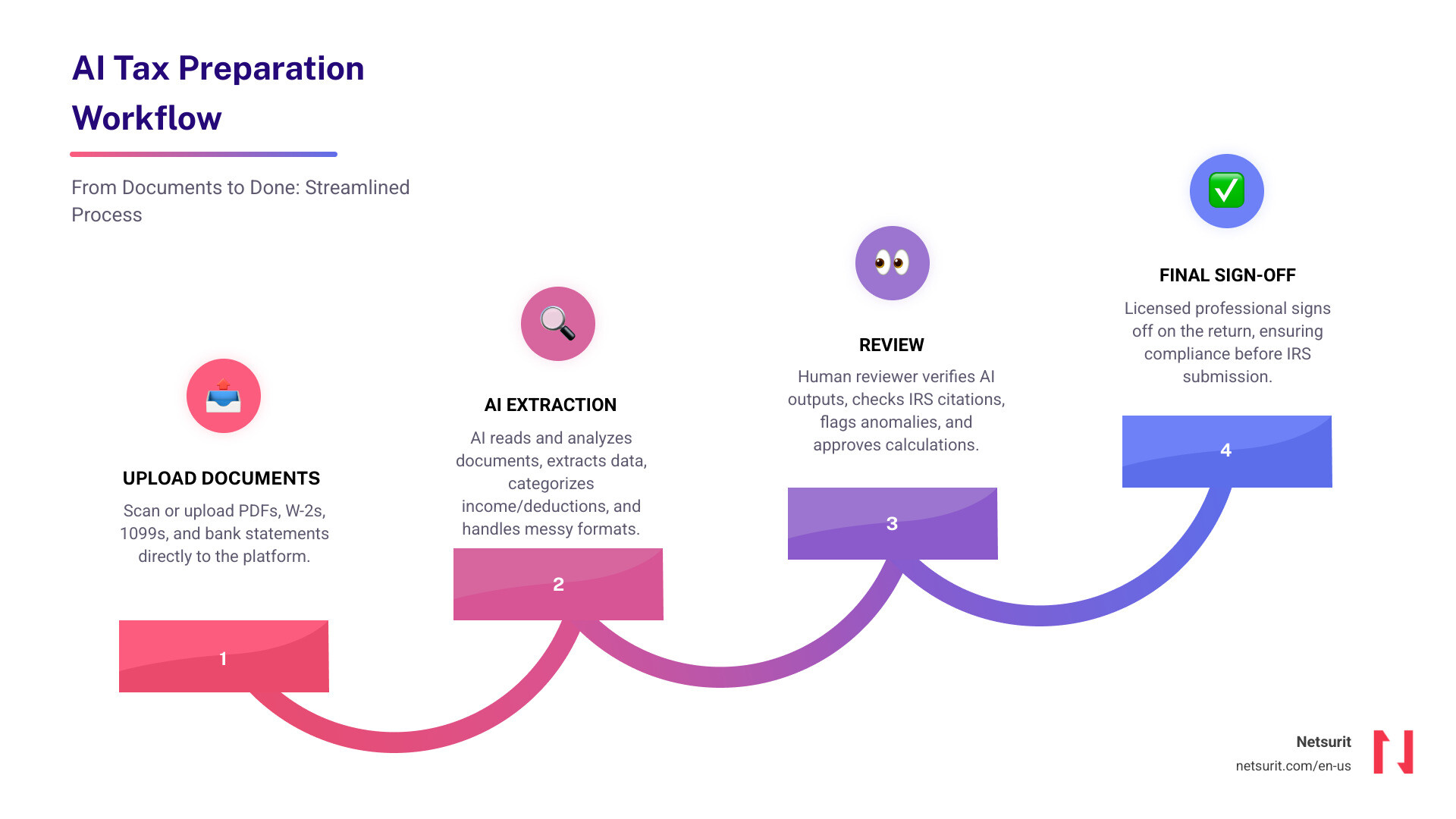
This technology solves the “garbage in, garbage out” problem that plagued older systems. Modern platforms use advanced document analysis to handle messy scans, varied formats, and complex multi-page statements that traditional Optical Character Recognition (OCR) often failed to process. By integrating AI tools to reduce manual data entry, firms are moving away from the “gatherer” phase and straight into the “reviewer” phase.
Real-time Accuracy and Hallucination Control
The biggest fear with AI is “hallucination”—when a model confidently states a fact that is entirely false. Leading tax AI platforms mitigate this using Retrieval-Augmented Generation (RAG). Instead of guessing, the AI is tethered to a specific, vetted database of tax law, such as the Internal Revenue Code (IRC) and Treasury Regulations.
When you ask a question about Section 174 research credits, the AI doesn’t just answer; it provides a direct citation. This creates an audit trail that allows a CPA to verify the logic instantly. It’s the difference between a chatbot and a digital researcher. For a deeper dive into these mechanics, see Your Guide to AI in Tax and Accounting.
Shifting from Preparer to Reviewer
The most significant impact of AI for tax prep is the 90% time savings reported on data extraction. For a firm in the Houston metro area, this means a junior associate who used to spend 40 hours a week on data entry can now spend that time reviewing 5x the volume of returns.
| Feature | Traditional Software | AI-Powered Platforms |
|---|---|---|
| Data Entry | Manual or basic OCR | Automated via agentic extraction |
| Research | Manual search in databases | Instant answers with IRC citations |
| Error Detection | Basic math checks | Contextual “red flag” outlier detection |
| Workflow | Linear and manual | Agentic (AI executes steps) |
Example: A solo practitioner in Katy, TX, recently used an AI assistant to handle over 1,000 K-1s. By automating the extraction of footnotes and complex line items, they cut preparation time by two-thirds and virtually eliminated the transposition errors common in manual entry.
Leading AI Tax Assistants for Individuals and Professionals
The market in April 2026 is split between tools for the “Do-It-Yourself” (DIY) filer and “Pro” tools designed for accounting firms. Both use generative AI to simplify the user experience, but the professional versions offer deeper integration with existing tax stacks.
Consumer-Facing Tools: H&R Block vs. TurboTax
For the individual filer, AI Tax Assist from H&R Block and Intuit Assist (TurboTax) provide 24/7 support. These tools excel at answering “plain English” questions like, “Why is my refund lower than last year?” or “Can I deduct my home office in Sugarland?”
These consumer tools use Azure AI to provide personalized explanations. Instead of a generic help article, you get a response tailored to your specific data, such as: “Your refund decreased because your 1099-K income from your side gig increased by $12,000, moving you into a higher bracket.”
Professional-Grade AI for Tax Prep: Black Ore and TaxGPT
For CPAs and EAs, platforms like Black Ore and TaxGPT offer “agentic” workflows. These aren’t just chatbots; they are agents that can log into your existing software—like UltraTax, Drake, or ProConnect—and populate the returns.
Professional tools like Filed focus on “amplifying” the firm. They standardize binders and automate the heavy lifting of document sorting. This allows firms to scale without the traditional “busy season” burnout. Many firms have found that tax practices can’t afford to ignore IT planning when integrating these advanced agents into their tech stack.
Trade-offs of AI Tax Assistants
While the benefits are high, AI is not a “set it and forget it” solution.
- Works best for: Standard 1040s, K-1 heavy portfolios, and clear digital documentation.
- Avoid when: Handling undocumented cash-only businesses or highly speculative, unlegislated crypto assets where IRS guidance is non-existent.
- Risks: Over-reliance on AI without human review; potential for outdated state-specific rules if the model’s training data lags.
- Mitigations: Mandatory CPA sign-off on every return; using tools with real-time IRS link verification and RAG technology.
Automating Complex Returns with Agentic AI Workflows
The real “magic” of AI for tax prep happens with complex business entities. Handling Form 1065 or 1120-S involves navigating dense K-1s and K-3s. Traditionally, this required hours of manual spreadsheet work.
Tools like Abacus specialize in this high-complexity data extraction. They don’t just see numbers; they read footnotes. If a K-1 has a specific 11ZZ or QBI (Qualified Business Income) component buried in the back pages, the AI identifies and extracts it into an Excel workpaper. This is the best way to automate accounting firm workflows with AI, as it turns the preparer into a high-level auditor.
Handling 1040, 1065, and 1120 Forms with AI for Tax Prep
Multi-agent reasoning allows different AI “specialists” to work on a return. One agent might focus on document verification, while another focuses on state-specific compliance. This is crucial for Texas-based businesses that may have nexus in other states. The AI ensures that state-specific deductions and exemptions are applied correctly across all 50 states, significantly reducing the risk of multi-state filing errors.
Case Study: High-Volume Efficiency in Houston
A mid-sized firm in Conroe, TX, faced a 25% increase in client volume with no new hires. By deploying an agentic AI workflow, they processed 1,000 returns using their existing staff of three. The AI handled the initial document sort and data entry for 1040s and 1065s, saving over 20 hours per week per staff member. This allowed the partners to focus on tax advisory services—like estate planning and entity restructuring—which carry much higher profit margins than basic compliance.
Security Protocols for Sensitive Financial Data
When dealing with AI for tax prep, security is the non-negotiable foundation. You are handling Social Security numbers, bank details, and income history. A data breach isn’t just a PR nightmare; it’s a regulatory catastrophe.
Professional AI platforms utilize U.S.-based servers and Azure’s enterprise-grade encryption. Crucially, reputable providers ensure that your client data is not used to train their global models. Your data stays in a “siloed” environment. This is a key part of AI compliance and SEC rules for financial firms.
Data Privacy and Redaction
Before an AI even processes a document, many systems use PII (Personally Identifiable Information) anonymization. They redact SSNs and names, replacing them with unique identifiers. The AI performs the “math” and “logic” on the anonymized data, and the system re-attaches the PII only when the final return is generated in your secure local environment. This “privacy-by-design” approach is essential for staying ahead of the curve in financial compliance.
Compliance and Audit Readiness
To be “audit-ready,” you need to show your work. AI tools now generate traceable ledgers. If the IRS asks why a specific deduction was taken on Line 16, the software provides a “traceable PDF” that links that number directly to the source document (e.g., a specific 1099-INT) and the corresponding IRS rule. Most professional tools are SOC 2 Type II compliant, ensuring they meet the highest industry standards for data security and operational reliability.
Frequently Asked Questions about AI Tax Prep
Can AI fully automate my tax return without a human?
No. While AI can do 90% of the work, the “human-in-the-loop” is a legal and ethical requirement. A qualified human must review the AI’s output, verify the context, and provide the final sign-off. You are the “pilot,” and the AI is the “autopilot.”
How does AI handle complex state-specific tax laws?
Top-tier tools have 50-state coverage. They are trained on state-specific tax codes, which is vital for residents in states like New Mexico or Washington. For example, BasilTax currently supports 18+ states with full bracket and deduction logic, with more being added as state agencies digitize their guidance.
Is my data safe with AI tax software?
Yes, provided you use professional-grade tools. Look for SOC 2 compliance, PII filtering, and Azure-based encryption. Avoid using public, “open” AI chatbots (like the free version of ChatGPT) for tax prep, as those may use your data for training. Professional tools keep your data encrypted at rest and in transit.
Conclusion
The adoption of AI for tax prep is the single biggest productivity jump for the accounting industry in decades. It allows firms to move from being “historians” who record the past to “advisors” who plan the future. By crushing the downtime associated with manual entry, you unlock the momentum needed to scale your practice or simply enjoy a stress-free tax season.
At Netsurit, we help firms in Houston, Albuquerque, and beyond navigate this transition. Whether you need to secure your data or integrate these new AI agents into your workflow, we are your elite tech partner. Ready to transform your tax season? Explore our Managed IT Services and Support in Texas to get started.