
Why Disaster Recovery Automation is Essential for Modern Business Continuity
Disaster recovery automation is the practice of using software, scripts, and orchestration tools to automatically detect outages, trigger failover processes, replicate data in real-time, and restore critical systems without manual intervention. Instead of relying on spreadsheets and frantic phone calls during a crisis, automation executes pre-defined recovery workflows that bring systems back online in minutes rather than hours.
Key benefits of disaster recovery automation:
- Speed: Automated systems detect failures and initiate recovery instantly, reducing downtime from hours to minutes
- Reliability: Eliminates human error during high-pressure recovery scenarios through standardized, tested processes
- Cost savings: Minimizes revenue loss from outages and reduces operational expenses by requiring fewer manual interventions
- Compliance: Generates automated audit trails and detailed recovery records for regulatory requirements
- Scalability: Handles growing infrastructure demands without proportionally increasing recovery complexity
When it comes to disaster recovery, every second of downtime builds up and could cost millions. The proportion of major outages that cost over $100,000 is increasing every year, making automation not just convenient—it’s becoming a business necessity.
Traditional manual recovery processes are prone to mistakes, especially when IT teams are scrambling under pressure. A missed step in a 50-page runbook or a misconfigured server setting can turn a recoverable incident into a catastrophic failure. Automation removes these risks by orchestrating complex recovery sequences consistently every time.
By automating disaster recovery steps, businesses can significantly reduce their Recovery Time Objectives (RTOs) and Recovery Point Objectives (RPOs). Automated solutions detect issues and trigger responses instantly, while continuous data replication ensures minimal data loss. This combination of speed and accuracy is simply impossible to achieve through manual processes alone.
The Core Benefits and Strategic Importance of Disaster Recovery Automation
In today’s digital landscape, an outage isn’t just an inconvenience; it’s a direct hit to your bottom line. The financial impact of downtime can be staggering, with the proportion of major outages that cost over $100,000 increasing every year. This reality underscores why DISASTER RECOVERY AUTOMATION isn’t merely a nice-to-have; it’s a strategic imperative for operational resilience. By integrating automation into our DR strategies, we can boost efficiency, minimize manual errors, and open up significant productivity gains.
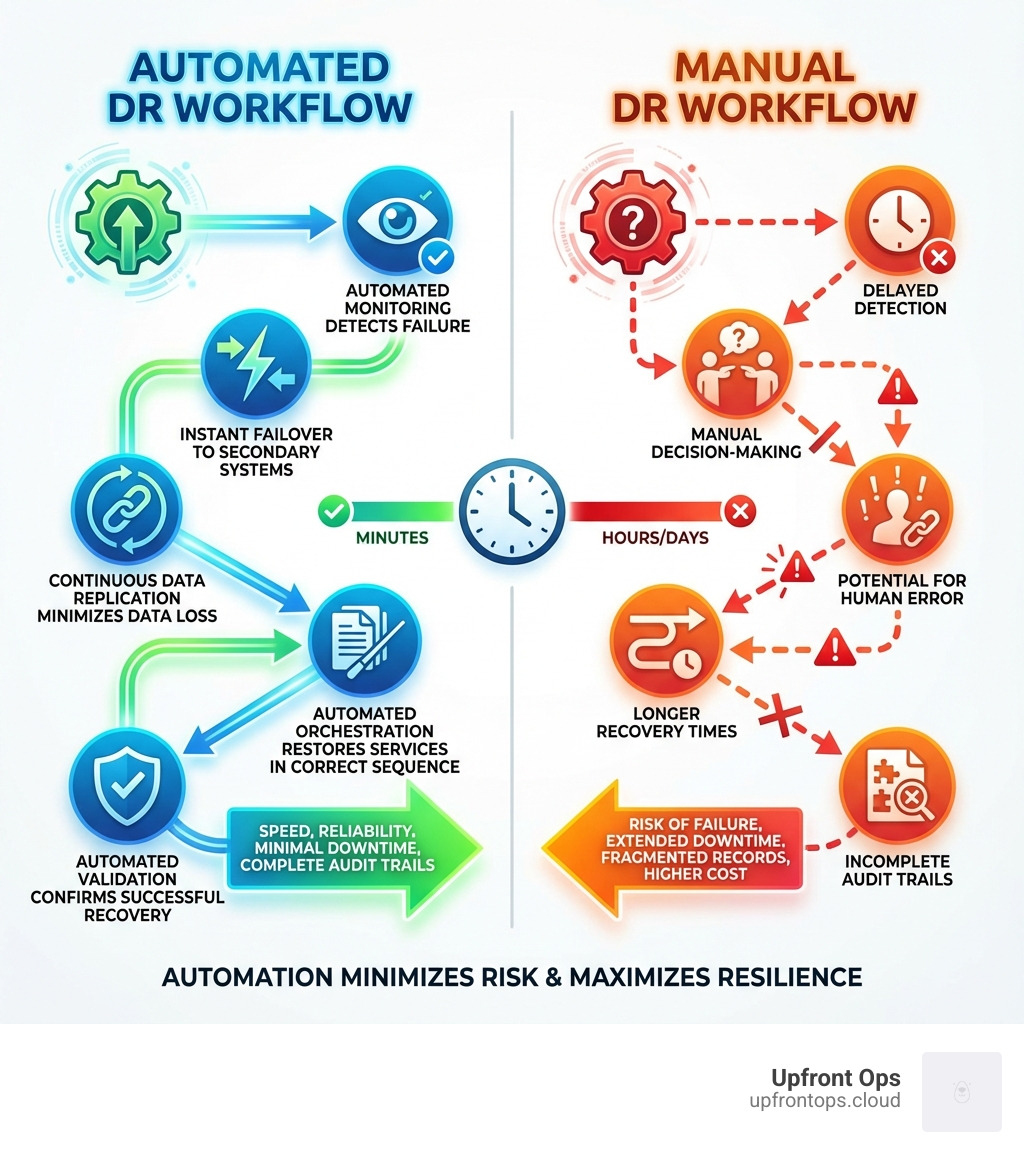
Consider the stark contrast between manual and automated disaster recovery. Manual processes are often like trying to put out a fire with a watering can – slow, inefficient, and prone to human error when every second counts. Automated solutions, however, act like an intelligent sprinkler system, instantly detecting the issue and triggering a predefined, reliable response.
| Metric | Manual Disaster Recovery | Automated Disaster Recovery |
|---|---|---|
| RTO (Recovery Time Objective) | Hours to days | Minutes to hours |
| RPO (Recovery Point Objective) | Hours to days | Seconds to minutes (sub-second with CDP) |
| Cost | High (downtime, labor, data loss, fines) | Lower (reduced downtime, less manual labor, prevented data loss) |
| Reliability | Variable (prone to human error) | High (consistent, repeatable processes) |
| Testing Frequency | Infrequent (complex, disruptive, costly) | Frequent (non-disruptive, cost-effective) |
| Compliance | Manual audit trails (time-consuming, error-prone) | Automated audit trails (detailed, instant, accurate) |
| Scalability | Limited (scales with human effort) | High (scales with infrastructure demands) |
Drastically Improved RTOs and RPOs
One of the most compelling advantages of DISASTER RECOVERY AUTOMATION is its ability to drastically reduce Recovery Time Objectives (RTOs) and Recovery Point Objectives (RPOs). RTO defines the maximum acceptable downtime after an incident, while RPO specifies the maximum amount of data loss a business can tolerate. Automating these steps ensures critical applications are available when they’re needed most, reducing downtime from hours to minutes.
Automated disaster recovery solutions detect issues and trigger responses instantly, often bringing systems back online in minutes. This speed directly translates to minimal data loss and rapid restoration of services, ensuring business continuity and maintaining customer trust.
Improved Reliability and Reduced Human Error
Let’s face it, under pressure, even the most seasoned IT professional can make a mistake. Manual processes are inherently susceptible to human error, especially during high-stakes disaster scenarios. This is where automation shines. Automated disaster recovery ensures that predefined processes are executed consistently every single time, eliminating manual mistakes.
By standardizing recovery workflows and removing human intervention from repetitive tasks, we gain predictable outcomes. Our systems will recover exactly as planned, every time, without the panic-induced typos or missed steps that can plague manual recoveries. This consistency builds immense confidence in our ability to rebound from any disruption.
Streamlined Compliance and Reporting
In many industries, particularly financial services, strict regulatory frameworks govern disaster recovery strategies. Compliance isn’t optional; it’s a legal and ethical obligation. DISASTER RECOVERY AUTOMATION significantly simplifies adherence to these regulations by providing automated audit trails. These detailed records offer a complete history of actions taken during the recovery process, eliminating the need to piece together what happened after the event.
The DORA law, for instance, mandates a universal framework for managing Information and Communication Technology (ICT) risks, further highlighting the regulatory push for resilience. Automated solutions ensure that our technology recovery tools adhere to all relevant regulations, streamline audit preparation, and provide irrefutable evidence of our recovery capabilities. This means less time scrambling for documentation and more time focusing on what matters: keeping our business running.
How Automation Revolutionizes DR Processes
At its heart, DISASTER RECOVERY AUTOMATION is about orchestrating a complex symphony of tasks to bring our systems back from the brink. Instead of a chaotic free-for-all, automation provides a conductor, ensuring that each instrument (or system, in our case) plays its part in the correct sequence. This involves prioritizing critical systems and applications, ensuring they come online in the right order to restore functionality efficiently.

Enhancing Failover and Failback
Failover and failback are the bread and butter of disaster recovery. Failover is the process of switching to a redundant or standby system upon the failure or abnormal termination of the primary system. Failback is the process of restoring operations to the primary environment once the issue is resolved. Automation dramatically improves both.
Automated disaster recovery solutions detect issues and trigger responses instantly. This can involve automatically rerouting traffic to a secondary site or bringing up mirrored instances in a different region. Critical to this process are robust health checks that go beyond simple heartbeats, evaluating the interrelated nature of application components to accurately predict and respond to events. By implementing health checks and automated monitoring, we can ensure a seamless transition and minimal downtime.
When the primary system is restored, automated failback mechanisms ensure a smooth return to normal operations, often without users even noticing the switch. This seamless transition is a testament to the power of well-designed automation.
The Critical Role of Real-Time Data Replication
What good is a quick recovery if your data is days old? This is where real-time data replication steps in as a cornerstone of effective DISASTER RECOVERY AUTOMATION. Solutions employing Continuous Data Protection (CDP) ensure that our target machines are in their most current state, providing sub-second RPOs. This block-level replication continuously copies data changes from the primary system to the recovery site, minimizing potential data loss to mere seconds.
This constant synchronization means that in the event of a disaster, the data available for recovery is virtually identical to what was present just moments before the incident. It’s like having an always-on, always-up-to-date twin of your critical data, ready to step in at a moment’s notice.
Facilitating Non-Disruptive Testing and Validation
One of the Achilles’ heels of traditional DR plans is the difficulty and cost of testing. Manual DR testing is often disruptive, resource-intensive, and therefore, infrequent. This leads to plans that are untested, outdated, and ultimately unreliable.
DISASTER RECOVERY AUTOMATION turns this challenge into an opportunity. It facilitates regular, non-disruptive testing and validation of DR plans. Automated recovery platforms can conduct live disaster simulations, allowing us to validate our DR plans without impacting production environments. We can identify gaps, refine our scripts, and build immense confidence in our recovery procedures. This continuous testing and refinement ensures that when a real disaster strikes, our automated systems perform exactly as expected, every time.
Key Technologies and Tools in the DR Automation Stack
Building a robust DISASTER RECOVERY AUTOMATION solution requires a carefully selected stack of technologies and tools. Think of it as assembling a high-performance race car: each component plays a vital role in achieving speed, reliability, and precision. Our DR automation tech stack is designed to provide comprehensive protection and rapid recovery for our digital assets.

Core Tools and Technologies
At the foundation of any modern DR automation strategy are several key categories of tools:
- Infrastructure as Code (IaC): Tools like Terraform and Ansible allow us to define our recovery environments in code. This means we can rapidly redeploy entire environments, ensuring consistency and version control for our recovery processes. IaC makes our recovery environment as consistent as our source environment.
- Orchestration Platforms: These are the conductors of our DR symphony. Platforms like AWS Systems Manager Automations or AWS Step Functions orchestrate complex recovery workflows, ensuring that systems are brought back online in the correct order and dependencies are managed. Automated recovery platforms also offer testing capabilities and conduct live disaster simulations.
- Monitoring and Alerting Tools: Solutions like Prometheus, Datadog, or Amazon CloudWatch continuously monitor our systems for anomalies and potential failures. When an issue is detected, they trigger automated alerts and can even initiate recovery workflows instantly.
- Communication Platforms: During a disaster, clear and rapid communication is paramount. Platforms that facilitate fast and easy internal communication ensure that teams, stakeholders, and executives are all aligned and informed throughout the DR event.
For deeper insights into how these technologies integrate, especially within cloud environments, resources like Automating your DR strategy – AWS Prescriptive Guidance offer excellent guidance.
The Role of DRaaS (Disaster Recovery as a Service)
Disaster Recovery as a Service (DRaaS) has emerged as a game-changer, fundamentally enabling and simplifying DISASTER RECOVERY AUTOMATION. DRaaS leverages cloud-based infrastructure to provide a cost-effective, scalable, and highly automated approach to disaster recovery.
With DRaaS, we benefit from:
- Cloud-based Recovery: Our recovery environment resides in the cloud, eliminating the need for us to maintain expensive secondary data centers.
- Pay-as-you-go Models: We only pay for the resources we use, making DR more accessible and budget-friendly.
- Scalable Resource Allocation: Automated solutions can dynamically allocate resources based on demand during failover, ensuring our recovered systems have the capacity they need without over-provisioning.
- Managed Services: DRaaS providers often handle much of the underlying infrastructure and management, freeing up our IT teams to focus on core business initiatives.
DRaaS enables automation through features like automated failover and failback, real-time data synchronization, policy-driven processes, and scalable resource allocation. It’s a powerful way to achieve robust DR without the heavy lifting of building and managing everything ourselves.
Key Features of DISASTER RECOVERY AUTOMATION Software
When evaluating DISASTER RECOVERY AUTOMATION software, we look for features that empower us to build resilient, efficient, and compliant recovery solutions:
- Scalability and Flexibility: The solution must be able to handle our current infrastructure and easily scale with future growth, supporting diverse environments (cloud, on-premises, hybrid).
- Ease of Integration: Seamless integration with our existing IT infrastructure, applications, and cloud platforms is crucial for a smooth transition during disaster recovery.
- Real-Time Data Access: Access to real-time data for accurate decision-making and continuous monitoring of recovery progress is essential.
- Policy-Based Automation: The ability to define and enforce recovery policies ensures consistency and alignment with our business goals, governing how and when recovery processes are triggered.
- Comprehensive Dashboards: Intuitive dashboards, such as those that can be built with Amazon CloudWatch, provide clear visibility into the progress and health of automated recovery procedures, along with detailed reporting for compliance.
These features collectively ensure that our automated DR solution is not just functional, but also manageable, adaptable, and truly effective.
Implementation: Strategy, Security, and Challenges
Implementing DISASTER RECOVERY AUTOMATION is more than just deploying software; it’s a strategic shift that requires careful planning, a strong focus on security, and a realistic understanding of potential challenges. It’s about changing our approach from reactive to proactive, building a resilient foundation for our business. For more information on how automation can transform business processes, you can explore resources like More info about automating business workflows.
Integrating DISASTER RECOVERY AUTOMATION into Your IT Strategy
Integrating DISASTER RECOVERY AUTOMATION into our overall IT strategy involves aligning our recovery goals with broader business objectives. This process typically includes:
- Aligning with Business Goals: First, we define our business risks and measure our Recovery Time Objectives (RTOs) and Recovery Point Objectives (RPOs) for critical applications. This ensures our automation efforts directly support business continuity.
- Dependency Mapping: Understanding the intricate web of dependencies between applications, services, and infrastructure components is crucial. This mapping informs the order in which systems should be recovered.
- Creating Automated Runbooks: We develop automated runbooks—scripts or workflows that detail the exact steps for recovery. These runbooks should integrate with our existing tech stack and be version-controlled, similar to how we manage our production code. This makes our recovery environment consistent and allows for reliable, reproducible processes.
- Version Control for Recovery Processes: Treating our recovery automation scripts and configurations as code, under version control, ensures consistency, auditability, and ease of updates.
By taking these steps, we embed DR automation deep within our IT operations, making it a natural extension of our infrastructure management.
Security and Scalability Considerations
While automation offers immense benefits, it also introduces new security considerations. An automated system with liftd privileges could, if compromised, be exploited to cause more widespread damage. Therefore, robust security measures are paramount:
- Secure Credential Management: Implementing strong, secure credential management is vital. This means using secrets management tools, multi-factor authentication, and least-privilege access principles to protect the credentials used by our automated DR systems.
- Network Security: Our recovery environments must be as secure as our primary ones, employing encryption, firewalls, and regular security audits. Data should be encrypted both in-flight and at-rest to protect sensitive information during replication and storage.
- Scalability: As our infrastructure grows and evolves, our automated DR solutions must be able to scale with it. This involves designing solutions that can handle increased data volumes, more applications, and a larger footprint without compromising recovery times or reliability.
We must implement robust security measures to ensure that sensitive data is protected from cyber threats. Compliance with standards like GDPR and HIPAA also remains crucial.
Potential Risks and Common Challenges
Even with its many advantages, DISASTER RECOVERY AUTOMATION isn’t without its complexities and potential pitfalls. We must be aware of these to build truly resilient systems:
- Complexity of Setup: Initial setup can be complex, requiring deep understanding of our infrastructure and the automation tools themselves.
- Risk of False Alarms: Automated disaster event detection, while powerful, carries the risk of false alarms. An unnecessary failover can introduce its own set of availability issues. We build manual overrides into our automated detection workflows to confirm failovers and mitigate this risk.
- Over-reliance on Automation: While tempting, a complete “hands-off” approach can be dangerous. We avoid automatically initiating recovery in high-risk situations without human confirmation.
- Need for Human Oversight: A balance between automation and human oversight is crucial. Humans are still needed for complex decisions, forensic analysis after an incident, and managing unexpected scenarios that automation scripts may not cover. We need to retain an “Andon cord” or “big red stop button” to halt automation if it’s not working as intended.
- Thorough Testing Requirements: Automation in disaster recovery requires thorough testing to ensure it handles edge cases and doesn’t fail during partial outages. This means continuous testing and refinement of our automated recovery procedures.
By acknowledging and proactively addressing these risks, we can harness the power of automation while maintaining essential control and flexibility.
Frequently Asked Questions about Disaster Recovery Automation
We often get asked about the nuances of DISASTER RECOVERY AUTOMATION. Here are some common questions and our expert answers:
What is the difference between disaster recovery automation and business process continuity?
This is a great question, as the two terms are often used interchangeably, but they represent distinct concepts. DISASTER RECOVERY AUTOMATION primarily focuses on the technical restoration of IT infrastructure, systems, and data after an outage. Its goal is to get your applications and data back online as quickly as possible.
Business process continuity, on the other hand, is a broader concept. It ensures that essential workflows (like invoice approvals, purchase orders, and order-to-cash cycles) can continue even if a physical office, server, or file repository becomes unavailable. While DR automation is a crucial component of business process continuity, the latter also encompasses non-IT aspects, such as staff availability, alternative work locations, and manual workarounds to keep the business functioning. Think of DR automation as restoring the engine, and business process continuity as ensuring the entire car can still reach its destination, even if it needs a temporary spare tire or a detour.
What are the first steps to implementing DR automation?
Starting on the journey of DISASTER RECOVERY AUTOMATION can seem daunting, but breaking it down into manageable steps makes it achievable. We recommend starting with the following:
- Identify Critical Business Applications: Pinpoint the applications and data that are absolutely essential for your business to operate. These are your top priorities for automation.
- Define RTO and RPO Targets: For each critical application, establish clear Recovery Time Objectives (RTOs) and Recovery Point Objectives (RPOs). These metrics will guide your automation strategy and help you select appropriate tools.
- Evaluate Your Current Infrastructure: Understand your existing IT environment, including hardware, software, network topology, and dependencies. This assessment helps identify what can be automated and what might require re-architecture.
- Start Small with a Pilot Project: Don’t try to automate everything at once. Begin with a small-scale pilot project, such as automating the backup and recovery of a single, non-critical application. This allows you to gain experience, refine your processes, and demonstrate value without risking your most vital systems.
- Document and Test: Thoroughly document every step of your automated recovery process and, most importantly, test it regularly.
Can disaster recovery be fully automated?
While a high degree of automation is achievable in disaster recovery, aiming for full “lights-out” automation is often not recommended and rarely practical for complex enterprise environments. We advocate for a balanced approach.
Automation excels at repetitive, predictable tasks like detecting failures, initiating failover, and orchestrating system startup sequences. However, real-world disasters can be messy and unpredictable. Human oversight remains crucial for:
- Complex Decision-Making: Determining whether to initiate a full failover, especially in ambiguous or partial outage scenarios.
- High-Risk Actions: Authorizing actions that could have significant business impact or data loss if executed incorrectly.
- Managing Unexpected Scenarios: Handling edge cases, unforeseen dependencies, or novel cyber threats that automation scripts may not be programmed to address.
- Forensic Analysis: After an incident, human expertise is indispensable for understanding the root cause, learning from the event, and refining future recovery strategies.
Therefore, while we strive for maximum automation to reduce RTOs, RPOs, and human error, we always design our solutions with mechanisms for human intervention, review, and the ability to halt processes if necessary. This ensures resilience and control, even in the face of the unexpected.
Conclusion
In the modern digital age, DISASTER RECOVERY AUTOMATION has evolved from a luxury to an absolute necessity. We’ve seen how it transforms our approach from reactive scramble to proactive resilience, significantly reducing the financial impact of outages and safeguarding our operational continuity. The key takeaways are clear: speed, reliability, and compliance are no longer aspirational goals but achievable realities through intelligent automation.
By embracing this shift, we future-proof our businesses against the ever-present threats of cyberattacks, natural disasters, and human error. Automation empowers us to not only survive disruptions but to emerge stronger, with minimal downtime and data loss. It allows our teams to focus on innovation rather than crisis management, open uping productivity and ensuring peace of mind.
At Upfront Ops, we believe in empowering businesses with the tools and strategies to thrive in any environment. Take control of your business continuity by exploring our solutions and find how we can help you build a resilient, automated future.