
Your Network Is Being Tested Every Day — Here’s How Filtering Stops the Attacks
Cyber security filtering is the process of inspecting, categorizing, and blocking malicious network traffic — including dangerous emails, websites, and data packets — before it reaches your systems or users.
Quick answer: What is cyber security filtering?
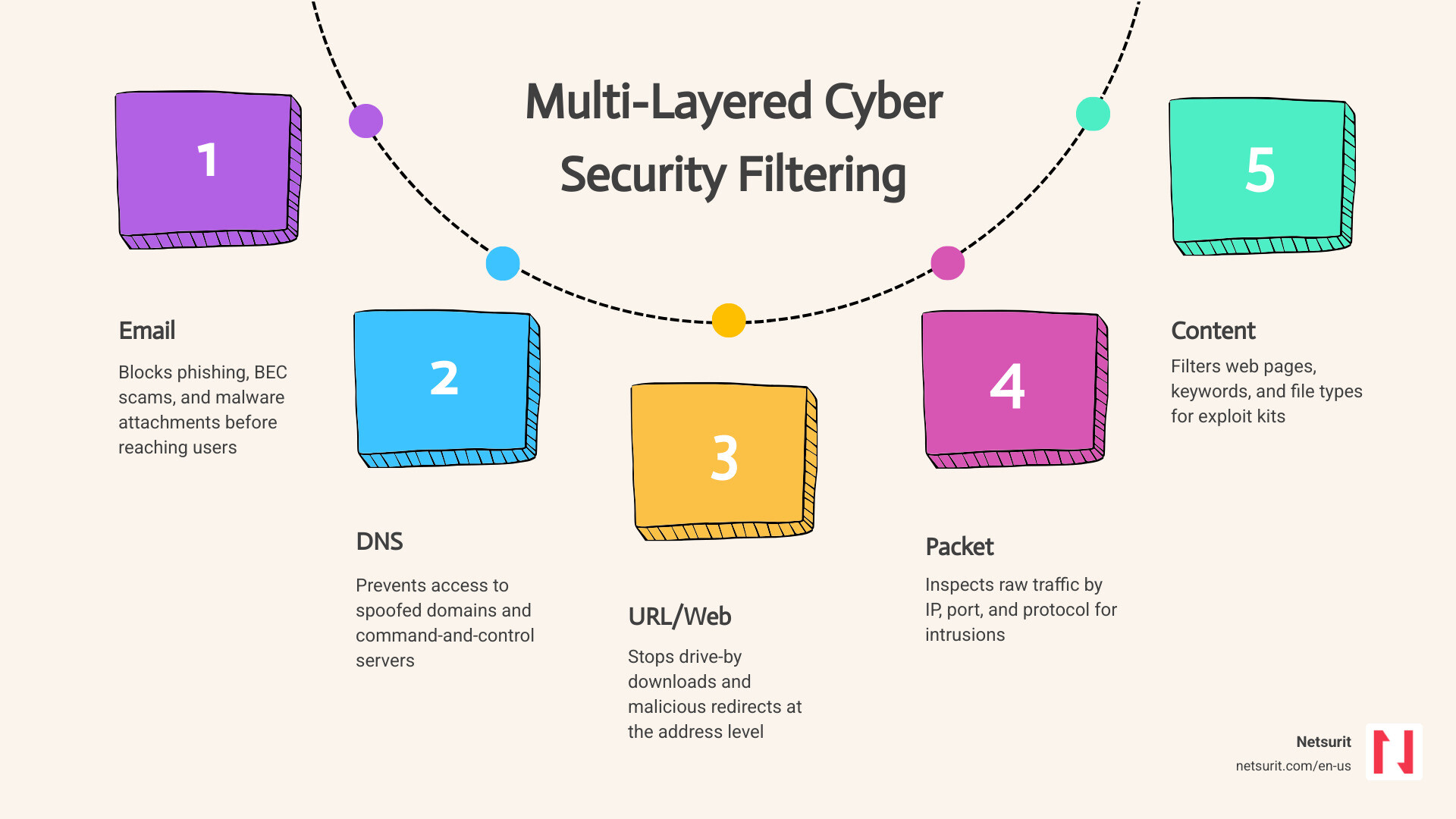
| Layer | What It Filters | Example Threat Blocked |
|---|---|---|
| Email filtering | Inbound and outbound messages | Phishing, BEC, malware attachments |
| DNS filtering | Domain name requests | Spoofed IRS portals, C2 callbacks |
| URL/web filtering | Full web addresses and page content | Drive-by downloads, malicious redirects |
| Packet filtering | Raw network traffic by IP, port, protocol | Port scans, unauthorized intrusions |
| Content filtering | Web page content, keywords, file types | Exploit kits, inappropriate content |
| Proxy filtering | Traffic routed through an intermediary | Bypassed security controls, data exfiltration |
Tax and accounting firms in the Houston metro area — handling mountains of sensitive financial data for thousands of clients — sit squarely in the crosshairs of attackers. Phishing attacks surged 147% between 2023 and 2024, and nearly 96% of those attacks arrive via email. Business Email Compromise alone has cost organizations over $50 billion in reported losses.
A multi-layered filtering strategy blocks most of these threats before they reach a single employee. But filtering is not a one-size-fits-all tool. Misconfigured filters block legitimate client invoices during tax season. Overly permissive filters let ransomware slip through. Getting the balance right takes deliberate design and continuous tuning.
That’s exactly what this guide covers.
I’m Orrin Klopper, CEO and co-founder of Netsurit — a global IT services company that has been helping businesses stay secure since 1995, and one where cyber security filtering is a cornerstone of the managed security strategies we build for clients across North America. In the sections ahead, I’ll walk you through how filtering works at each layer, where it succeeds, where it fails, and how to configure it so your firm stays protected without grinding operations to a halt.
Stopping Threats at the Perimeter: How Filtering Blocks Attacks Before Entry
To understand how cyber security filtering protects your firm, you must first understand how data moves. Every email, webpage request, and file download is broken down into small units called packets. As these packets travel from the public internet toward your internal network, they must pass through your security perimeter.
If you do not inspect these packets, you are essentially leaving your front door wide open. Attackers exploit this lack of visibility to deliver ransomware payloads, establish command-and-control (C2) connections, or harvest user credentials. Implementing a robust filtering strategy at your perimeter ensures that every piece of data is scrutinized before it enters your trusted environment.
For tax and accounting firms, this isn’t just about general security; it is about protecting the lifeblood of your practice.
For example, consider a CPA firm in Sugar Land, TX. During the peak of tax season, employees are working under tight deadlines and frequently accessing online tax portals, state municipal sites, and client databases. An attacker registers a domain designed to look identical to an official IRS portal (e.g., irsgov-tax-portal-login.com). Without perimeter defenses, a distracted accountant might click a link in an email and navigate directly to this credential-harvesting site.
By deploying localized Sugar Land Cybersecurity Services paired with DNS filtering, the firm automatically blocks the connection. The filter recognizes that the domain is newly registered and lacks a trustworthy reputation, stopping the credential theft before the page can even load.
Understanding the difference between raw packet analysis and deeper content evaluation is critical when choosing your defense tools. Here is how traditional packet filtering compares to Deep Packet Inspection (DPI):
| Capability | Traditional Packet Filtering | Deep Packet Inspection (DPI) |
|---|---|---|
| Inspection Layer | Network & Transport Layers (Layers 3 & 4) | Application Layer (Layer 7) |
| Data Inspected | Source IP, Destination IP, Port, Protocol | Full payload content, application behavior, file signatures |
| Performance Impact | Negligible (extremely fast) | Moderate to High (requires hardware acceleration or optimization) |
| Encryption Support | None (cannot read encrypted data) | Yes (with HTTPS/SSL decryption enabled) |
| Primary Use Case | Blocking unauthorized network access by port/IP | Detecting malware, exploits, and data exfiltration |
By combining these methods, you create a resilient perimeter that stops attacks at the earliest possible stage. This proactive stance is the foundation of modern Network Security and explains Why is Cyber Security Important for protecting business continuity.
Packet-Level Inspection and DNS Resolution
At the lowest level of network defense, packet-level inspection examines the headers of incoming and outgoing data. It checks the source IP address, the destination IP address, the protocol type (such as TCP or UDP), and the port numbers. This is a stateless process, meaning the filter evaluates each packet in isolation without knowing the context of the overall session. While incredibly fast, packet-level filtering cannot see what is inside the packet’s payload.
DNS (Domain Name System) filtering adds a critical layer of context during the domain resolution phase. Before your browser connects to a website, it must translate the domain name (like google.com) into an IP address. A DNS filter intercepts this request. If the domain is flagged as malicious, the filter blocks the resolution, preventing your device from establishing a connection in the first place.
Implementing these protocols aligns with federal standards, such as those outlined in the CISA Guide on Securing DNS, to prevent early-stage network intrusions.
Application-Layer Analysis and HTTPS Decryption
Traditional firewalls are blind to the actual content of modern web traffic because more than 90% of web sessions are encrypted via HTTPS (using TLS 1.3). If an attacker hides a malicious payload inside an encrypted session, a standard packet filter will let it pass right through port 443.
To solve this, modern firewalls use HTTPS inspection (also known as SSL decryption or SSL/TLS bridging). The firewall acts as an authorized intermediary: it decrypts the incoming traffic, scans the payload for malware using application-layer analysis, and then re-encrypts the traffic before sending it to the user. This ensures that you maintain full visibility over your network traffic without creating unmonitored blind spots.
HTTPS Decryption Trade-offs
- Works best when: Decrypting standard, non-sensitive web traffic to scan for hidden malware payloads, exploit kits, and unauthorized file transfers.
- Avoid when: Handling highly sensitive, regulated transactions—such as direct banking portals, healthcare portals, or trusted accounting repositories—where decryption could violate compliance mandates.
- Risks: User privacy concerns, legal compliance issues, and the potential exposure of sensitive credentials or personal data if the decryption keys or decrypted traffic are mismanaged.
- Mitigations: Implement strict bypass lists within your Network Security policies to ensure financial, medical, and trusted government domains are never decrypted.
Deploying Core Content Filters to Secure Your Digital Perimeter
To build a modern security posture, you must deploy specialized content filters across your entire digital perimeter. Relying on a single firewall is no longer sufficient. Instead, you need a coordinated, multi-layered security stack that addresses the specific vectors attackers use to target your firm.
Deploying Email Filters to Stop Inbound Phishing
Email is the single most abused vector in corporate cyberattacks. Phishing campaigns have evolved far beyond poorly written messages; today, they leverage sophisticated social engineering and Business Email Compromise (BEC) techniques that contain no malicious links or attachments, making them incredibly difficult for legacy spam filters to catch.
For a tax firm in Katy, TX, the risks peak during busy season when the office is flooded with urgent client requests. An attacker might send an email to the billing department that looks exactly like an urgent wire transfer request from the managing partner, using a spoofed domain.
Without advanced Email Security filters, this email lands directly in the employee’s inbox. By deploying localized Katy Cybersecurity Services – Texas , the firm can block these highly targeted attacks. Modern filters inspect the sender’s domain alignment (DKIM, SPF, and DMARC), analyze the email’s sentiment using machine learning to detect coercion, and block the message before it can cause financial damage.
This layer of defense is critical to Protect Your Business from BEC Scams and secure your communication channels.
Email Filtering Trade-offs
- Works best when: Integrated directly with API-based cloud mailboxes (such as Microsoft 365 or Google Workspace) to enable real-time, behavioral analysis of incoming messages.
- Avoid when: Relying solely on legacy on-premises email gateways that lack API access and fail to analyze internal, east-west email traffic.
- Risks: Aggressive filtering can result in false positives, quarantining legitimate client communications, tax documents, or time-sensitive invoices.
- Mitigations: Configure automated quarantine digests for users, establish clear allowlists for known business partners, and implement a rapid-release feedback loop for your IT team.
Web and URL Filtering to Control Network Access
Web filtering prevents users from navigating to dangerous, inappropriate, or non-compliant websites. Rather than blocking the entire internet, modern web filters categorize billions of domains into specific classifications (such as “Malware Sites,” “Gambling,” or “Social Media”) and assign reputation scores to each URL based on real-time threat intelligence.
When a user attempts to visit a page, the filter checks the URL against these categories. If your firm’s policy blocks “High-Risk” domains, access is denied immediately. To achieve this level of granular control, many organizations deploy advanced tools like KyberFilter — AI-Powered Web Filtering with HTTPS Inspection | KyberGate , which decrypts and inspects encrypted web traffic in real-time.
Additionally, enterprise platforms rely on robust policy frameworks, such as those found in the Cisco Secure Firewall Management Center Device Configuration Guide, 7.3 – URL Filtering Rules [Cisco Secure Firewall Management Center] – Cisco or the steps to Set up URL filtering service in your network | Cloud Next Generation Firewall | Google Cloud Documentation , to enforce consistent access rules across distributed offices.
For businesses operating in metropolitan hubs, partnering with a provider that understands the local threat landscape—such as utilizing Cybersecurity Services in Houston—ensures that web filtering policies are tailored to block localized phishing domains and malicious regional hosting sites.
Optimizing Sensor Performance with Pre-DPI Filtering
While Deep Packet Inspection (DPI) provides unparalleled security by analyzing the actual payload of network traffic, it is highly resource-intensive. Running DPI on every single packet—including trusted, high-volume data streams like internal backups or video calls—can severely degrade network throughput and cause performance bottlenecks.
To prevent this, organizations use stateless pre-DPI filters. These filters evaluate basic packet headers (IP addresses, ports, and protocols) and apply quick “Accept” or “Drop” rules before passing traffic to the heavy DPI scanning engine.
By defining rules using tcpdump or Wireshark syntax, as detailed in the Pre-DPI Filters documentation, you can discard unnecessary or trusted traffic early. This optimization strategy aligns with the NIST Guidelines on Firewalls and Firewall Policy, ensuring your security appliances maintain high throughput without compromising on deep security analysis when it is actually needed.
Why Multi-Layered Filtering is Essential for Regulatory Compliance
In the accounting and financial sectors, cybersecurity is not just a operational preference; it is a strict regulatory requirement. Firms that fail to protect client data face massive fines, reputational ruin, and potential legal action. Multi-layered filtering serves as a primary control for meeting these compliance mandates while keeping your network running efficiently.
Deploying these layers helps protect your infrastructure from external disruption, which is a core reason Why is Network Security Important for long-term business viability.
Mitigating Malware and Exploit Kits
Exploit kits target vulnerabilities in web browsers, PDF readers, and browser extensions to install malware without the user’s active cooperation. Known as “drive-by downloads,” these attacks occur silently when a user visits an infected, otherwise legitimate website.
Consider an accounting firm in Conroe, TX. During a lunch break, an employee visits a compromised local news website to check the weather. An exploit kit hosted on the site immediately scans the employee’s browser for unpatched vulnerabilities. If it finds one, it attempts to download and execute a ransomware payload.
By working with localized Conroe Cybersecurity Services , the firm can implement web filters that detect the malicious redirect or block the download of executable files from unclassified domains. This proactive blocking is an essential step in Building a Ransomware Proof Business and stopping threats before they execute on endpoints.
Ensuring Regulatory Compliance and Bandwidth Optimization
For tax preparers and financial advisors, regulatory frameworks dictate exactly how sensitive data must be handled:
- FTC Safeguards Rule: Mandates that non-banking financial institutions (including tax preparers) implement comprehensive administrative, technical, and physical safeguards to protect customer information. Multi-layered filtering satisfies the technical requirement for monitoring and protecting data in transit.
- HIPAA Compliance: If your firm handles tax preparation for medical offices or healthcare providers, you are bound by HIPAA rules to secure Protected Health Information (PHI). Email and web filtering prevent the accidental transmission of PHI over unencrypted channels.
- PCI-DSS: If you accept credit card payments, you must comply with strict standards regarding firewall configurations and network segmentation, both of which rely on robust packet and content filtering.
Beyond compliance, filtering acts as an excellent tool for bandwidth optimization. By blocking high-bandwidth, non-business traffic—such as video streaming, online gaming, and large file-sharing networks—you preserve your network’s capacity for business-critical applications. This reduces latency, prevents slow-downs during critical client calls, and lowers overall operational costs.
Understanding these regulatory and operational impacts is a key element highlighted in The Importance of Cybersecurity Compliance.
Overcoming Filtering Friction and Tuning Policies for Peak Performance
While the security benefits of filtering are clear, overly aggressive policies can create operational friction. If your employees cannot access the tools they need to do their jobs, they will find ways to bypass your security controls, creating even larger vulnerabilities.
To maintain a secure yet productive environment, you must perform regular assessments to tune your policies. Utilizing a structured Cyber Security Assessment Checklist helps identify where your filters are too restrictive or too permissive.
Managing False Positives and Over-Filtering
Over-filtering occurs when security policies block legitimate, safe websites or emails because they match generic threat signatures or broad category classifications. This is a common issue for accounting firms that frequently interact with obscure local, state, and municipal portals.
For example, a Houston-based accounting firm preparing quarterly filings might find that its web filter blocks access to a small municipal tax portal because the portal lacks a modern SSL certificate or is hosted on a newly registered domain.
If this block happens on the day of a major filing deadline, it can cause severe disruption. By working with Cybersecurity Services in Houston, the firm can establish a rapid-response override protocol. Rather than turning off the filter entirely, the IT team can inspect the blocked URL, verify its safety, and add a specific exception rule in the firewall, resolving the issue in minutes.
Disabling or Tuning Filters for Legitimate Access
When a legitimate site is blocked, you need a safe, controlled method to grant access without exposing your network to risk. You should never completely disable your firewall or router-based content filters. Instead, you should apply targeted policy adjustments.
To configure these exceptions properly, administrators can refer to the Security Configuration Guide: Unified Threat Defense, Cisco IOS XE 17 – Web Filtering [Cisco IOS XE 17] – Cisco or follow the steps outlined in the Security and VPN Configuration Guide, Cisco IOS XE 17.x – Web Filtering [Cisco IOS XE 17] – Cisco . These guides explain how to create parameter maps, define regex patterns, and associate specific domains with “Allowed Lists.”
For organizations looking to secure distributed offices beyond Texas, such as those requiring Cyber Security Services in Albuquerque, New Mexico , implementing centralized policy management ensures that when a trusted domain is whitelisted, the rule propagates across all office locations instantly. This keeps security tight and operations smooth, regardless of where your team is working.
Frequently Asked Questions About Cyber Security Filtering
Can cyber security filtering stop zero-day threats?
Traditional signature-based filters cannot stop zero-day threats because they rely on databases of known bad files and domains. However, modern filters that utilize behavioral analysis, virtual sandboxing, and machine learning can identify and block anomalous behavior associated with zero-day exploits. For example, if an unknown PDF attachment attempts to execute code in a isolated sandbox, the email filter will block it before it reaches the user’s inbox.
How does HTTPS inspection affect user privacy?
HTTPS inspection decrypts web traffic to scan for hidden threats, which means it can theoretically expose personal data, such as banking passwords or medical records, to the firewall’s logs. To protect employee privacy, firms must implement strict decryption bypass policies. These policies ensure that traffic to financial institutions, healthcare portals, and personal communication sites remains fully encrypted and is never inspected by the security appliance.
What is the difference between DNS filtering and URL filtering?
DNS filtering blocks access at the domain level during the initial name resolution phase (for example, blocking malicious-site.com). This is highly efficient and stops connections before they are even established. URL filtering, on the other hand, inspects the full path of the web request (for example, allowing access to trusted-site.com but blocking trusted-site.com/malicious-payload.zip). This provides much more granular control but requires deeper inspection capabilities.
Conclusion
Effective cyber security filtering is not a set-it-and-forget-it tool. It requires continuous monitoring, tuning, and expert management to balance robust threat protection with day-to-day operational efficiency. By securing your email, DNS, web, and network layers, you build a resilient defense that stops modern cyber threats before they can impact your business.
What to watch next (2026 and beyond): As we move through 2026, keep an eye on the rise of AI-driven polymorphic threat filtering. These advanced systems do not rely on static blocklists; instead, they analyze and block rapidly mutating malware variants and AI-generated phishing content in real-time at the network edge.
Ready to secure your firm’s digital perimeter without slowing down your team’s momentum? Partner with Netsurit to design, implement, and manage a tailored cybersecurity strategy. Learn more about our Fully Managed Cybersecurity options or explore our comprehensive Cybersecurity services today.