Tag: Blog

  • How AI-Driven Compliance Monitoring Reduces Risk for MSPs

    How AI-Driven Compliance Monitoring Reduces Risk for MSPs

    Managed service providers face an increasingly complex regulatory landscape. From HIPAA to SOC 2, the compliance requirements keep growing while the margin for error shrinks.

    Done right, machine learning turns compliance from a cost center into a competitive edge. Instead of manually reviewing logs and configurations, AI systems can continuously monitor infrastructure for compliance drift, flagging issues before they become audit findings.

    The most effective implementations combine automated scanning with human oversight. AI handles the volume — scanning thousands of configurations daily — while security analysts focus on the edge cases that require judgment.

    For MSPs serving healthcare clients, this approach has proven transformative. Automated HIPAA compliance monitoring reduced audit preparation time by 60% in one case study, while simultaneously improving the detection rate for potential violations.

    The key insight is that compliance monitoring is fundamentally a pattern-matching problem. Neural networks excel at identifying when a system configuration drifts from its compliant baseline, even when the drift is subtle enough to evade rule-based systems.

    As regulations continue to evolve, the ability to rapidly adapt monitoring rules becomes a competitive differentiator. MSPs that invest in AI-driven compliance today will be better positioned to handle whatever regulatory changes come next.

  • 5 Ways Machine Learning Protects Your Accounting Firm

    5 Ways Machine Learning Protects Your Accounting Firm

    Machine learning is transforming how accounting firms approach cybersecurity and compliance. Predictive models can flag high-risk clients before they default on payments. Automated compliance monitoring reduced audit preparation time by 40% in firms that adopted it early. Real-time threat detection catches breaches before they reach sensitive client data.

    The accounting industry faces unique cybersecurity challenges that generic IT solutions cannot address. Firms using ML-powered anomaly detection reported a 67% reduction in false positive security alerts. Continuous monitoring systems now process over 10,000 transactions per second without human intervention.

    For modern accounting firms, IT infrastructure is not just overhead. It is the operational backbone that protects revenue, clients, and reputation from increasingly sophisticated threats.

  • The Accountant’s New Best Friend: Unpacking AI’s Impact

    The Accountant’s New Best Friend: Unpacking AI’s Impact

    Why AI for Accounting Is No Longer Optional

    AI for accounting transforms how firms handle data entry, financial reporting, and client advisory work. It automates repetitive tasks, reduces errors, and frees accountants to focus on strategic decision-making. Here’s what you need to know:

    • Efficiency: AI reallocates approximately 8.5% of accountant time from data entry to high-value tasks
    • Speed: Firms using AI see a 7.5-day reduction in monthly close time
    • Accuracy: AI detects patterns and anomalies humans often miss, lowering fraud risk
    • Growth: Accountants report increased client capacity and job satisfaction when AI handles routine work

    The accounting profession faces three converging pressures: a deepening talent shortage, rising regulatory complexity (think ESG disclosures and evolving lease standards), and the persistent risk of manual errors that cost firms both money and reputation. AI for accounting addresses all three simultaneously. It’s not a speculative technology—it’s a practical solution already delivering measurable productivity gains across firms of every size.

    The shift is dramatic. Only 21% of tax firms currently use generative AI, but 53% are actively planning or considering adoption. Among early adopters, the results speak clearly: 30–70% time savings on workflow automation, 50% faster document analysis for research, and firms finalizing monthly financial statements almost two weeks sooner than competitors still relying on manual processes.

    Yet adoption brings real challenges. Integration with legacy systems tops the list of obstacles, followed by security concerns, data governance questions, and the skills gap between what AI can do and what accountants know how to ask of it. The most successful implementations pair AI’s computational power with human judgment—what researchers call the “human-in-the-loop” model. AI handles the pattern recognition and first-pass analysis; experienced accountants interpret the results, apply business context, and make the final call.

    This guide unpacks how AI works in accounting, where it delivers the highest ROI, what risks you must manage, and how to build a phased adoption plan that fits your firm’s size and risk tolerance. You’ll see concrete examples from Houston-area firms, understand the difference between general-purpose AI tools and specialized accounting platforms, and learn which skills your team needs to thrive alongside intelligent systems.

    I’m Orrin Klopper, CEO of Netsurit, where we’ve guided over 300 client organizations through technology changes since 1995. Over the past three years, I’ve watched AI for accounting evolve from a buzzword into a core competitive advantage for firms that adopt it thoughtfully, and I’ve seen the mistakes that derail implementation when firms rush in without a clear strategy.
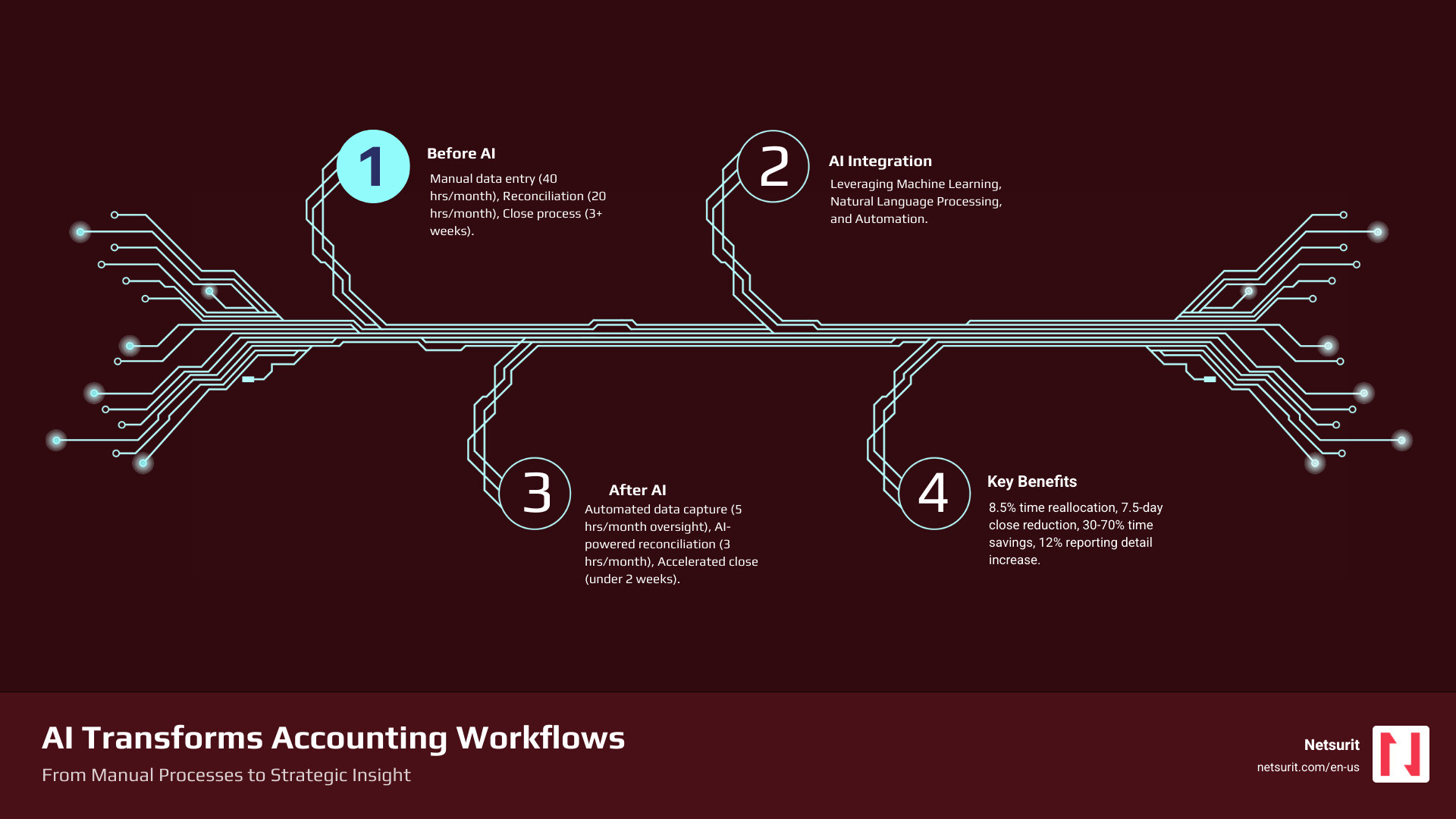
    infographic showing AI impact on accounting workflows - AI for accounting infographic infographic-4-steps-tech

    Infographic details: A visual flowchart showing how AI transforms accounting workflows. Left side shows “Before AI” with manual data entry (40 hours/month), manual reconciliation (20 hours/month), and manual close process (3+ weeks). Center shows “AI Integration” with icons for machine learning, natural language processing, and automation. Right side shows “After AI” with automated data capture (5 hours/month oversight), AI-powered reconciliation (3 hours/month review), and accelerated close (under 2 weeks). Bottom panel displays key metrics: 8.5% time reallocation to strategic work, 7.5-day reduction in close time, 30-70% time savings on workflows, 12% increase in reporting detail.

    From Calculators to Cognition: What AI in Accounting Really Means

    AI in accounting refers to systems that simulate human intelligence to perform tasks. This goes beyond simple automation to include learning, reasoning, and self-correction. The core technologies driving this shift are Machine Learning (ML), Natural Language Processing (NLP), and Generative AI, which are often packaged into specialized “vertical AI” solutions designed specifically for finance.

    Machine Learning (ML) allows systems to learn from data without explicit programming, making it ideal for identifying patterns in large datasets—crucial for tasks like fraud detection and transaction categorization. Natural Language Processing (NLP) enables computers to understand, interpret, and generate human language, revolutionizing document review, contract analysis, and client communication. Generative AI (GenAI), a powerful subset of ML and NLP, can create new content, such as drafting reports, summarizing complex financial regulations, or even generating initial financial statements. Together, these technologies are moving accounting from a retrospective function to a proactive, predictive one.

    diagram of AI, ML, NLP, GenAI relationship - AI for accounting

    General vs. Specialized AI

    A key distinction exists between general-purpose AI like ChatGPT and specialized, or “vertical,” AI for accounting. While a general tool can draft an email or answer a basic query, it lacks the contextual understanding and domain-specific knowledge required for complex accounting tasks. A vertical AI solution, in contrast, is purpose-built for the finance and accounting industry. It understands the nuances of revenue recognition, lease accounting (ASC 842), and tax codes, ensuring compliance and auditability. As the a16z market map shows, venture investment is accelerating into these specialized tools that tackle accounting’s most complex use cases—from tax and audit to practice management, revenue recognition, and financial close.

    Vertical AI solutions are trained on vast datasets of financial transactions, accounting standards, and regulatory documents. This specialized training allows them to offer better accuracy and fewer “hallucinations” (incorrect or fabricated information) compared to general-purpose models. When we discuss “agentic AI” in accounting, we’re often referring to these vertical solutions that act as intelligent agents, capable of autonomous task execution, learning from interactions, and adapting to firm-specific preferences. They can perform repetitive tasks, flag anomalies, and even generate insights, freeing up human accountants for higher-value work.

    Feature General-Purpose AI (e.g., ChatGPT) Vertical Accounting AI (e.g., Klarity.ai, Glean.ai)
    Data Training Broad, web-scale data; diverse topics Specialized, finance-specific data; accounting standards, transactions, regulations
    Compliance No inherent compliance knowledge; requires human input Built-in knowledge of accounting standards (GAAP, IFRS) and tax regulations
    Auditability Outputs may lack source attribution; difficult to trace Designed with audit trails, source linking, and explainability for financial review
    Accuracy Prone to “hallucinations” on specific domain questions Higher domain-specific accuracy; lower risk of errors in accounting contexts
    Integration Often standalone; requires manual data transfer Seamless integration with ERPs, accounting software, and financial systems
    Use Cases Content generation, general research, brainstorming Transaction categorization, reconciliation, fraud detection, tax preparation, audit

    Example: A Tale of Two AIs in Katy, TX

    Consider a growing CPA firm in Katy, TX, that serves a diverse client base, from small businesses to mid-sized manufacturing plants. This firm uses a general-purpose tool like ChatGPT to help draft client communication templates and marketing materials for local outreach. It’s excellent for generating creative text and overcoming writer’s block.

    However, for its core accounts payable (AP) work, which involves processing hundreds of invoices monthly for clients, the firm relies on a vertical AI solution like Glean.ai. This specialized tool integrates directly with their accounting software, uses ML to code invoices accurately, and automates the three-way matching process. When an invoice comes in for a client, Glean.ai automatically extracts relevant data, matches it against purchase orders and receipts, and flags any discrepancies. This ensures compliance, reduces manual errors, and provides a clear audit trail for every transaction—something a general-purpose AI cannot do with the required precision or auditability. The firm’s accountants in Katy then review flagged items, ensuring human judgment is applied where context is critical.

    How AI Is Automating Workflows and Boosting Productivity Today

    AI for accounting is not a future concept; it’s delivering measurable results now. A recent study confirms that accountants using AI reallocate approximately 8.5% of their time from routine data entry to high-value tasks like client communication and quality assurance. This shift is driven by AI’s ability to automate core accounting functions and provide deeper analytical insights. The 2025 Generative AI in Professional Services Report from Thomson Reuters found that vendors report time savings between 30–70% with AI-powered workflow automation. Furthermore, LLM-based research tools are helping to reduce document analysis time by 50% or more.

    AI automated month-end close dashboard - AI for accounting

    Key Applications and Gains

    The impact of AI is seen across numerous accounting tasks:

    • Task Automation: AI streamlines repetitive, rule-based processes, allowing systems to automatically categorize expenses, reconcile accounts, and even draft initial journal entries. Accountants using AI saw a 12% increase in general ledger granularity.
    • Invoice Processing & Expense Management: Intelligent Document Processing (IDP) uses AI to extract data from invoices and receipts, automating data entry and matching, leading to significant time savings and reducing manual errors.
    • Accounts Payable (AP) & Accounts Receivable (AR): AI automates AP workflows by matching invoices to purchase orders and receipts, and it can manage AR by sending automated reminders for outstanding invoices, significantly improving cash flow.
    • Improved Analytics & Forecasting: AI analyzes large volumes of historical data to identify patterns and predict future trends more accurately than traditional methods. This improves financial forecasting, budgeting, and risk assessment.
    • Fraud Detection: AI can identify unusual or anomalous transactions and patterns that indicate potential fraud, often with greater precision than human review, and at a much faster rate. The use of AI in antifraud programs is expected to triple over the next two years.
    • Real-time Reporting & Anomaly Detection: AI provides continuous monitoring of financial data, flagging discrepancies or potential issues as they occur, leading to a 7.5-day reduction in monthly close time for firms embracing AI.

    Example: Closing the Books Faster in Sugarland, TX

    A mid-sized accounting firm in Sugarland, TX, serving local manufacturing clients, was struggling with a monthly close process that consistently stretched beyond two weeks. This delay limited their capacity to provide timely strategic advice to clients. After implementing an AI for accounting-powered close management tool, their workflow transformed.

    The AI system now automatically reconciles thousands of general ledger transactions, flags anomalies in journal entries that might indicate errors or fraud, and generates draft financial statements in under two weeks—a process that previously took over three. This significant acceleration means the firm’s senior accountants can now dedicate their freed-up time to providing forward-looking cash flow analysis and strategic advice, strengthening client relationships and increasing advisory revenue. For firms in the Houston metro area looking to make a similar leap, a clear plan for technology adoption and IT strategy is essential. Our team at Netsurit can provide more info about IT strategy services to help you steer this transition.

    While the benefits of AI for accounting are compelling, adopting AI is not without its challenges. Implementation requires careful planning to address initial costs, potential skills gaps within your team, and the critical need for high-quality data. Integrating AI with existing legacy systems can be complex, and ensuring data cleanliness and readiness is paramount, as AI is only as good as the data it’s trained on. Furthermore, 62% of surveyed accountants express valid concerns about errors and accuracy in AI-generated reporting, highlighting the non-negotiable role of human oversight.

    Ethical Guardrails and Human Oversight

    The ethical implications of AI in accounting are a critical consideration. These include:

    • Algorithmic Bias: AI models learn from historical data, which can inadvertently perpetuate biases present in that data. For example, an AI flagging transactions that unfairly targets specific business units due to learned biases rather than actual risk.
    • Accountability: When an AI makes an error, who is accountable? Establishing clear frameworks for responsibility is essential.
    • Data Privacy: AI systems process vast amounts of sensitive financial data. Ensuring robust data security and adherence to privacy regulations (like GDPR, if applicable to global clients, or state-specific privacy laws) is critical.
    • Transparency and Explainability: Understanding how an AI arrived at a conclusion is vital, especially in audit and compliance. The “black box” nature of some AI models can be a barrier to trust and auditability.
    • The “human-in-the-loop” model: This approach ensures that AI recommendations and automated processes are always reviewed, validated, and contextualized by a human expert. This maintains a critical balance between efficiency and accuracy.
    • Judgment and Context: AI excels at pattern recognition and data processing, but it lacks human judgment, empathy, and the ability to understand nuanced business context. These remain indispensable human skills.

    Trade-offs: Implementing AI for accounting

    Implementing AI effectively means understanding its limitations and designing workflows that capitalize on its strengths while mitigating its weaknesses.

    • Works best when: Automating high-volume, rules-based tasks like invoice processing, initial data extraction for tax returns, or first-pass bank reconciliations. These are the “laundry” tasks that free up human accountants.
    • Avoid when: Making final judgments on complex tax strategies, ambiguous accounting treatments, or ethical dilemmas that require deep contextual understanding of a client’s business. These are the “poetry” tasks that demand human insight and creativity.
    • Risks: Over-reliance on AI can lead to skill atrophy in human accountants if they stop performing basic checks. Data privacy breaches are a significant concern, especially if firms use unsecured public AI tools or don’t vet their vendors. Algorithmic bias can perpetuate historical errors or create unfair outcomes if not continuously monitored.
    • Mitigations: Mandate a “human-in-the-loop” review for all critical AI-generated outputs, particularly those affecting financial reporting or compliance. Partner with a trusted IT provider for secure, private AI implementation and robust data governance. Regularly audit AI outputs for fairness and accuracy, and conduct algorithmic bias audits during AI development and post-deployment. Our team offers cybersecurity consulting to help firms in Houston, Sugarland, and Katy build these essential safeguards.

    The Evolving Accountant: How to Thrive in an AI-Driven World

    The most common question—”Will AI replace accountants?”—is the wrong one. AI will replace tedious tasks, not the professionals who perform them. The future belongs to accountants who partner with AI, using it to handle the “laundry” (data processing) so they can focus on the “poetry” (strategic advice and client relationships), a concept captured in a now-famous meme. A study from MIT Sloan found that experienced accountants used AI strategically to boost performance gains, highlighting that AI amplifies, rather than replaces, human expertise.

    AI addresses the current talent shortage in the accounting profession not by eliminating jobs, but by making the profession more attractive and sustainable. By automating repetitive tasks, AI frees up accountants from burnout-inducing data entry, allowing them to focus on more stimulating, high-value work. This shift can help retain existing talent and attract new professionals seeking strategic, impactful careers.

    To thrive in an AI-driven environment, accounting professionals need to cultivate a new set of skills:

    • AI Literacy: Understanding what AI is, how it works, its capabilities, and its limitations. This includes knowing when and how to apply AI tools effectively.
    • Prompt Engineering: The ability to craft precise and effective instructions for AI models to generate accurate and relevant outputs.
    • Data Analytics and Interpretation: Moving beyond data entry to analyzing and interpreting AI-generated insights, identifying trends, and extracting actionable intelligence.
    • Critical Thinking and Problem-Solving: Applying human judgment to AI outputs, identifying potential errors or biases, and solving complex problems that AI cannot.
    • Client Communication and Advisory: Focusing on communicating financial insights clearly to clients, building strong relationships, and providing strategic advice based on AI-powered analysis.

    Future trends indicate a move towards:

    • Hyperautomation: The combination of AI, machine learning, and Robotic Process Automation (RPA) to automate increasingly complex end-to-end business processes.
    • Agentic AI: Autonomous AI systems that can execute multi-step tasks, learn from experience, and adapt to changing conditions with minimal human intervention. Gartner forecasts that by 2028, 15% of daily accounting decisions will be made autonomously by AI agents.
    • Real-time Audits: AI will enable continuous monitoring and analysis of financial data, making audits less about periodic sampling and more about real-time assurance.
    • AI as a Strategic Advisor: AI will move beyond task automation to provide predictive and prescriptive insights, helping accountants guide clients on future financial decisions and risks.

    Upskilling Pathways

    To stay relevant and competitive, accounting professionals should proactively engage in upskilling. Here are some pathways:

    • Certifications: Look for certifications in AI for finance, data analytics, or specific accounting software with AI integrations.
    • Online Courses: Platforms like Coursera, edX, and LinkedIn Learning offer numerous courses on AI, machine learning, and data science relevant to finance.
    • In-house Training: Advocate for and participate in internal training programs that focus on AI tool usage, prompt engineering, and ethical AI practices.
    • Community Engagement: Join professional communities like the AI @ Thomson Reuters community to connect with experts, learn about the latest trends, and share best practices.

    A Practical Guide to Adopting AI for Accounting Firms

    Getting started with AI does not require a massive, high-risk investment. It requires a thoughtful, phased approach focused on solving specific problems and empowering your team. The CPA.com 2025 AI in Accounting Report outlines a roadmap: Find, Pilot, Operationalize, and Scale.

    Step 1: Assess Readiness and Identify Pain Points

    Before diving into solutions, understand your firm’s current state and where AI can make the biggest impact.

    • Workflow Audit: Conduct a thorough review of your existing accounting workflows to identify high-friction, repetitive, or rules-based tasks.
    • Repetitive Tasks: Pinpoint tasks that consume significant staff time but offer little intellectual challenge, such as data entry, invoice processing, or initial reconciliation. These are prime candidates for AI automation.
    • High-Friction Processes: Identify areas where errors are frequent, compliance is challenging, or bottlenecks occur regularly.
    • Data Hygiene: Assess the quality and structure of your data. AI thrives on clean, organized data, so addressing data hygiene issues is a crucial prerequisite.

    Step 2: Start Small with a Pilot Program

    Don’t try to automate everything at once. Choose a small, manageable project to gain experience and demonstrate value.

    • Select Use Case: Pick 1-3 high-value, low-risk use cases for a pilot. Examples include AI-enabled bank reconciliations, automated expense categorization, or AI-assisted tax return review for specific forms.
    • Assign Champions: Designate internal team members who will lead the pilot, learn the AI tool, and champion its adoption within the firm.
    • Track KPIs: Establish clear Key Performance Indicators (KPIs) to measure the success of your pilot. This could include time saved, error reduction, increased client capacity, or improved turnaround time.

    Step 3: Choose the Right Tools and Partners for AI for accounting

    The market for AI for accounting tools is rapidly evolving. Selecting the right solutions and support is critical for success.

    • Vendor Evaluation: Research specialized vertical AI solutions that address your identified pain points. Look for vendors with a strong track record, clear security protocols, and positive user reviews. Consider options like Klarity.ai for document review or BILL for AP/AR.
    • Security: Prioritize solutions that offer robust data security, encryption, and compliance with relevant regulations. Ask potential vendors about their data usage policies and how they protect sensitive client information.
    • Integration: Ensure the AI tool integrates seamlessly with your existing accounting software (e.g., QuickBooks, Xero) and other critical systems to avoid data silos and manual transfers.
    • Scalability: Choose solutions that can scale with your firm’s growth and adapt to evolving client needs.
    • Expert Partnership: Consider partnering with an elite tech partner like Netsurit. We help firms in Houston, Sugarland, Conroe, and Katy steer vendor selection, ensure secure implementation, and manage the ongoing IT infrastructure required for AI solutions. Our IT services for accounting firms are designed to support your firm’s technological evolution.

    Step 4: Scale Thoughtfully with a Focus on People

    Successful AI adoption is as much about people as it is about technology.

    • Change Management: Communicate clearly and transparently with your team about the “why” behind AI adoption. Address concerns, highlight benefits, and involve staff in the change process.
    • Upskill Workforce: Invest in continuous training for your team. This includes AI literacy, prompt engineering, and developing the critical thinking skills needed to work alongside AI.
    • Create Accountability: Establish clear roles and responsibilities for managing and overseeing AI systems. Define who is responsible for AI outputs, error detection, and continuous improvement.
    • Institutionalize Governance: Develop internal policies and a Responsible AI Framework that covers AI use, oversight, data management, and risk evaluation. This ensures ethical, secure, and effective long-term AI integration.

    Frequently Asked Questions about AI for accounting

    Will AI completely replace accountants?

    No. AI automates tasks but improves the strategic, advisory, and relationship-building roles that require human judgment and empathy. It empowers accountants to deliver more value, not become obsolete. The focus shifts from transactional work to critical analysis, client communication, and strategic guidance.

    How are the Big 4 using AI differently than smaller firms?

    Big 4 firms like Deloitte and EY are investing heavily in proprietary, large-scale AI platforms for global audit engagements, risk assessment, and internal software development. They are building extensive in-house capabilities to handle their vast client bases and complex regulatory environments. For example, Deloitte has developed generative and agentic capabilities in its audit platform for initial document reviews, and PwC has seen 20-50% productivity gains in development processes due to GenAI.

    Smaller accounting firms, in contrast, typically adopt specialized, off-the-shelf vertical AI tools. These solutions address specific pain points in areas like tax preparation, AP/AR automation, financial close, and practice management. They focus on leveraging accessible technology to improve efficiency and free up time for advisory services, rather than building bespoke AI systems from scratch.

    What is the single most important factor for a successful AI implementation?

    Data quality. AI is only as good as the data it learns from. Clean, structured, and well-governed data is the non-negotiable foundation for generating reliable and accurate AI-driven insights. Flawed or incomplete data will lead to biased or incorrect AI outputs, undermining the entire purpose of the implementation. Ensuring trustworthy data also involves ethical collection and careful management throughout its lifecycle.

    Conclusion: Your Firm’s Next Move

    AI for accounting is a transformative force, shifting accounting from a reactive, compliance-focused function to a proactive, strategic one. The first step is not a massive investment, but a strategic assessment of where automation can free your team to deliver higher value. By embracing AI thoughtfully, firms in Houston, Sugarland, Conroe, and Katy can not only overcome current challenges like talent shortages and manual errors but also open up new opportunities for growth and client engagement. As an elite tech partner, Netsurit helps firms securely implement AI solutions to crush downtime and open up business momentum, ensuring your technology strategy aligns with your business aspirations.

    Get expert guidance on IT services for your accounting firm.
  • Houston’s IT Lifeline Navigating Network Support for Seamless Operations

    Houston’s IT Lifeline Navigating Network Support for Seamless Operations

    Why Network Reliability is Non-Negotiable for Houston Businesses

    Network support Houston TX is the backbone that keeps your business connected, productive, and secure. When your network fails, you’re not just dealing with a technical glitch—you’re losing revenue, frustrating customers, and risking sensitive data. For Houston businesses navigating a competitive, economy, a single hour of downtime can cost thousands of dollars and damage hard-earned reputations.

    What you need to know about network support in Houston:

    • Core services include 24/7 monitoring, firewall management, help desk support, VPN setup, and backup/disaster recovery
    • Average resolution time for critical network issues is 10 minutes with top-tier providers
    • Cost of downtime can reach $5,600 per minute for small-to-medium businesses
    • Local providers offer faster on-site response times and understand Houston’s unique business landscape (energy, aerospace, healthcare)
    • Proactive monitoring prevents 95% of common network issues before they disrupt operations
    • Typical response times range from 1 minute for queries to 15 minutes for critical outages under Service Level Agreements

    The stakes are particularly high in Houston. Whether you’re managing client data in Katy, coordinating teams across Sugar Land and The Woodlands, or serving global customers from the Energy Corridor, your network is working around the clock. A poorly planned or outdated network doesn’t just slow things down—it opens the door to ransomware (81% of attacks happen outside business hours), causes video calls to drop during critical negotiations, and forces your team to lose an average of one full work week per year to performance issues.

    I’m Orrin Klopper, CEO of Netsurit, and over the past 29 years I’ve built IT infrastructure for businesses across North America, including right here in Houston. I’ve seen how the right network support transforms a company from firefighting daily IT crises to confidently scaling operations. This guide will show you exactly what to look for, what to avoid, and how to make your network a strategic advantage rather than a constant headache.

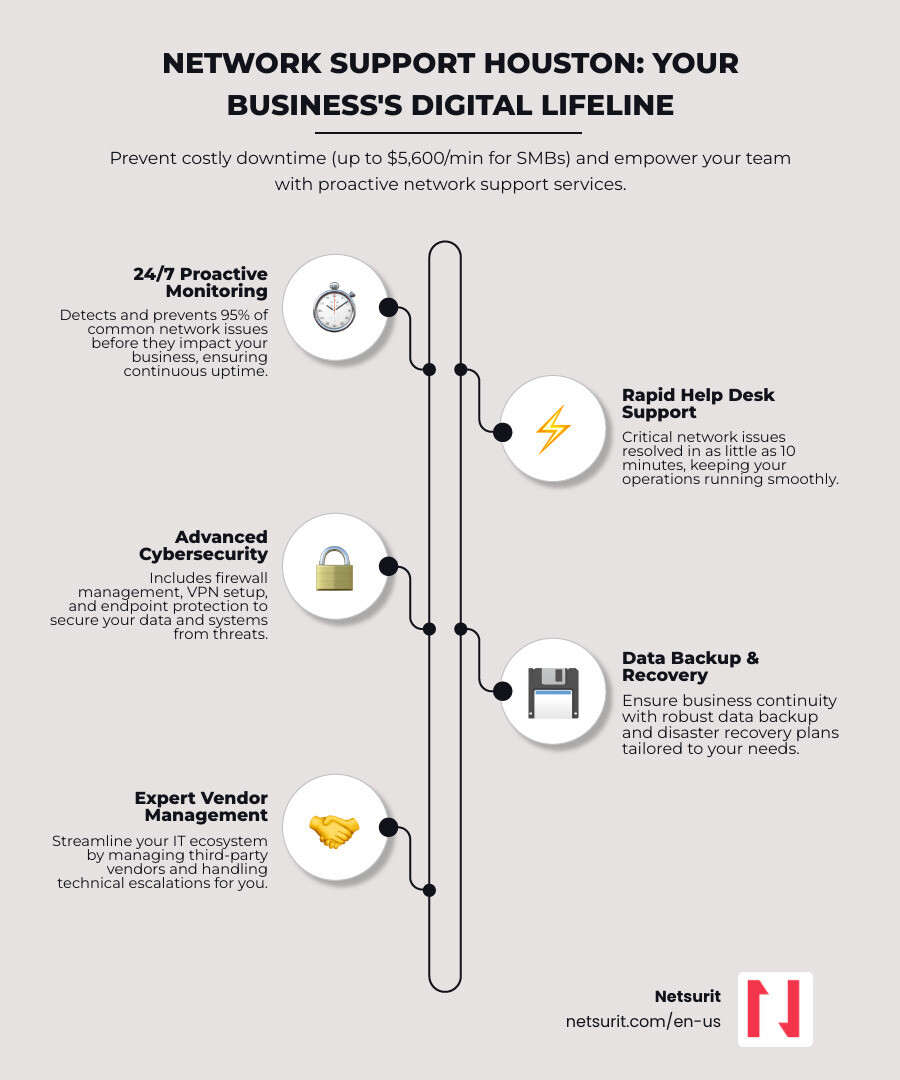
    infographic showing breakdown of network support services including 24/7 monitoring with 95% issue prevention rate, help desk support with average 10-minute critical resolution time, cybersecurity protection with firewall and VPN management, backup and disaster recovery for business continuity, and vendor management to handle escalations, with Houston-specific data points on downtime costs and response times - Network support Houston TX infographic infographic-line-5-steps-elegant_beige

    Boost Productivity and Cut Costs: The Business Case for Proactive Network Support

    When your network is down, your business is effectively closed. This isn’t just an inconvenience; it’s a direct hit to your bottom line, productivity, and reputation. For businesses across Houston, Sugar Land, Conroe, and Katy, relying on a “break-fix” approach to IT is a losing strategy. It’s like waiting for your car to break down on the Katy Freeway before you ever think about an oil change. Instead, professional network support is a strategic investment that impacts your business’s core functions by preventing problems before they start.

    frustrated employee vs productive team - Network support Houston TX

    Why Reactive IT Fails Houston Businesses

    The cost of network neglect is staggering. Every time your network and computer systems are down, you become less productive and lose opportunities to make money and engage your customers. For small to mid-sized businesses, network downtime can cost up to $5,600 USD per minute. That’s not a typo. This immediate financial drain is compounded by lost productivity, as the average employee loses one week of work per year due to network performance issues. Imagine the impact on your team in Houston trying to meet deadlines or serve clients when systems are slow or inaccessible.

    Beyond the immediate financial hit, reactive IT leads to:

    • Lost revenue and opportunities: Every minute your systems are offline, sales are missed, and client service suffers.
    • Reputational damage: Unreliable IT makes your business look unprofessional and can erode customer trust.
    • Inefficient workflows: Constant interruptions and slow systems force employees to waste time, reducing overall efficiency.
    • Security vulnerabilities: Outdated systems and unpatched software are open invitations for cyberattacks. Ransomware attacks, for instance, are enacted outside regular business hours in 81% of cases, highlighting the danger of not having continuous protection.

    Consider a Katy-based accounting firm during tax season. If their server crashes, they face immediate chaos. Client files become inaccessible, tax filings are delayed, and the firm risks substantial penalties and a damaged reputation. A reactive approach means waiting for the crisis, then scrambling to fix it, often at a much higher cost than prevention. This is why we advocate for a different approach entirely.

    The Proactive Advantage: How Monitoring Prevents Disaster

    Our approach to network support is designed to crush downtime and open up business momentum. We shift from reacting to problems to actively preventing them. This proactive strategy includes:

    • 24/7 Network Monitoring: We continuously watch over your network, identifying unusual activity, bottlenecks, or failing components before they escalate into major issues. This relentless vigilance ensures your systems remain stable and connected.
    • Automated Maintenance: Regular updates, patches, and system checks are performed automatically, often outside business hours, to keep your network optimized and secure without disrupting your team.
    • Patch Management: We ensure all your software and operating systems are up-to-date with the latest security patches, closing vulnerabilities that cybercriminals exploit.
    • Performance Optimization: We fine-tune your network to reduce latency, minimize downtime, and ensure fast, reliable access to applications. This means employees spend less time waiting and more time working.

    The benefits are clear: proactive monitoring can prevent 95% of common network issues before they cause business disruption. For our clients, this means fewer network problems and more uptime, which translates directly into more business for you. We aim for IT without fuss, ensuring added stability and enabling innovation. This is the essence of effective IT Support Houston and what we believe truly exceptional Managed IT Services Houston should deliver.

    Decoding Network Support: Core Services Your Business Needs

    Navigating IT services can sometimes feel like wading through alphabet soup. What exactly is included in network support, and why does it matter for your Houston business? At its heart, network support is about ensuring the infrastructure that connects your devices and data is always available, secure, and performing optimally. We cover everything from the physical cables to the cloud connections, ensuring every piece of your digital puzzle works seamlessly together.

    network health monitoring dashboard - Network support Houston TX

    Essential Network Support Services

    Here’s a breakdown of the core services typically included in a comprehensive network support package:

    • Network Infrastructure Management: This is the foundation of your digital operations. We manage, monitor, and maintain all the hardware that makes your network run. This includes routers, switches, and firewalls, ensuring they are configured correctly, updated, and performing efficiently. For multi-office businesses in Houston and its surrounding areas like Conroe or Sugar Land, we can implement advanced solutions like Multiprotocol Label Switching (MPLS) for seamless, secure connectivity between locations. We also ensure your Wi-Fi is robust, secure, and provides optimal coverage across your premises. Structured cabling, though often overlooked, is crucial for a reliable network foundation, and we ensure it’s delivered to improve connectivity and data transfer speeds.
    • Proactive Monitoring: Our 24/7/365 monitoring is like having a digital guardian constantly watching over your systems. We use sophisticated tools, including our Netsurit Productivity Monitor (NPM), to detect unusual activity, bottlenecks, or failing components. This allows us to resolve issues often before you even notice them, keeping your systems stable and preventing costly downtime. Automated alerts, updates, and maintenance are part of this proactive approach, preventing disruptions.
    • Cybersecurity Foundation: In today’s threat landscape, robust network security is non-negotiable. We implement enterprise-grade firewalls, configure secure Virtual Private Networks (VPNs) for remote access (essential for a distributed workforce), and deploy endpoint protection to safeguard individual devices. We can improve your IT network security by implementing 256-bit encryption – the same level used to protect top-secret government data – to shield your sensitive information. We also monitor for suspicious activity, unauthorized access, and vulnerabilities, ensuring your data is protected from ransomware and other cyber threats.
    • Data Backup & Disaster Recovery: Your data is your business’s lifeblood. We ensure your critical business data is regularly backed up and that you have a robust disaster recovery plan in place. This means that even in the event of a major incident – be it a hardware failure, natural disaster, or cyberattack – your business can recover quickly and minimize data loss.
    • Help Desk Support: When an issue arises, you need fast, reliable help. Our dedicated IT Help Desk Houston team is available to resolve employee IT issues quickly. We pride ourselves on rapid response times; for critical issues, the average resolution time can be as low as 10 minutes, with queries often answered in just one minute. We also offer bi-lingual service desk support to cater to Houston’s diverse business community.
    • Vendor Management: Dealing with multiple IT vendors can be a headache. We act as your single point of contact, handling relationships and escalating issues with internet service providers, software vendors, and other technology partners. Our vendor-agnostic approach ensures we always recommend the best solutions for your business, not just what’s convenient for us.
    • Cloud Integration: Many Houston businesses leverage cloud solutions like Microsoft 365, Azure, or AWS. We seamlessly integrate these cloud services into your existing network infrastructure, ensuring secure and efficient access. We can host data on our secure infrastructure for advanced Microsoft 365 environments, simplifying remote work management through specialized connectivity tools.
    • VoIP Phone Systems: Modern businesses rely on Voice over Internet Protocol (VoIP) for clear, reliable communication. We install, configure, and maintain VoIP phone systems, ensuring your communication infrastructure is as robust as your data network.

    By encompassing these services, we provide comprehensive network support that keeps your business connected, secure, and moving forward.

    How to Select the Right Provider for Network support Houston TX

    Choosing the right network support provider for your Houston business is a critical decision. It’s not just about fixing computers; it’s about partnering with a team that understands your business goals and can align your technology with them. With numerous options in the Houston metro area, including Sugar Land, Conroe, and Katy, how do you make an informed choice? We believe a structured approach is best.

    Key Vetting Criteria for Your Houston Business

    When evaluating potential partners for Network support Houston TX, consider these key criteria:

    • Technical Certifications and Expertise: Look for providers whose technicians hold industry-recognized certifications like Cisco CCIE, CISA, or CISSP. These demonstrate a deep level of knowledge and problem-solving capability. For example, remote support engineers with practical backgrounds and access to advanced technology can resolve issues quickly, and those with top-tier certifications like a Cisco CCIE are equipped to solve complex problems rapidly. Our team, with over 450 specialists and 27+ years of experience, ensures you have access to a broad range of certified experts.
    • Scalability of Services: Your business isn’t static, and neither should your IT support be. Can the provider offer custom network support packages that grow with you? We focus on aligning network infrastructure with business goals, ensuring our solutions are scalable for growing businesses.
    • Local Presence and On-site Support: While much can be resolved remotely (we resolve 95% of service requests this way), sometimes on-site support is essential. Ensure your chosen provider has a local presence in Houston, Sugar Land, Conroe, or Katy, guaranteeing timely on-site assistance when needed. This is particularly important for physical infrastructure issues.
    • Response Times and Service Level Agreements (SLAs): Don’t just ask about response times; demand a clear Service Level Agreement. This contract should define measurable terms, including support availability, covered items, performance benchmarks, and help desk response times. Top providers offer response times of 15 minutes or less for critical issues, with average resolution times for critical IT issues as low as 10 minutes.
    • Strategic IT Planning and Quarterly Business Reviews (QBRs): A true partner doesn’t just fix problems; they help you plan for the future. Look for providers who offer strategic IT planning and conduct regular QBRs. These reviews ensure your IT strategy remains aligned with your evolving business objectives and help you budget for future technology needs.
    • Client Testimonials and Case Studies: What do other Houston businesses say about them? Look for evidence of client satisfaction, such as our 100% satisfaction guarantee, and stories of how they’ve helped businesses achieve their goals, not just fix their computers.

    In-House vs. Outsourced IT: A Cost-Benefit Analysis

    The decision to manage IT in-house or outsource it is a perennial one for businesses. Here’s a comparison to help you weigh the options for your Houston operations:

    Feature In-House IT Employee Outsourced Managed Services Provider (MSP)
    Annual Costs Salary, benefits, training, recruitment, office space Predictable monthly subscription fees
    Expertise Limited to individual’s knowledge Broad team of specialists (e.g., cybersecurity, networking, cloud)
    Availability Typically 9-5, subject to vacation/sick leave 24/7/365 monitoring and support
    Overhead High (equipment, software licenses, infrastructure) Low, shared across multiple clients
    Focus Often reactive, day-to-day firefighting Proactive, strategic planning, and issue prevention
    Scalability Difficult to scale up or down quickly Flexible, scales with business needs

    For many small and mid-sized businesses in Houston, outsourcing network support makes significant financial sense, saving both money and time. It allows you to access a diverse pool of expertise, ensuring comprehensive coverage without the high cost and complexity of hiring and retaining a full internal IT team. This frees your internal resources to focus on core business growth.

    Trade-offs: Outsourcing Your Network Support

    While the benefits of outsourcing network support are compelling, it’s crucial to consider the trade-offs to ensure it’s the right fit for your business.

    • Works best when: You need access to a broad range of expertise and 24/7 support without the high cost of hiring a large internal team. This is particularly true if your business relies heavily on diverse technologies or operates outside standard business hours. An MSP like us can provide advanced capabilities, such as proactive threat detection, that a small internal team might struggle to maintain.
    • Avoid when: Your business uses highly proprietary, custom-built software that requires dedicated, on-site developers with deep institutional knowledge. In such niche scenarios, the unique expertise required might be better kept in-house, or a co-managed IT model could be more appropriate.
    • Risks: Potential for slower response for on-site needs if the provider is not truly local; misaligned priorities if the provider doesn’t understand your business goals. For example, a business in Conroe might experience delays if their provider’s only technicians are based across town in Sugar Land during peak traffic.
    • Mitigations: Insist on a provider with a guaranteed on-site response time in your Service Level Agreement, especially for your specific locations like Katy or The Woodlands. Also, ensure the provider offers strategic Quarterly Business Reviews (QBRs) and transparent communication to ensure their services align with your evolving business objectives. This keeps them invested in your success.

    By carefully considering these factors and seeking a reputable partner, you can leverage IT Outsourcing Houston to your strategic advantage.

    Fortifying Your Digital Assets: Network Security and Compliance in Houston

    Your network is not just a conduit for information; it’s a vault for your most valuable assets. For Houston businesses, the stakes are particularly high, given the region’s concentration of critical industries like energy, healthcare, and finance. Effective network support is intrinsically linked to robust cybersecurity and adherence to industry-specific compliance standards.

    Addressing Houston’s Unique Security Challenges

    Houston’s dynamic business environment presents specific cybersecurity challenges. Our businesses frequently handle sensitive data, from intellectual property in the energy sector to protected health information (PHI) in healthcare. The rise of remote work also means securing connections for employees working from Sugar Land to Conroe.

    Our network support services address these challenges head-on:

    • Proactive Threat Detection: We continuously monitor your network for suspicious activity and potential vulnerabilities, often detecting and neutralizing threats before they can cause damage.
    • Advanced Firewalls: We deploy and manage enterprise-grade firewalls that act as the first line of defense, filtering malicious traffic and preventing unauthorized access.
    • Multi-Factor Authentication (MFA): Implementing MFA significantly improves security by requiring users to verify their identity through multiple methods, making it much harder for cybercriminals to gain access even if they steal passwords.
    • Intrusion Prevention Systems (IPS): These systems actively scan network traffic for known attack patterns and can automatically block or alert on malicious activity, adding another layer of defense.
    • Secure Remote Work Connections: We establish and maintain secure VPNs (Virtual Private Networks) to encrypt data transmitted between remote employees and your corporate network, ensuring confidentiality and integrity.

    The goal is to protect your digital assets from the ever-present threat of ransomware and data breaches, ensuring business continuity and peace of mind. This comprehensive approach is central to our Cybersecurity Services in Houston.

    Beyond general security, many businesses in Houston must adhere to specific regulatory frameworks and data protection standards. Network support plays a crucial role in achieving and maintaining compliance.

    • NIST Compliance: The National Institute of Standards and Technology (NIST) provides a framework for cybersecurity best practices, particularly relevant for government contractors and businesses handling sensitive data. Our services ensure your network infrastructure, data handling, and security protocols align with NIST guidelines, helping you shield your data with NIST-compliant services.
    • GDPR Compliance: For businesses with international clients, particularly those in the EU, the General Data Protection Regulation (GDPR) mandates strict rules for data privacy and protection. Network support ensures that your data storage, processing, and transfer mechanisms comply with GDPR requirements, which is vital for understanding GDPR for international clients.

    Consider a Houston law firm that represents clients based in the European Union. This firm handles highly sensitive personal and legal data. Without robust network support that is both NIST and GDPR compliant, they face severe risks: hefty fines, reputational damage, and loss of client trust. Our network support services would help them implement secure data handling policies, encrypted communications, and audit trails to demonstrate full compliance, ensuring their operations in Katy or Sugar Land meet global standards.

    Frequently Asked Questions about Network Support in Houston

    We understand you have questions about how network support can best serve your Houston business. Here are some of the most common inquiries we receive:

    How is network support different from general IT support?

    This is a great question, as the terms are often used interchangeably, but they have distinct focuses. Network support specifically targets the underlying infrastructure that allows all your devices to communicate. This includes managing, maintaining, and troubleshooting components like routers, switches, firewalls, Wi-Fi access points, and the cabling that connects them. Its primary goal is to ensure seamless connectivity and optimal network performance.

    General IT support, on the other hand, has a broader scope. It encompasses a wider range of technical assistance, including end-user device management (laptops, desktops, mobile phones), software installation and troubleshooting, email support, and general user assistance. While there’s overlap, think of network support as focusing on the “roads and bridges” of your digital world, while general IT support focuses on the “vehicles and passengers” using those roads.

    How quickly can I expect a response to a critical network issue?

    For critical network issues, rapid response is paramount to minimize downtime and prevent lost revenue. The expected response time for a critical issue is typically outlined in your Service Level Agreement (SLA) with your provider. Top-tier providers in Houston, including us, aim for incredibly fast response times, often within 15 minutes or less. Some providers even boast an average resolution time of 10 minutes for critical IT issues, with initial queries answered in just one minute.

    We also offer guaranteed response times, meaning you’ll know exactly what to expect when a major problem arises. Our goal is to resolve issues quickly, often remotely, to get your business back online with minimal disruption.

    Can network support help my business adopt new technologies like AI?

    Absolutely. A robust, well-managed network is the foundational bedrock upon which advanced technologies like Artificial Intelligence (AI) are built. Without a high-performing, secure, and scalable network, deploying and leveraging AI tools effectively becomes a significant challenge.

    A strategic network support partner will ensure your infrastructure is not only stable today but also future-ready. This involves optimizing network capacity, ensuring sufficient bandwidth, and implementing security protocols capable of handling the increased data flow and processing demands that AI applications typically require. We can help you assess your current network capabilities, identify potential bottlenecks, and design solutions that support your AI adoption roadmap. This ensures your business in Houston, Sugar Land, Conroe, or Katy can confidently integrate and scale AI tools, IoT devices, and other future innovations without your network becoming a limiting factor.

    Conclusion: Take the Next Step Toward Seamless Operations

    In Houston’s competitive business landscape, a reliable, secure, and efficient network is not a luxury; it’s the central nervous system of your business. It’s the silent force that keeps your teams productive, your data safe, and your operations running smoothly from Katy to Conroe. By partnering with an expert network support provider, you move from fighting daily IT fires to strategically growing your business, confident that your critical operations are protected and optimized.

    We are Netsurit, and we are committed to being your elite tech partner in Houston. We combine enterprise-level experience with a local touch, delivering managed IT, cybersecurity, and AI solutions designed to crush downtime and open up business momentum. Let us help you transform your network into a strategic asset that supports your aspirations and drives your success.

    Take the next step toward seamless operations and lasting peace of mind. Schedule a consultation to assess your Houston IT support needs.

  • Sleep Soundly: How to Drastically Reduce Your Audit Risk

    Sleep Soundly: How to Drastically Reduce Your Audit Risk

    Why Understanding Audit Risk Is Your First Line of Defense

    To reduce audit risk, you must strengthen internal controls, maintain meticulous records, and use modern technology to automate compliance and detect anomalies. This combination of process discipline and IT solutions is your best defense against scrutiny from the IRS and financial statement auditors.

    Quick Answer: How to Reduce Audit Risk

    1. Accuracy First – E-file returns (0.5% error rate vs. 21% for paper) and report all income from W-2s, 1099s, and K-1s.
    2. Document Everything – Keep receipts, travel logs, and detailed records for every deduction.
    3. Strengthen Controls – Separate duties, enforce access controls, and implement regular reconciliations.
    4. Use Technology – Deploy AI-powered analytics and automated monitoring to catch errors in real-time.
    5. Avoid Red Flags – Be cautious with large deductions, Schedule C losses, and unusually round numbers.

    Recent studies show most Americans fear an IRS audit more than identity theft. This fear is understandable but manageable. The stakes are real: in 2021, the IRS sent nearly 16 million notices for math errors alone. For businesses, a failed financial statement audit can trigger regulatory penalties and reputational damage. For example, Kraft Heinz paid $62 million to settle SEC charges over improper accounting, with executives facing personal penalties.

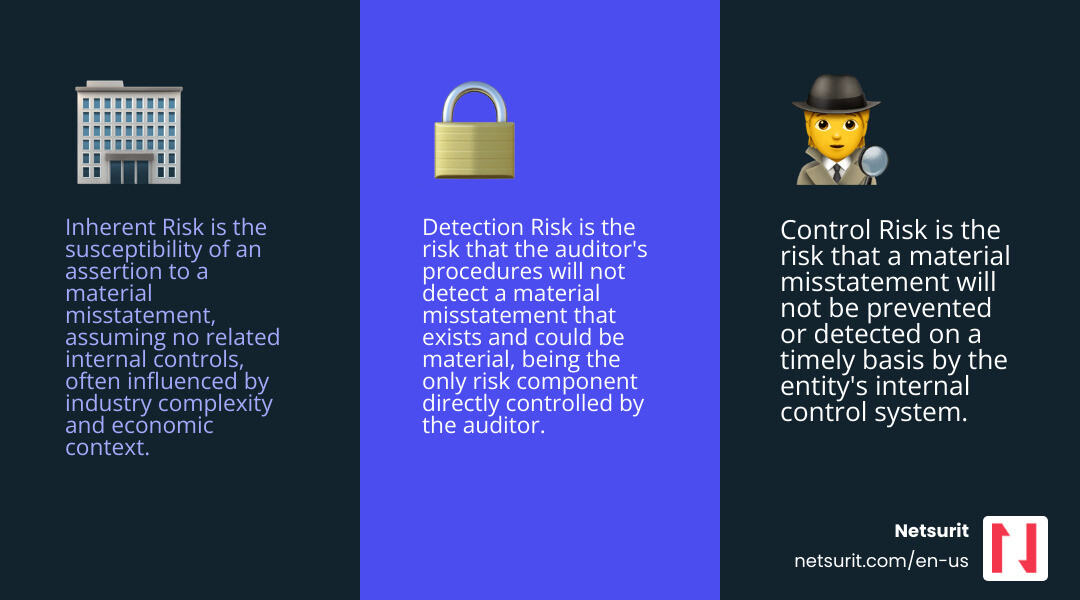
    Audit risk comprises inherent risk (business complexity), control risk (internal safeguard effectiveness), and detection risk (what an auditor might miss). You can’t change inherent risk—a Houston firm serving oil and gas clients faces more complexity than one serving retail shops—but you can minimize control and detection risk with disciplined processes and clean data.

    This article provides a concrete playbook for reducing your exposure. I’m Orrin Klopper, CEO of Netsurit. For 29 years, I’ve helped over 300 organizations in high-stakes industries like accounting and healthcare build secure IT infrastructures that reduce audit risk by ensuring data integrity and automating financial controls.

    infographic showing three pillars: Inherent Risk (business complexity and industry factors), Control Risk (internal control failures), and Detection Risk (auditor procedures and sampling), with arrows showing how each contributes to total Audit Risk - Reduce audit risk infographic 3_facts_emoji_blue

    Deconstructing the Threat: The Three Pillars of Audit Risk

    To reduce audit risk, you must understand its components. The audit risk model is a formula: Audit Risk (AR) = Inherent Risk (IR) x Control Risk (CR) x Detection Risk (DR). The auditor’s goal is to reduce this overall risk to an “appropriately low level.”

    Audit risk is the danger of an auditor issuing a clean opinion on financial statements that are materially misstated. A “material misstatement” is an error significant enough to influence a user’s economic decisions. Understanding these components is key to managing them. You can find more details about IT audits and assessments in our dedicated resources here.

    Inherent Risk: The Dangers You’re Born With

    Inherent risk is the raw probability of a material misstatement in your financial statements, assuming no internal controls exist. It’s intrinsic to your business and industry. Factors include:

    • Industry-specific risks: Some industries are naturally more complex or volatile.
    • Transaction complexity: Intricate financial transactions are more prone to error.
    • Economic context: Changing markets or economic downturns increase risk.
    • Susceptibility to misstatement: Accounts involving significant estimates carry higher inherent risk.

    For example, a Houston accounting firm serving oil and gas clients faces high inherent risk from volatile asset valuations and complex regulations. You can’t control inherent risk, but knowing it helps you focus on what you can control.

    Control Risk: When Your Safety Nets Fail

    Control risk is the chance that your internal controls will fail to prevent or detect a material misstatement. Weak or absent controls mean high control risk. Common causes include:

    • Ineffective policies: Controls are poorly designed or outdated.
    • Lack of oversight: Management fails to review transactions or reports.
    • Human error: Employees fail to follow procedures.
    • Fraud prevention failures: Controls are not robust enough to deter fraud.

    A CPA firm in Sugarland, TX, that skips mandatory multi-factor authentication on its client portal has high control risk. This single failure point invites data breaches and unauthorized access, risking client data integrity and legal trouble. Strengthening internal controls is one of the most effective ways to reduce audit risk.

    Detection Risk: What the Auditor Might Miss

    Detection risk is the chance an auditor’s procedures will miss a material misstatement. Unlike the other two risks, this one is primarily influenced by the auditor’s work, which includes:

    • Auditor procedures: The specific tests and analyses they perform.
    • Substantive testing: Detailed examination of transactions and account balances.
    • Sampling errors: The risk that a selected sample isn’t representative.

    If your inherent and control risks are high, auditors must perform more rigorous testing to lower their detection risk. If your risks are low, they can accept a higher detection risk. As a business, your role is to provide clean, well-supported data, which makes the auditor’s job easier and helps them lower detection risk, as guided by standards like the PCAOB’s AS 1101.

    Fortifying Your Defenses: Practical Steps to Reduce Audit Risk

    This section focuses on proactive measures any business can take, with a focus on IRS audit triggers and preparation.

    person using tax software on a laptop, looking confident - Reduce audit risk

    IRS audits are statistically rare but stressful. Proactive preparation and attention to detail are your best defense.

    Master Your Numbers: Accuracy and Honesty Above All

    The most powerful way to reduce audit risk is to ensure your tax returns are accurate and honest. Most IRS notices stem from basic errors.

    • Double-check figures: Manual data entry is a common source of errors. Paper returns have a 21% error rate versus just 0.5% for e-filed returns.
    • Report all income: The IRS automatically cross-references income from W-2s, 1099s, and K-1s. A mismatch triggers a CP-2000 notice. If a 1099 is wrong, get it amended; don’t omit the income.
    • Avoid math errors: The IRS sent nearly 16 million automated notices for simple arithmetic mistakes in 2021.
    • E-file your returns: Built-in checks in e-filing software drastically reduce errors, making an audit less likely. We help Houston accounting firms streamline this with our managed IT services for accounting firms.

    Substantiate Everything: The Power of Good Records

    The IRS mantra is: “If it’s not documented, it didn’t happen.” Good record-keeping is your best defense, especially for deductions.

    • Document deductions: Back every deduction with clear documentation like receipts, invoices, and bank statements. For non-cash charitable contributions, follow IRS Publication 526 for substantiation rules.
    • Use a record-keeping system: Cloud-based expense tracking apps, synced with accounting software, can automate much of this process.
    • Keep business expense receipts: If you file Schedule C, have a receipt for every business deduction. The IRS scrutinizes Schedule C filers, particularly those with consecutive losses, which may suggest a hobby, not a business.
    • Maintain travel logs: If you split time between states like Texas, keep detailed travel logs, calendars, and utility bills to defend your tax residency if challenged.

    For example, a consultant in Katy, TX, uses a cloud expense app to auto-categorize and store receipts for business expenses, making substantiation effortless and reducing the risk of disallowed expenses.

    Avoid Red Flags and Scams

    Certain actions can increase your chances of an IRS audit.

    • Unusually large deductions: Deductions that are disproportionately high compared to your income are a red flag. Claiming a charitable deduction for 40% of your income will get a closer look.
    • Schedule C losses: Reporting losses for three consecutive years on Schedule C can signal to the IRS that your “business” is a hobby, leading them to disallow your expense deductions.
    • High income-level scrutiny: High-income earners (over $1 million) are audited more often due to complex returns. Some low-income earners claiming certain credits also face higher scrutiny.
    • “Dirty Dozen” tax scams: Avoid any schemes on the IRS’s annual “Dirty Dozen” list.
    • Unsigned tax preparer returns: A reputable tax preparer always signs your return and provides their Preparer Tax Identification Number (PTIN). An unsigned return is a major red flag.

    Common IRS Red Flags:

    • Significant income jump or drop
    • Large, unsubstantiated deductions relative to income
    • Claiming 100% business use of a vehicle
    • Multiple years of business losses on Schedule C
    • Round numbers for major expense categories

    The Corporate Playbook: Strengthening Internal Controls and Processes

    This section details how to build a resilient internal framework to minimize financial statement audit risk.

    team collaborating around a whiteboard displaying a process flowchart - Reduce audit risk

    Beyond individual tax returns, businesses face financial statement audits. Here, the focus shifts to the reliability of your internal systems. Strengthening these controls is paramount to managing your overall audit risk.

    How to build a fortress of internal controls to reduce audit risk

    Internal controls are the processes that ensure your financial data is accurate, reliable, and compliant. They are your first defense against errors and fraud.

    • Segregation of duties: No single employee should control a transaction from start to finish. The person who authorizes payments should not be the one who records them.
    • Access controls: Restrict access to sensitive systems and data with strong passwords, multi-factor authentication, and role-based permissions.
    • Regular reconciliations: Periodically compare internal records with external statements (e.g., bank reconciliations) to catch discrepancies early.
    • Management review: Key financial reports and transactions should be reviewed and approved by management for oversight and accountability.

    For example, a Conroe manufacturing company requires different employees to approve purchase orders and process payments. This segregation of duties reduces the risk of fraudulent payments. We offer cybersecurity consulting to help businesses design these critical controls.

    The Role of Internal vs. External Audits

    Internal and external audits have distinct but complementary roles in managing risk.

    • Internal audits (in-house or outsourced) improve operations by focusing on process improvement, internal compliance, and risk management. They aim to find weaknesses before external auditors do.
    • External audits provide an independent opinion on the fairness of financial statements for outside users like investors and creditors, building trust in your financial reporting.

    A strong internal audit function reduces external audit risk by ensuring controls are effective and data is reliable, leading to a more efficient external audit. Our IT strategy services can help integrate these audit functions with your IT infrastructure.

    Using a Risk Matrix to Prioritize Threats

    A risk matrix is a tool for visualizing and prioritizing risks based on their likelihood and potential impact. It helps you focus audit resources on the areas of highest concern.

    Impact \ Likelihood Low Medium High
    Catastrophic Medium High Critical
    Major Medium High High
    Moderate Low Medium Medium
    Minor Low Low Low

    This mapping helps identify critical risks that need immediate attention. For instance, a Houston firm might classify a ransomware attack as ‘Critical’ (High Likelihood, Catastrophic Impact), justifying significant investment in cybersecurity.

    The Tech Advantage: Using Automation and AI for Risk Mitigation

    Manual processes are inefficient and increase audit risk through human error. Automation and artificial intelligence (AI) are now essential for proactive risk management and to reduce audit risk.

    Automating Compliance and Monitoring

    Technology allows for continuous monitoring, catching issues in real-time before they escalate.

    • Continuous monitoring: Automated systems scan transactions and data for anomalies and policy violations, providing an ongoing assessment of controls.
    • Automated reconciliations: Software automatically reconciles bank statements and invoices, reducing manual effort and the risk of errors.
    • AI-powered data analytics: AI tools analyze vast datasets to find hidden patterns, potential fraud, or errors that humans would miss.
    • Anomaly detection: AI learns your normal financial behavior and flags deviations, such as unusual spending or duplicate payments.
    • Fraud detection: Advanced analytics can identify fraud indicators, like altered invoices, much faster than traditional methods.

    For example, a Houston financial services firm uses an AI tool to analyze expense reports in real-time, flagging non-compliant spending or duplicates before approval. This reduces control risk and the chance of issues appearing in an external audit. Our Microsoft Azure services can help you build the infrastructure for these solutions.

    Securing the Foundation: IT Infrastructure and Cybersecurity

    Data integrity is foundational to reducing audit risk. Compromised, inaccurate, or inaccessible data skyrockets this risk. A robust IT infrastructure and strong cybersecurity are non-negotiable.

    • Data integrity: Protect financial data from unauthorized alteration, corruption, or loss to ensure it is accurate and reliable.
    • Unauthorized access prevention: Implement strong access controls, firewalls, and intrusion detection systems.
    • Ransomware protection: Protect against ransomware with robust backups, employee training, and advanced endpoint detection.
    • Written Information Security Plan (WISP): A formal WISP documents your security policies, demonstrating due diligence and ensuring regulatory compliance.

    For a Houston CPA firm, strong cybersecurity protects client data and maintains the integrity of financial records. A system compromise calls all financial data into question, increasing audit risk. Our managed firewall services are designed to protect your network perimeter.

    • Works best when… Your firm handles sensitive data (PII, financial records) and must comply with regulations like GLBA or HIPAA. Essential for accounting, healthcare, and financial firms in the Houston area.
    • Avoid when… You have no digital records. This is a rare and risky scenario; outdated practices increase audit risk.
    • Risks… Misconfigured tools can create vulnerabilities, and employee resistance can lead to risky workarounds. Implementation costs can be significant.
    • Mitigations… Partner with an MSP like Netsurit for expert configuration. Conduct regular employee security training to build a security-conscious culture.

    Conclusion

    Proactive risk management is about control, not fear. The most effective strategy to reduce audit risk is integrating sound financial practices with a secure, modern IT framework. This approach protects assets, ensures compliance, and lets you focus on growing your business.

    By managing inherent, control, and detection risks through accuracy, documentation, strong controls, and technology, you create an environment where audits become routine checks, not dreaded investigations.

    Netsurit provides the expert IT strategy and cybersecurity foundation that allows Houston-area firms to operate with confidence. Ready to fortify your defenses? Speak to an expert about your IT strategy today.

  • The Best Data Integrity Solutions to Keep Your Business Honest

    The Best Data Integrity Solutions to Keep Your Business Honest

    Why Data Integrity Solutions Protect Your Business From Costly Errors

    Data integrity solutions ensure your business information remains accurate, consistent, and uncorrupted throughout its entire lifecycle. If you’re looking for the right approach, here are the core components you need:

    Solution Type What It Does Primary Benefit
    Immutable Backups Prevents deletion or modification of backup data for 15-60 days Blocks ransomware from destroying recovery points
    Checksum Validation Creates digital fingerprints (SHA-256, CRC32C) to detect corruption Catches silent data errors before they spread
    Soft Deletion Marks data as deleted but keeps it recoverable for 30-60 days Protects against accidental deletion and account hijacking
    3-2-1 Backup Rule Three copies, two media types, one offsite Ensures recovery from hardware failures and disasters
    Data Validation Pipelines Automated daily or weekly integrity checks Detects inconsistencies within 24 hours

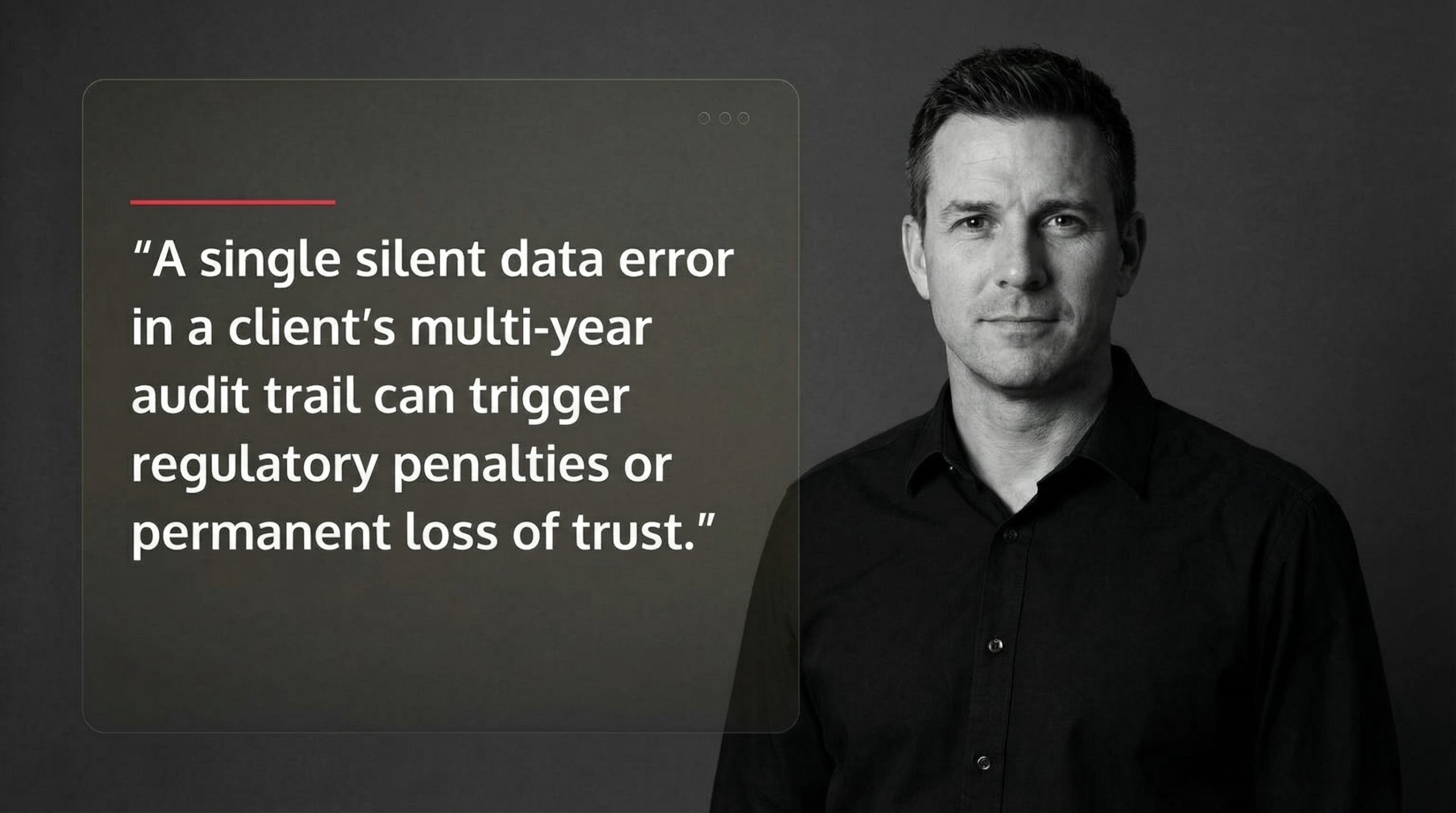
    For tax and accounting firms in the Houston metro area—from Sugarland to Katy to Conroe—a single silent data error in a client’s multi-year audit trail can trigger regulatory penalties or permanent loss of trust. Google’s Site Reliability Engineering team found that the majority of account hijacking and data integrity issues are detected within 60 days, which is why modern soft-deletion windows span that period. The difference between a recoverable incident and a business-ending disaster often comes down to whether your backups survived the attack.

    Traditional backups fail because attackers now target them first. Ransomware operators encrypt your live data, then delete or corrupt your backups before demanding payment. Immutable storage—where even administrators cannot alter data during its retention period—has become essential, not optional. Similarly, checksums act as trip wires: if a file’s digital fingerprint changes without authorization, you know corruption occurred before it cascades through your systems.

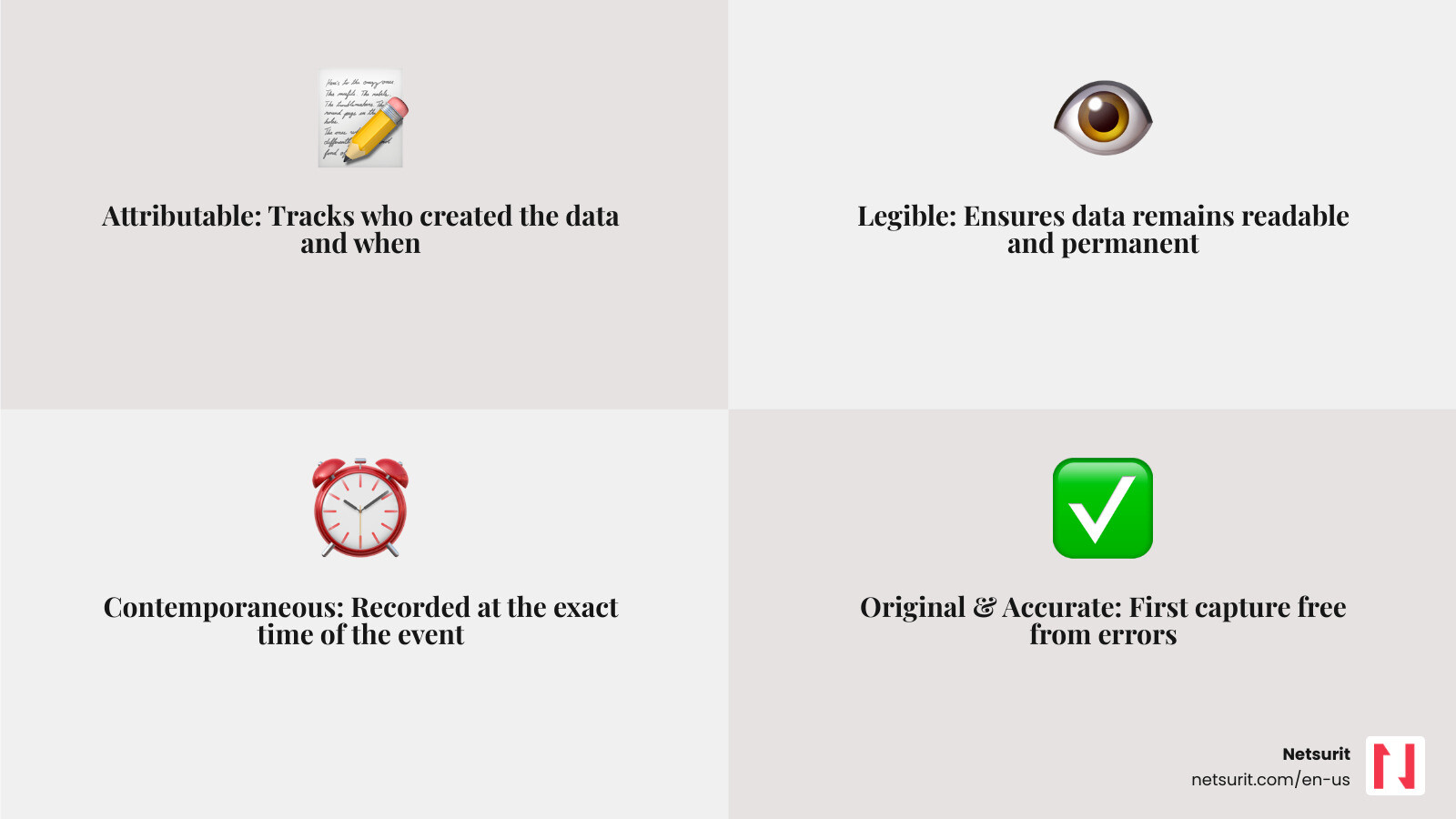
    The stakes are higher in regulated industries. The FDA’s 21 CFR Part 11 and the ALCOA+ framework (Attributable, Legible, Contemporaneous, Original, Accurate) require that electronic records remain tamper-proof and auditable. A manufacturing client in Conroe discovered this when a faulty disk controller caused misdirected writes, overwriting critical production logs. Without checksums and validation pipelines, the corruption went undetected for weeks, jeopardizing their compliance audit.

    This guide walks through the most resilient data integrity solutions—from defense-in-depth strategies like soft deletion and tiered backups, to technical safeguards like end-to-end checksumming and automated validation pipelines. You’ll see how cloud-native tools (AWS Backup, Google Cloud Storage) and enterprise platforms (Pure Storage, DAOS) implement these protections at scale, and learn how to test your recovery processes so they actually work when disaster strikes.

    I’m Orrin Klopper, CEO of Netsurit, and over three decades I’ve helped more than 300 organizations across North America implement data integrity solutions that survive both hardware failures and malicious attacks. Data integrity isn’t just about technology—it’s about building systems that keep your business honest when everything else fails.

    Infographic showing the ALCOA+ framework for data integrity: Attributable (who created the data and when), Legible (readable and permanent), Contemporaneous (recorded at the time of the event), Original (first capture or certified copy), Accurate (free from errors), plus Complete (all data captured), Consistent (chronological and in sequence), Enduring (preserved throughout retention period), and Available (accessible for review). The diagram includes icons for audit trails, timestamps, checksums, and immutable storage, with arrows showing how each principle supports regulatory compliance for tax and accounting firms. - Data integrity solutions infographic 4_facts_emoji_grey

    Defining Data Integrity and Why It Matters for Houston Accounting Firms

    What is Data Integrity? It is the assurance that data is accurate, complete, and consistent throughout its entire lifecycle. For a CPA firm in Katy, this means when you pull up a client’s 2022 tax return, the numbers are exactly what were filed, and the audit trail showing who touched that file remains intact.

    Data integrity relies on the ALCOA+ framework. This standard ensures data is Attributable (who did it?), Legible (can you read it?), Contemporaneous (recorded as it happened?), Original (first capture?), and Accurate. The “+” adds completeness and consistency. When these principles fail, you face “silent data corruption”—errors that occur without a system warning, like a single bit-flip in a spreadsheet that changes a $1,000,000 asset to $0.

    The Strategic Role of Data Integrity Solutions

    Maintaining integrity is a strategic move, not just a technical chore. High-quality data fuels accurate business analytics and builds customer trust. If your Software Asset Management indicates you are compliant with licenses, but the underlying data is corrupted, you risk failed audits and heavy fines.

    Industry-Specific Risks in the Houston Metro

    Local firms face unique pressures. Tax firms in Sugarland must maintain multi-year records for IRS compliance. In Conroe, manufacturing plants rely on precise sensor data for quality control; a failure in data integrity here could lead to product recalls or equipment damage. Our Cybersecurity Checklist helps these businesses identify where their data is most vulnerable.

    Core Defense-in-Depth Strategies for Data Integrity

    No single tool provides 100% protection. We use a “defense-in-depth” approach, layering multiple data integrity solutions to catch failures at different stages. This begins with Backup and Disaster Recovery plans that prioritize recovery over just “having a backup.”

    Metric Hot Tier (Snapshots) Cold Tier (Offsite)
    RPO (Data Loss) 0–4 hours 24 hours
    RTO (Recovery Time) Minutes Hours/Days
    Integrity Check Continuous/Daily Weekly/Monthly

    Implementing Soft Deletion and Delayed Requests

    Accidental deletion is the most common cause of data loss. We implement “soft deletion,” where data is marked as deleted but stays in a hidden “recycling bin” for 15 to 60 days. This is a core Data Integrity Requirement for high-velocity environments. If a disgruntled employee in a Houston office tries to wipe a directory, soft deletion allows us to restore it instantly. This also mitigates account hijacking; even if an attacker gains access, they cannot permanently delete files within the retention window.

    The Power of Immutable Backups

    Ransomware is the primary threat to Houston businesses. Modern attackers use “delayed” payloads that wait until your backups are also infected. Immutable backups use WORM (Write Once, Read Many) technology. Once a backup is written, it cannot be changed, encrypted, or deleted by anyone—including a compromised administrator account. This ensures that even if your live network is hit, you have a “clean” copy to restore from, significantly reducing Cloud Disaster Recovery times.

    Technical Safeguards: Checksums and Validation Pipelines

    data validation pipeline architecture showing data flowing from source systems into a validation engine that calculates checksums, compares them against stored values, and triggers alerts if discrepancies are found. The pipeline includes stages for ingestion, transformation, and automated scrubbing to detect silent data corruption. - Data integrity solutions

    To catch silent errors, we use checksum functionality. A checksum is a unique digital fingerprint (like SHA-256) of a file. If the file changes by even one bit, the fingerprint changes.

    End-to-End Integrity with Checksums

    Systems like Amazon S3 and DAOS use end-to-end checksums. When a client in Sugarland uploads a file, the client software calculates a checksum. The server calculates its own upon receipt. If they don’t match, the transfer is rejected. This prevents data from being corrupted while in transit over the internet.

    Automating Data Validation at Scale

    For firms with massive datasets, manual checking is impossible. Validating 700 petabytes would take 80 years with a single task. Instead, we use data validation pipelines that run map-reduce jobs to “scrub” data. Google SRE teams run these daily, detecting inconsistencies within 24 hours. We use tools like AWS Glue Data Quality to automate this, reducing manual validation time from days to hours.

    Top Data Integrity Solutions for Cloud and Hybrid Environments

    Selecting the right data integrity solutions depends on your infrastructure.

    Cloud-Native Integrity: AWS and Google Cloud

    AWS provides robust tools like Object Locking and Multi-AZ (Availability Zone) deployments. This ensures that if one data center in the region fails, your data exists identically in another. When performing a Cloud Migration, we use AWS DMS (Database Migration Service) which includes built-in validation to ensure the data on the target matches the source exactly.

    Enterprise Storage: Pure Storage and DAOS

    For high-performance needs, Pure Storage FlashBlade offers “Petabyte-Scale Recovery.” It uses Zero Move Tiering to manage data across hot and cold storage automatically. DAOS (Distributed Asynchronous Object Storage) is another leader, providing internal Data Integrity through background scrubbing that scans for silent corruption and auto-fixes errors using redundancy.

    Trade-offs of Enterprise Storage:

    • Works best when: You have massive unstructured data (images, logs, research).
    • Avoid when: You are a small firm with under 10TB of data (cloud-native is more cost-effective).
    • Risks: High initial setup complexity.
    • Mitigations: Use a managed service provider (MSP) like Netsurit to handle the configuration and monitoring.

    Testing and Monitoring Your Integrity Framework

    A backup is only as good as your last successful restore. We use a Cyber Security Assessment Checklist to verify that integrity checks are actually running.

    Proactive Data Scrubbing and Telemetry

    “Scrubbing” is a background process that reads data and verifies it against its stored checksum. If a mismatch is found, the system raises an alert. We monitor telemetry metrics like “scrubs completed” and “silent corruptions detected” to ensure the health of your storage.

    Verifying Recovery Processes

    We recommend “heartbeat” alerts—automated tests that restore a random file every day to prove the Backup and Disaster Recovery system is functional. This prevents “latent failures,” where you think your backups are fine until the day you actually need them and find they are unreadable.

    Frequently Asked Questions about Data Integrity

    What is the difference between data integrity and data security?

    Data security is about “who can see it” (confidentiality). Data integrity is about “is it correct?” (accuracy). You can have a very secure file that is completely corrupted and useless. Encryption Benefits overlap both, as encrypted data is harder to modify without detection.

    How do checksums prevent silent data corruption?

    They don’t prevent the corruption itself (which can be caused by hardware age), but they ensure you detect it immediately. By comparing the current fingerprint to the original, the system knows the data is no longer “honest” and can restore a clean version from a backup.

    Why are immutable backups necessary for ransomware protection?

    Ransomware now targets administrative credentials. If an attacker gets your “Admin” password, they can delete traditional backups. Immutable backups prevent this because the “lock” is enforced by the storage hardware/protocol, not just a software password.

    Conclusion

    Data integrity is the bedrock of a reliable business. For firms in Houston, Sugarland, and Katy, implementing these data integrity solutions is the only way to ensure your records survive the evolving threat landscape. At Netsurit, we act as your elite tech partner to crush downtime and protect your most valuable asset: your data.

    Next Action: Review your current retention policy. If you don’t have at least a 30-day “soft delete” window or immutable offsite copies, Contact Netsurit today to fortify your defenses.

  • Why Every Business Needs a Disaster Recovery Plan

    Why Every Business Needs a Disaster Recovery Plan

    When your server crashes or your network fails, a remote session often is not enough. Onsite IT services are critical to minimize disruption and restore operations quickly.

    68 percent of businesses that experience a major data loss close within one year.